
-
×InformationWindows update impacting certain printer icons and names. Microsoft is working on a solution.
Click here to learn moreInformationNeed Windows 11 help?Check documents on compatibility, FAQs, upgrade information and available fixes.
Windows 11 Support Center. -
-
×InformationWindows update impacting certain printer icons and names. Microsoft is working on a solution.
Click here to learn moreInformationNeed Windows 11 help?Check documents on compatibility, FAQs, upgrade information and available fixes.
Windows 11 Support Center. -
- HP Community
- Archived Topics
- Your Voice Ready Only
- Community Feedback
- Re: Change email address?

Create an account on the HP Community to personalize your profile and ask a question
Your account also allows you to connect with HP support faster, access a personal dashboard to manage all of your devices in one place, view warranty information, case status and more.
 This topic has been archived. Information and links in this thread may no longer be available or relevant. If you have a question create a new topic by clicking here and select the appropriate board.

02-05-2009 06:49 AM
 HP Recommended
I registered on this forum using my HP login name, but I can't change my email address. How do I do it?
Solved! Go to Solution.
1 ACCEPTED SOLUTION
Accepted Solutions
10-03-2012 10:59 AM
HP Recommended
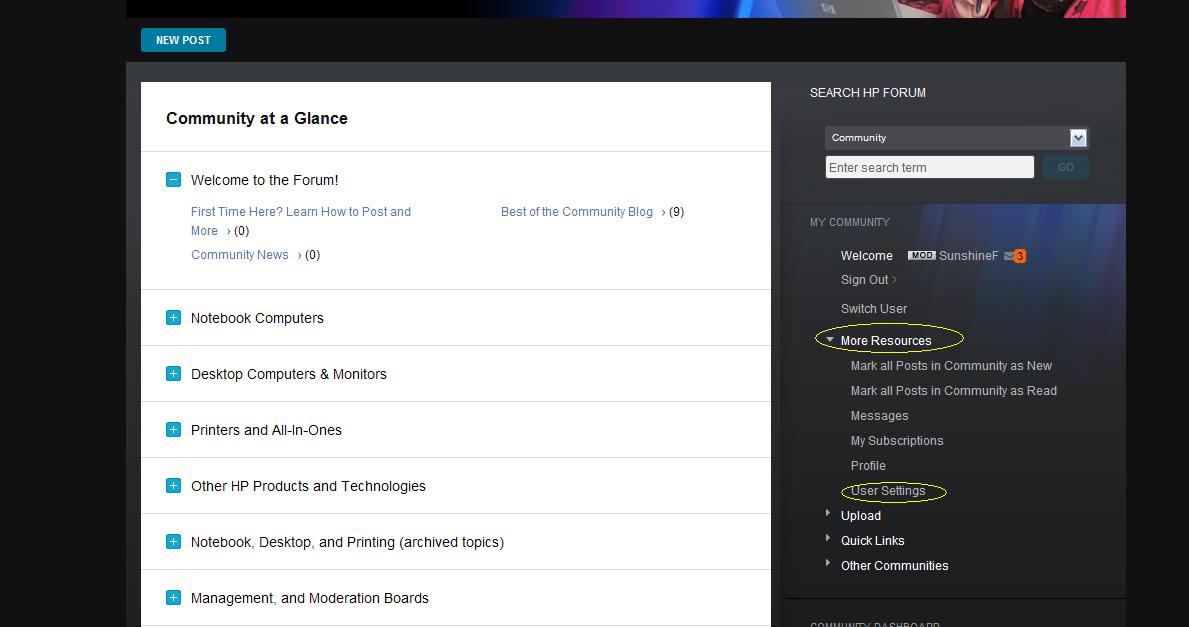
@Eeyeore: The easiest is to go back to the main HP community page and click on
More Resources => User Settings (see Sunshine's screen shot above), it will lead you to your own Personal Profile page, then you can click on Contact Information (see screen shot below) and update your email on the next page.
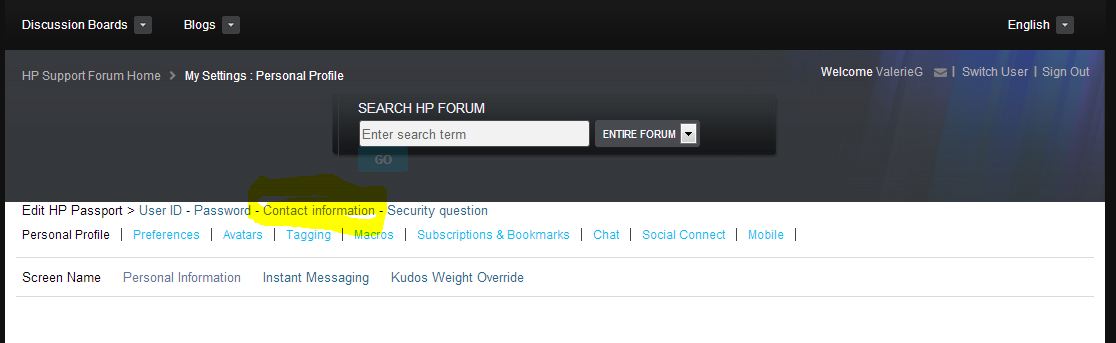
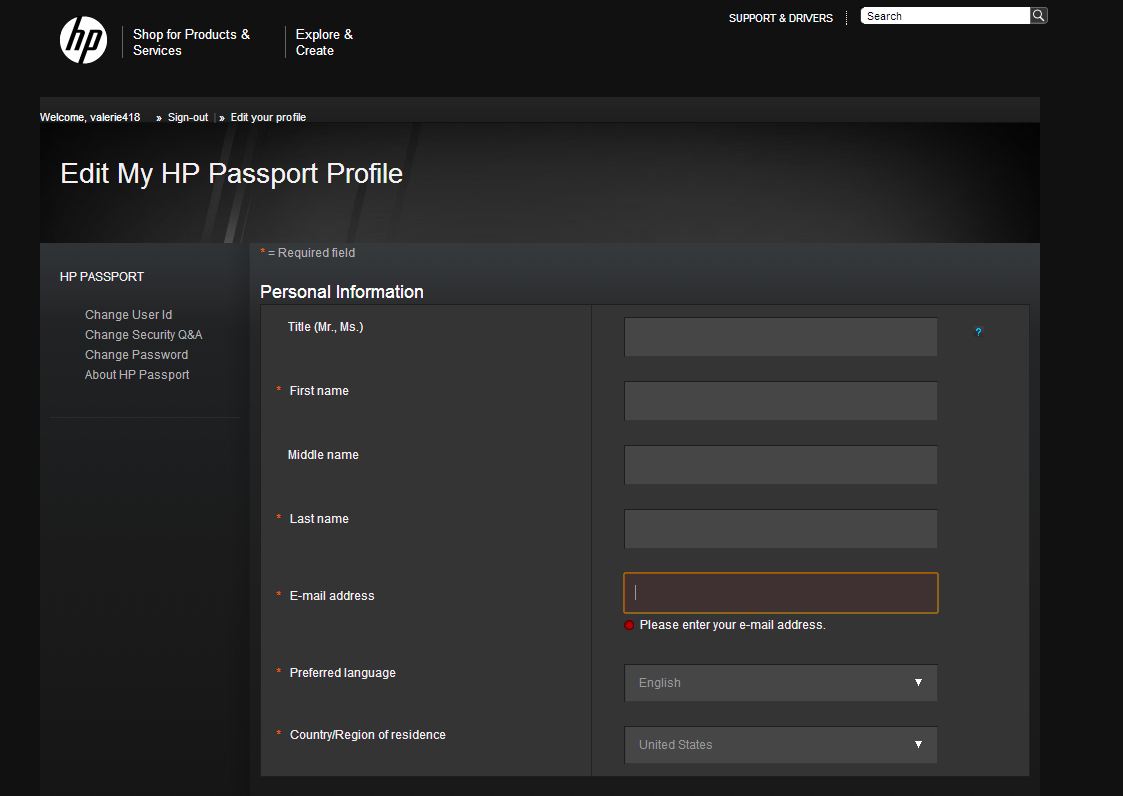
Let me know if you have additional questions.
Regards,
Valerie
Moderator
21 REPLIES 21
02-05-2009 11:22 AM
HP Recommended
Hi nigermercier,
Thanks for visiting the HP Consumer Support forums.
To change your email address, click the "My Profile" link in the top left of any forum page. At the top of the Edit HP Passport tab, click the "User ID" link.
Here you should be able to submit a new email address.
- Clicking the "Kudos star" to the left is a great way to say thanks!
- When your problem has been solved, accept the solution by clicking the "Accept as Solution" button to help other members in the future!
Rules of Participation

05-21-2012 08:45 AM
HP Recommended
I'm trying to find the same thing. I've clicked around the site and clicked every possible button that shows my settings, my profile and my preferences.
It'd be helpful if someone provided more than just "click the 'My Profile'" button, as I can't find the "My Profile" button either.
10-03-2012 10:59 AM
HP Recommended
@Eeyeore: The easiest is to go back to the main HP community page and click on
More Resources => User Settings (see Sunshine's screen shot above), it will lead you to your own Personal Profile page, then you can click on Contact Information (see screen shot below) and update your email on the next page.
Let me know if you have additional questions.
Regards,
Valerie
Moderator
10-03-2012 11:28 AM - last edited on 10-03-2012 12:19 PM by ValerieG
HP Recommended
Thank You!
I know this is a user to user forum, but could they make it a little more obvious?
Oddly the email reply I got (see below) still makes no sense. However you post to the community works like a charm. Thanks again!
To manage your subscriptions or to change your subscription options, click here.
If this link doesn't work:
- Log on to HP Support Forum.
- Click My Profile.
- Click the Subscriptions & Bookmarks tab.
- Change your settings and click Save Changes.
Thanks for being a HP Support Forum member.
Your HP Support Forum Team
HP Support Forum sent this message to [removed for privacy]
10-03-2012 12:24 PM
HP Recommended
Glad to hear that it worked. 🙂
Regarding the subscription, you can always make changes from your personal settings as well. Follow the same steps above except on your Profile page click on Subscription & Bookmarks. You can uncheck "Automatically subscribe me to topics I participate in" if you do not wish to get emails whenever someone else reply to your posts.
Hope this helps.
Regards,
Valerie
Moderator
This topic has been archived. Information and links in this thread may no longer be available or relevant. If you have a question create a new topic by clicking here and select the appropriate board.
† The opinions expressed above are the personal opinions of the authors, not of HP. By using this site, you accept the Terms of Use and Rules of Participation.


Didn't find what you were looking for? Ask the community
† The opinions expressed above are the personal opinions of the authors, not of HP. By using this site, you accept the <a href="https://www8.hp.com/us/en/terms-of-use.html" class="udrlinesmall">Terms of Use</a> and <a href="/t5/custom/page/page-id/hp.rulespage" class="udrlinesmall"> Rules of Participation</a>.