
-
×InformationNeed Windows 11 help?Check documents on compatibility, FAQs, upgrade information and available fixes.
Windows 11 Support Center. -
-
×InformationNeed Windows 11 help?Check documents on compatibility, FAQs, upgrade information and available fixes.
Windows 11 Support Center. -
- HP Community
- Archived Topics
- Notebooks Archive
- Re: Missing Base System Device Driver

Create an account on the HP Community to personalize your profile and ask a question
Your account also allows you to connect with HP support faster, access a personal dashboard to manage all of your devices in one place, view warranty information, case status and more.
 This topic has been archived. Information and links in this thread may no longer be available or relevant. If you have a question create a new topic by clicking here and select the appropriate board.

06-02-2012 01:26 PM - edited 06-02-2012 01:43 PM
 HP Recommended
I bought my Elitebook 8560p a few weeks back off of a friend. Wiped the entire laptop clean and installed a new OS (Windows 7 Ultimate 32 Bit). I thought I installed all the drivers, but the device manager says im still missing a "Base System Device" driver. Help please?
Solved! Go to Solution.
1 ACCEPTED SOLUTION
Accepted Solutions

06-03-2012 04:32 PM
HP Recommended
Hi,
That's fine 
The driver you need is for the JMicron Media Card Reader which can be downloaded and installed from the following link.
Regards,
DP-K
---------------------------------------------------------------------------
****Click the White thumb to say thanks****
****Please mark Accept As Solution if it solves your problem****
****I don't work for HP****

****Click the White thumb to say thanks****
****Please mark Accept As Solution if it solves your problem****
****I don't work for HP****
Windows Insider MVP
119 REPLIES 119
06-02-2012 01:45 PM
HP Recommended
Hi,
Go into Device Manager, right click on the problem device and select Properties. Click the Details tab, choose Hardware Ids from the dropdown box and post back with the details shown under Value.
Regards,
DP-K
---------------------------------------------------------------------------
****Click the White thumb to say thanks****
****Please mark Accept As Solution if it solves your problem****
****I don't work for HP****
****Click the White thumb to say thanks****
****Please mark Accept As Solution if it solves your problem****
****I don't work for HP****
Windows Insider MVP
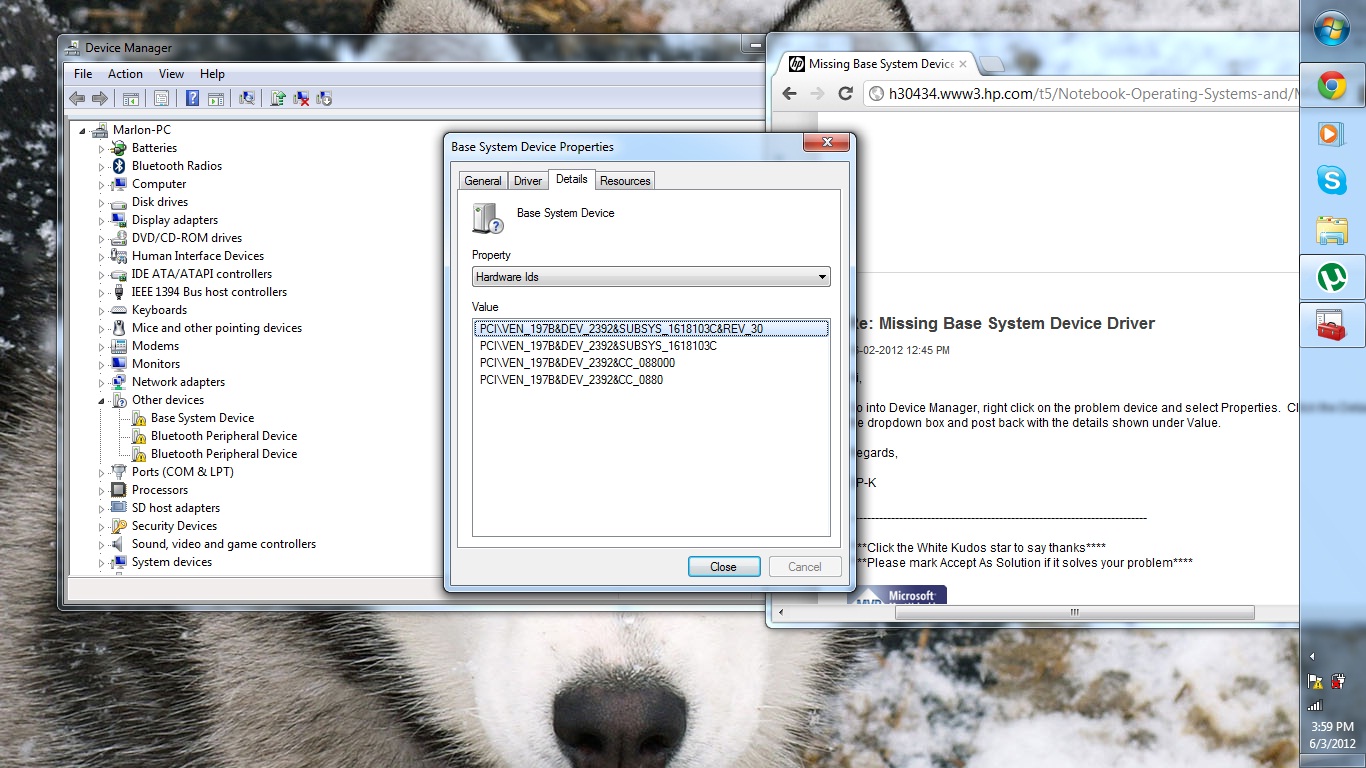
06-03-2012 04:02 PM
HP Recommended
Hi,
I can't see the image yet until it has been approved by a Moderator - I'll get back to you then.
Regards,
DP-K
---------------------------------------------------------------------------
****Click the White thumb to say thanks****
****Please mark Accept As Solution if it solves your problem****
****I don't work for HP****
****Click the White thumb to say thanks****
****Please mark Accept As Solution if it solves your problem****
****I don't work for HP****
Windows Insider MVP
06-03-2012 04:07 PM
HP Recommended
PCI\VEN_197B&DEV_2392&SUBSYS_1618103C&REV_30
PCI\VEN_197B&DEV_2392&SUBSYS_1618103C
PCI\VEN_197B&DEV_2392&CC_088000
PCI\VEN_197B&DEV_2392&CC_0880
Sorry, didn't realize pictures had to get authorized by mods. This is probably a bit quicker.
06-03-2012 04:32 PM
HP Recommended
Hi,
That's fine
The driver you need is for the JMicron Media Card Reader which can be downloaded and installed from the following link.
Regards,
DP-K
---------------------------------------------------------------------------
****Click the White thumb to say thanks****
****Please mark Accept As Solution if it solves your problem****
****I don't work for HP****
****Click the White thumb to say thanks****
****Please mark Accept As Solution if it solves your problem****
****I don't work for HP****
Windows Insider MVP
06-03-2012 04:41 PM - edited 06-03-2012 04:59 PM
HP Recommended
Worked perfectly! Thank you so much!
Maybe you could help with another one of my driver problems. Whenever I try to install the driver for my webcam, i keep getting an error that says "Setup has determined that your configuration does not support any of the included products". I'm using this driver: http://h20000.www2.hp.com/bizsupport/TechSupport/SoftwareDescription.jsp?lang=en&cc=us&prodTypeId=32... Any ideas?
06-04-2012 03:27 AM
HP Recommended
Hi,
I'll certainly try
From what you describe, my first thought is that this error message may be related to detecting the correct name of the HP Webcam from Device Manager. See the sub-heading Prerequisites - Special notes: at the bottom of the page Here.
Open windows Control Panel, open Device Manager and open up Imaging Devices - what is listed here?
Regards,
DP-K
---------------------------------------------------------------------------
****Click the White thumb to say thanks****
****Please mark Accept As Solution if it solves your problem****
****I don't work for HP****
****Click the White thumb to say thanks****
****Please mark Accept As Solution if it solves your problem****
****I don't work for HP****
Windows Insider MVP
06-05-2012 02:32 AM
HP Recommended
Hi,
Go back into Device Manager, click the View tab and select 'Show hidden devices' - does anything now show in the list as an 'Unknown device'?
Regards,
DP-K
---------------------------------------------------------------------------
****Click the White thumb to say thanks****
****Please mark Accept As Solution if it solves your problem****
****I don't work for HP****
****Click the White thumb to say thanks****
****Please mark Accept As Solution if it solves your problem****
****I don't work for HP****
Windows Insider MVP
This topic has been archived. Information and links in this thread may no longer be available or relevant. If you have a question create a new topic by clicking here and select the appropriate board.
† The opinions expressed above are the personal opinions of the authors, not of HP. By using this site, you accept the Terms of Use and Rules of Participation.


Didn't find what you were looking for?
Ask the community
† The opinions expressed above are the personal opinions of the authors, not of HP. By using this site, you accept the <a href="https://www8.hp.com/us/en/terms-of-use.html" class="udrlinesmall">Terms of Use</a> and <a href="/t5/custom/page/page-id/hp.rulespage" class="udrlinesmall"> Rules of Participation</a>.