
-
×InformationWindows update impacting certain printer icons and names. Microsoft is working on a solution.
Click here to learn moreInformationNeed Windows 11 help?Check documents on compatibility, FAQs, upgrade information and available fixes.
Windows 11 Support Center. -
-
×InformationWindows update impacting certain printer icons and names. Microsoft is working on a solution.
Click here to learn moreInformationNeed Windows 11 help?Check documents on compatibility, FAQs, upgrade information and available fixes.
Windows 11 Support Center. -
- HP Community
- Archived Topics
- Printers Archive
- Re: hp photosmart plus b210 double sided printing

Create an account on the HP Community to personalize your profile and ask a question
Your account also allows you to connect with HP support faster, access a personal dashboard to manage all of your devices in one place, view warranty information, case status and more.
 This topic has been archived. Information and links in this thread may no longer be available or relevant. If you have a question create a new topic by clicking here and select the appropriate board.

01-30-2011 08:32 AM
 HP Recommended
I cannot find an option in my printer settings for double sided printing. I know that it does not have automatic duplex printing, but usually there is an option for manual duplex so that the printer only prints one side then prompts me to turnt he pages for the other side.
9 REPLIES 9
01-31-2011 07:38 AM
HP Recommended
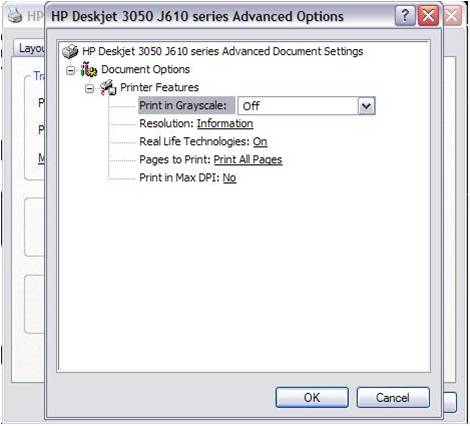
The option is available in Advance button called "Pages to Print" By default it will "All Pages". Click on this and drop down menu will appear with options "Odd Pages", "Even Pages".
–Steps to perform Manual Duplex on a multipage document:
1. Open the printer icon on the desktop and navigate to Advanced screen as shown below
2. Go to Pages to Print and select ‘Print Odd Pages Only’
3. Click OK to exit and close the printer settings window
4. Print document normally
5. Remove printed pages from output tray, rotate 180 deg and flip the pages over
6. Open the printer icon and navigate to Advanced screen
7. Go to Pages to Print and select ‘Print Even Pages Only’
8. Click OK to exit and close the printer icon window.
9. Print document normally
Say "Thanks" by clicking the Kudos Star in the post that helped you.
Please mark the post that solves your problem as "Accepted Solution"
11-02-2011 12:21 PM
HP Recommended
Why on earth have HP stopped with the manual double sided routine??????????? It was very useful. I have just bought a Photosmart 5510 and have the same problem. The 4380 I had gave up, but that had manual double sided printing. I am thinking of loading the 4380 software and see if the 5510 will react to that.
Note: For most printers DO NOT FLIP THE PAGES!! Rotate 180 for portrait book style, do not rotate for landscape bookstyle. For a top hinged (Calandar) outlay do the opposite.
12-08-2011 12:12 AM - edited 12-08-2011 12:14 AM
HP Recommended
I have a slightly different issue. The option is there, but when the prompt pops up and tells me to reinsert the printed pages to the paper tray to do the second side, the printer will not resume printing.
When I open the printer manager, I see the print job status as 'printing - restarting' or 'printing - resume' where it just stays forever.
No options on the computer or the printer, including clicking 'Resume', 'Restart', 'Pause' or even rebooting both, will allow the job to continue. Quite annoying when you just printed the even pages of a 200 page document and are now missing all the odd pages.
12-08-2011 02:40 AM
HP Recommended
I find the method of double sided printing given above a big step backwards from the 'old' print routines. Why on earth have HP left it out????
Watch out for turning the printed pages over - if you do you risk printing on the same side as the first run!!!
01-03-2012 12:25 AM
HP Recommended
I completely agree. Simple and intuitive features on my PSC 2355 all-in-one and was the reason I seeked out another HP printer to replace it. I'm very upset about the lack of the simple two-sided printing and would like to see a software update to make this possible again.
01-03-2012 04:01 AM
HP Recommended
I don't know the B210 but I have had dealings with a number of printers and it was always clicking the OK button on the pop-up telling you to turn the pages that started the second side printing.
HP printers have had the 'manual' double sided routine in the software for ages. I hope they put it back very soon or my next printer might be a Canon or whatever!
Waiting for that software update!!!!
02-20-2012 10:34 AM
HP Recommended
First of all, my Advanced preferences menu doesn't have the option you've mentioned. And why would HP not make it simple to print double-sided??? Not very green, not very sustainable. And not very intuitive for the user. I am an Information Architect by profession, and this kind of lack-of-usability sends me through the roof! When this printer breaks--and it will--I'm going back to Canon.
This topic has been archived. Information and links in this thread may no longer be available or relevant. If you have a question create a new topic by clicking here and select the appropriate board.
† The opinions expressed above are the personal opinions of the authors, not of HP. By using this site, you accept the Terms of Use and Rules of Participation.


Didn't find what you were looking for? Ask the community
† The opinions expressed above are the personal opinions of the authors, not of HP. By using this site, you accept the <a href="https://www8.hp.com/us/en/terms-of-use.html" class="udrlinesmall">Terms of Use</a> and <a href="/t5/custom/page/page-id/hp.rulespage" class="udrlinesmall"> Rules of Participation</a>.