-
×InformationNeed Windows 11 help?Check documents on compatibility, FAQs, upgrade information and available fixes.
Windows 11 Support Center. -

-
×InformationNeed Windows 11 help?Check documents on compatibility, FAQs, upgrade information and available fixes.
Windows 11 Support Center. -
- HP Community
- Gaming
- Gaming Notebooks
- HP Omen 17 control button "flickers"

Create an account on the HP Community to personalize your profile and ask a question
05-16-2020 02:44 AM
Hello,
I have just noticed that th control button on the keyboard kind of "flickers" when lighting is on.
What I mean is that the light changes intensity very fast. It looks like a bad contact of some sort.
It goes of after a few minutes...
Does somebody had the same problem, with another button maybe?
What is the remedy if any?
Thank you for your answers.
05-26-2020 12:42 PM
@BravoGolf Due to the current global COVID-19 situation, we're seeing an influx of customers coming in for support and we appreciate your patience.
That said, When was the last time it worked without these issues?
Have you attempted a system restore?
In the meantime, please try the reinstalling the software used to configure the keyword lights,
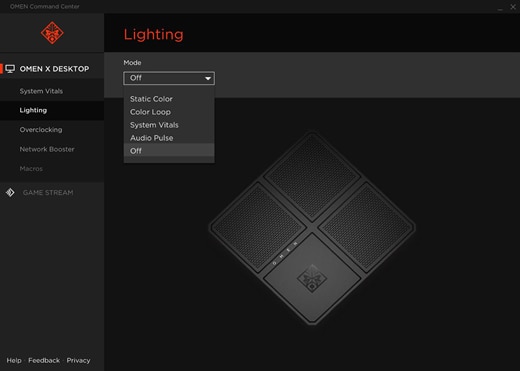
And I suggest you go into the lighting option as shown below and ensure the static color is chosen instead of color loop and check if that work:
(Your product may have a different pic instead of Omen X, but the software should have similar options)

P.S: Welcome to HP Community 😉
Let me know how that pans out,
If you feel I was helpful, simply click on Accept as Solution to help the community grow,
That said, I will have someone follow-up on this to ensure you've been helped,
Just in case you don't get back to us,
have a good day, ahead.
Riddle_Decipher
I am an HP Employee
Learning is a journey, not a destination.
Let's keep asking questions and growing together.
05-27-2020 05:20 AM
Hello Riddle Decipher,
I own a Omen 17.
I have not found the lighting option menu as shown on the picture you posted.
Where can I find this menu ? I did not find it in the Omen command center...
It looks like my Omen keyboard has only red color.
However the problem seems to be a mechanical one : it goes off after a couple of minutes after the PC has warmed up a bit.
Not exactly a proble but since this PC is new, it is a bit annoying.
May be some dust make a bad contact ?
Have a nice day.
05-28-2020 12:39 PM
@BravoGolf Dust on a new computer is highly unlikely, however, I suggest you click here for steps on cleaning the device, just to be on a safer side and if nothing helps, I suggest you talk to HP support and discuss your options, follow the below steps to get started:
1) Click on this link - http://www.hp.com/contacthp/
2) Click on Sign-in or select the product using the below step:
3) Enter the serial of your device.
4) Select the country from the drop-down.
5) Click on "Show Options".
Fill the web-form, to populate a case number and phone number for yourself!
Also, if you are having trouble navigating through the above options, it's most likely because the device is out of warranty, if yes? please send me a private message with the region you are contacting us from,
here's how private messages work: Click here for details.
If you wish to thank me for my efforts, you could click on "Accept as solution" on my post as the solution should help others too.
Riddle_Decipher
I am an HP Employee
Learning is a journey, not a destination.
Let's keep asking questions and growing together.
05-30-2020 07:51 AM - edited 05-30-2020 07:53 AM
Well I opened a case number and started to chat with somebody at HP.
This person told me to disconnect everything, power cable included, and restart the pc by holding the power button for 20 sec.
Which I did, of course this action terminated the chat session 🙂
And since the pc was "hot" the control button did not flicker... 🙂
So, in my opinion this "chat" was inefficient and not a good solution to my problem.
For info my case number is 5048428196. My pc warranty is still valid until 27/12/2020
06-01-2020 11:08 AM
@BravoGolf I suggest you initiate the chat support on another device, so you can perform relevant troubleshooting without disconnecting the chat, also, if you feel that inefficient, you may want to opt for the phone support option to set up an order to get the device repaired, let me know if you have any trouble getting that done.
Have a good day.
Riddle_Decipher
I am an HP Employee
Learning is a journey, not a destination.
Let's keep asking questions and growing together.