• ×
    Information
    Need Windows 11 help?
    Check documents on compatibility, FAQs, upgrade information and available fixes.
    Windows 11 Support Center.
  • post a message
  • ×
    Information
    Need Windows 11 help?
    Check documents on compatibility, FAQs, upgrade information and available fixes.
    Windows 11 Support Center.
  • post a message
Guidelines
Seize the moment! nominate yourself or a tech enthusiast you admire & join the HP Community Experts!
Common problems for INSTANT INK, HP+ PLANS: INK AND TONER
We would like to share some of the most frequently asked questions about Instant Ink. Check out this link: HP INSTANT INK, HP+ PLANS: INK AND TONER. .
HP Recommended

HP envy 5640 can’t connect to server to order instant ink


connecting via iPhone 16. .3.01 iOS 


can print fine to it from laptop and phone. 

wen access test results no problems found. 

1 REPLY 1
HP Recommended

Hi @Vincent-stroud,


Welcome to the HP Support Community. 


I'd like to help!


To address this message and make sure you receive replacement ink cartridges on time, connect your printer to the Internet, and then verify the connection status on your HP Instant Ink account page.

Depending on where the error message displays, touch or press OK on the printer control panel, or click OK on the computer.

The printer attempts to connect.

If a No Wireless or Connection Error message displays on the computer or the printer, go to the Wireless printing center (in English) to learn how to troubleshoot problems with your wireless network or Internet connection.

Once your printer is connected to the Internet with an active connection, go to hpinstantink.com/signin (the HP Connected website) to sign in to your HP Instant Ink account, if you are not signed in already.

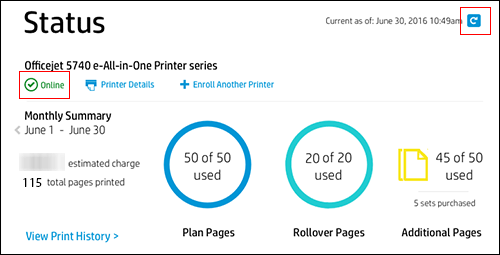
At the top of the Status area on your HP Instant Ink account page, click the refresh icon . Look for a green checkmark and Online to make sure your printer is connected to the HP Instant Ink service.

Figure : Clicking the refresh icon and making sure the printer is online

  1. Clicking the refresh icon and making sure the printer is online

If the printer is connected to the Internet, but the printer status on your Instant Ink account page continues to display Offline after clicking the refresh icon , wait and try again later.

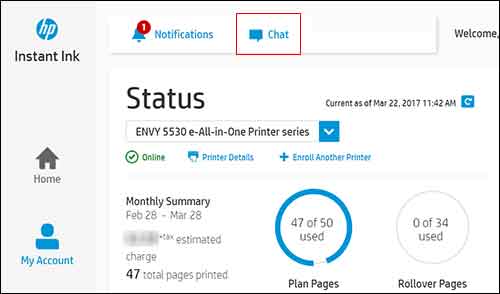
If you try again later, and the printer status is still Offline, contact HP Support. On your HP Instant Ink account page, click Chat at the top of the page to open a chat with HP support.

Figure : Clicking Chat at the top of the account page

  1. Clicking Chat at the top of the account page

To find a phone number for HP Support in your location, follow these steps:

Click Contact HP Support in the Help Center area of your HP Instant Ink account page.

On the HP Customer Support - Contact page, scroll down, and then fill out the contact form.

Click Show options.


HP contact options are display on the screen.

Select Chat Now or Get Phone Number.


Hope this helps! Keep me posted for further assistance.
Please click “Accepted Solution” if you feel my post solved your issue, it will help others find the solution. Click the “Kudos/Thumbs Up" on the bottom right to say “Thanks” for helping!

Nal_NR-Moderator
I am an HP Employee

† The opinions expressed above are the personal opinions of the authors, not of HP. By using this site, you accept the <a href="https://www8.hp.com/us/en/terms-of-use.html" class="udrlinesmall">Terms of Use</a> and <a href="/t5/custom/page/page-id/hp.rulespage" class="udrlinesmall"> Rules of Participation</a>.