
-
×InformationNeed Windows 11 help?Check documents on compatibility, FAQs, upgrade information and available fixes.
Windows 11 Support Center. -
-
×InformationNeed Windows 11 help?Check documents on compatibility, FAQs, upgrade information and available fixes.
Windows 11 Support Center. -
- HP Community
- Printers
- LaserJet Printing
- Envy 5530 Cut Margins On Mac

Create an account on the HP Community to personalize your profile and ask a question
Your account also allows you to connect with HP support faster, access a personal dashboard to manage all of your devices in one place, view warranty information, case status and more.

It has been a while since anyone has replied. Simply ask a new question if you would like to start the discussion again.

03-18-2015 03:11 PM
 HP Recommended
Xwei, thanks so much for identifying this issue. Were the guys from HP able to solve it for you? If they were, could you let me know what you did?
I have the same issue and am hoping to resolve it without the workaround.
Thank you so much in advance.

03-19-2015 06:50 AM
HP Recommended
Hi @gpont
What driver are you using, the Apple Airprint driver, or the HP printer driver? To determine if this is a driver issue, I suggested switching from the one you are using to the one you are not.
To check which driver you are using, open the Print and Scan window from System Preferences, click on your printer name so it is highlighted, then look to the right next to kind and see if it says Airprint or not.
If it says Airprint, delete the printer, add it again and choose the HP Driver, if of course it does not say Airprint, delete the printer, and add it back with the Airprint driver.

When you are adding the printer, look next to 'Print using' to select the driver. See image below;

Once you have made the change, please try printing again and let me know if your print is cut off.
Sunshyn2005
I work on behalf of HP
If you found this post helpful, you can let others know by clicking the “Accept as Solution” button. You can also show your appreciation, with a kudos, by clicking the “thumbs up" button!
11-22-2015 11:23 AM
HP Recommended
So I see a private message was sent with instructions which finally worked to correct this problem for this other user. I have the exact same problem, tried everything, and nothing works. Always cuts off top 1/2 inch.
Please publish the instructions so I may correct this also. So annoying!
Thank you!
11-25-2015 07:48 AM
HP Recommended
Hi @gailannski,
I will send you a PM (Private Message), but before I do, feel free to review the HP Privacy Statement.
This Privacy Statement informs you of our privacy practices and of the choices you can make about the way information about you and your online activity is collected and how that information is used. This statement is readily available on our HP.com home page and at the bottom of every HP web page.
There are an increasing number of posts in this forum and elsewhere in the internet with the steps to do a resets on different printers. The reset itself will sometimes fix problems, so the reset is not the issue.
Some resets require you to enter button combinations to open special menus on your printer that you were never meant to access. These special menus are used by the developers and support personnel for debugging issues, but they are not meant for untrained users and can have unintended results. One wrong button push and you no could no longer have a printer, but instead a pricey paper weight. To top it off, if you do happen to "brick" the printer this way, it is considered customer induced damage, and voids the warranty automatically. These resets are only meant to be given out and used as a last resort, and under direct instruction of a HP tech support representative. They should not be done lightly!
Printer Resets: What You Should Know by @Bob_Headrick
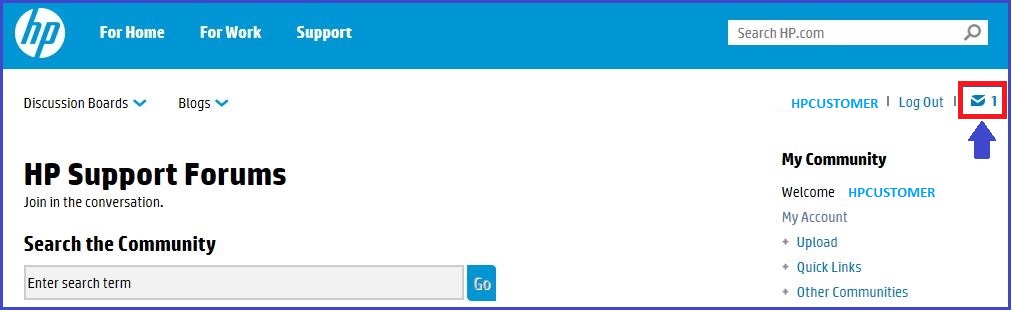
Please check the little envelope on the top right-hand corner of the forums page to check your Forums inbox.
Sunshyn2005
I work on behalf of HP
If you found this post helpful, you can let others know by clicking the “Accept as Solution” button. You can also show your appreciation, with a kudos, by clicking the “thumbs up" button!
- « Previous
-
- 1
- 2
- Next »

Be alert for scammers posting fake support phone numbers and/or email addresses on the community.
If you think you have received a fake HP Support message, please report it to us by clicking on "Flag Post".
† The opinions expressed above are the personal opinions of the authors, not of HP. By using this site, you accept the Terms of Use and Rules of Participation.


Didn't find what you were looking for?
Ask the community
† The opinions expressed above are the personal opinions of the authors, not of HP. By using this site, you accept the <a href="https://www8.hp.com/us/en/terms-of-use.html" class="udrlinesmall">Terms of Use</a> and <a href="/t5/custom/page/page-id/hp.rulespage" class="udrlinesmall"> Rules of Participation</a>.