• ×
    Information
    Need Windows 11 help?
    Check documents on compatibility, FAQs, upgrade information and available fixes.
    Windows 11 Support Center.
  • post a message
  • ×
    Information
    Need Windows 11 help?
    Check documents on compatibility, FAQs, upgrade information and available fixes.
    Windows 11 Support Center.
  • post a message
Guidelines
Meet the All-New HP App: One App for All Your HP Devices replacing HP Smart App Click here to view the Details!
Check some of the most frequent questions about Instant Ink: HP INSTANT INK, HP+ PLANS: INK AND TONER.


Check out our WINDOWS 11 Support Center info about: OPTIMIZATION, KNOWN ISSUES, FAQs AND MORE.
HP Recommended
HP Deskjet 2622
iOS

My printer won’t allow me to print in color no matter what I send,a photo or a document, from any app on my phone It’s automatically changes it to black and white and there is no option to change to color

2 REPLIES 2
HP Recommended

@Ering1 Welcome to HP Community!

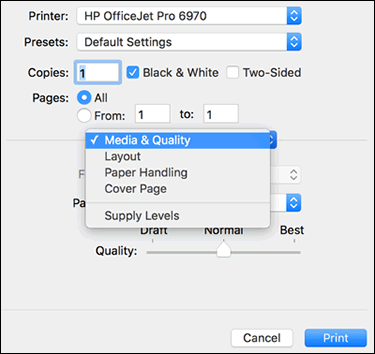
  1. Open a document, photo, or webpage, click File, and then click Print to open the print dialog.

  2. If a Show Details button displays at the bottom of the dialog, click it to reveal all available menu options. The button changes to Hide Details when clicked.

    Print dialog in macOS

  3. Select your printer in the Printer menu.

  4. Select an option in the Presets menu that applies to your print job or paper type.

  5. Click the unnamed print options menu at the separator bar to display more settings options.

    Unnamed print options pop-up menu

  6. Change any print job settings.

    • Print in color or black and white: Select or de-select Black & White on the main dialog. The Presets menu also includes color and black and white options.

  7. To save your settings for future print jobs, click the Presets menu, and then select Save Current Settings as Preset.

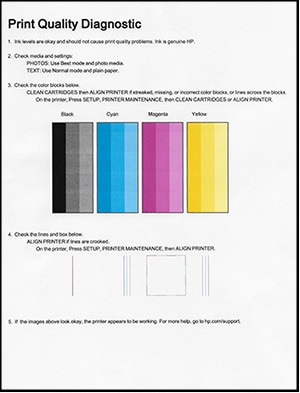
Please print a print quality report and ensure the pritner itself prints color as expected:

  1. Load U.S. Letter or A4 size, unused, plain white paper into the input tray.

  2. On the printer control panel, swipe the display to the left, and then touch Setup (). The Setup menu displays.

  3. Touch Reports, and then touch Print Quality Report. A Print Quality Diagnostic page prints.

Figure : Example of a Print Quality Diagnostic report with no defects

Image: Example of a Print Quality Diagnostic report with no defects.


Let me know how that pans out,

If you feel I was helpful, simply click on Accept as Solution to help the community grow,

That said, I will have someone follow-up on this to ensure you've been helped,

Just in case you don't get back to us within 24 - 48hrs, and have a good day, ahead.

Riddle_Decipher
I am an HP Employee


Learning is a journey, not a destination.
Let's keep asking questions and growing together.
HP Recommended

On your iPhone select a image to print, select print, select the printer, tap options and turn off the black & white slider.


IMG_0791.jpg

† The opinions expressed above are the personal opinions of the authors, not of HP. By using this site, you accept the <a href="https://www8.hp.com/us/en/terms-of-use.html" class="udrlinesmall">Terms of Use</a> and <a href="/t5/custom/page/page-id/hp.rulespage" class="udrlinesmall"> Rules of Participation</a>.