-
×InformationNeed Windows 11 help?Check documents on compatibility, FAQs, upgrade information and available fixes.
Windows 11 Support Center. -

-
×InformationNeed Windows 11 help?Check documents on compatibility, FAQs, upgrade information and available fixes.
Windows 11 Support Center. -
- HP Community
- Notebooks
- Notebook Hardware and Upgrade Questions
- HP 15-dy1038nr battery drain when off

Create an account on the HP Community to personalize your profile and ask a question
04-30-2020 06:24 AM - edited 04-30-2020 09:00 AM
Note. If YOU ARE OFFERING BOILERPLATE "SOLUTIONS" FROM THE THE WEB OR LECTURES ON LITHIUM ION BATTERIES THAT ARE A WASTE OF TIME, PLEASE DON'T REPLY.
Around holiday time late last year 2019, I bought four HP laptops...a 14" Pentium gold, 17" 8th gen I5, 14" 8th gen core i5 x360 , and a 15" HP 15-dy1038nr, the subject of this post.
It is Core i7-1065G7 8GB DDR4-2666 RAM; 512GB SSD; Intel Iris Plus.
Right out of box, battery was near dead. Checksum error on boot. After reset, charging and BIOS update to latest, machine worked.
But now I note a problem...recharge all 4 laptops. The batteries of the three others after a few weeks of nonuse are at 92% plus; the 1038nr is at 55% or less
This is not normal. Battery shows 0 degradation on HWINFO and passes HP diags.
All drivers and bios up to date. Tried all the "cybernetic sorcery" inexplicable-by-logic "solutions" on the net- disabled CS in registry (irrelevant anyway), deactivated fast startup, deleted & let Win reinstall battery driver, blah blah blah. Accomplished nothing but waste of time.
Any more "solutions" that might work and have a legitimate explanation for why?
DO NOT POST BOILERPLATE.
05-08-2020 12:19 PM
@scotsilv I know you don't want boilerplate responses and I hope this doesn't look like one, however, the below series of steps are known to resolve the issue such as the one you are going through at the moment, I suggest you perform all the steps and let me know how that pans out:
Resetting the ACPI battery driver may take care of this.
There will be a hard reset mixed in as well, so the two methods combined typically help a lot with battery issues.
1. Go to Start, search for Device Manager, and open this result.
2. Expand batteries.
3. Right-click on the ACPI option (usually the 2nd option) and select delete or uninstall. Follow the prompts.
4. Shut down the computer.
5. Disconnect the charger.
6. Remove the battery.
7. Hold down the power button for 1 minute.
8. Insert the battery only.
9. Attempt to turn the battery on.
If this had an impact, it should behave differently.
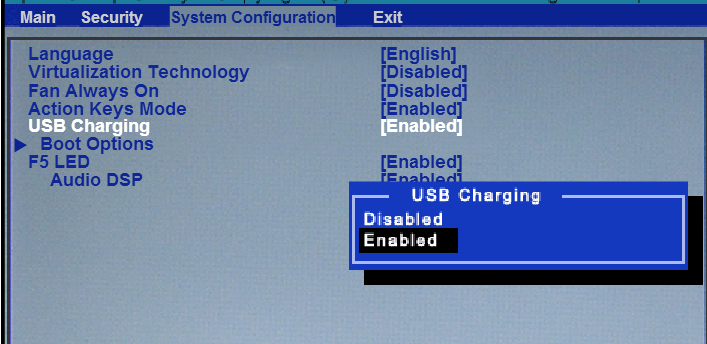
If not, Press the power button and then tap the F2 key to invoke the startup menu.
Choose and click on the F10 key to invoke the BIOS.
Use the System Configuration tab. Disable USB Charging and press the F10 key to save the changes and boot into Windows.

P.S: Welcome to HP Community 😉
Keep us posted,
If you would like to thank us for our efforts to help you,
Give us a virtual high-five by clicking the 'Thumbs Up' icon below, followed by clicking on the "Accept as solution" on this post,
Have a great day!
Riddle_Decipher
I am an HP Employee
Learning is a journey, not a destination.
Let's keep asking questions and growing together.
05-09-2020 01:49 PM - edited 05-09-2020 04:09 PM
None of these "fixes" apply to the machine. No such option in BIOS, battery not removable. This is why I said no boilerplate.
It looks like I'll have to just live with the machine, because if I send it back I'm certain I'll be told there's nothing wrong, or boilerplate fixes that do nothing will be done, and more of my time will be wasted.
05-11-2020 12:56 PM
@scotsilv well, I've tried to be as specific as I could, but if those options aren't available on your device, I suggest you talk to HP support and discuss your options to get the device repaired as the battery or adapter, may need a replacement, follow the below steps to get started:
1) Click on this link - http://www.hp.com/contacthp/
2) Click on Sign-in or select the product using the below step:
3) Enter the serial of your device.
4) Select the country from the drop-down.
5) Click on "Show Options".
Fill the web-form, to populate a case number and phone number for yourself!
Also, if you are having trouble navigating through the above options, it's most likely because the device is out of warranty, if yes? please send me a private message with the region you are contacting us from,
here's how private messages work: Click here for details.
If you wish to thank me for my efforts, you could click on "Accept as solution" on my post as the solution should help others too.
Riddle_Decipher
I am an HP Employee
Learning is a journey, not a destination.
Let's keep asking questions and growing together.