
-
×InformationNeed Windows 11 help?Check documents on compatibility, FAQs, upgrade information and available fixes.
Windows 11 Support Center. -
-
×InformationNeed Windows 11 help?Check documents on compatibility, FAQs, upgrade information and available fixes.
Windows 11 Support Center. -
- HP Community
- Notebooks
- Notebook Hardware and Upgrade Questions
- M.2 SSD Upgrade

Create an account on the HP Community to personalize your profile and ask a question
Your account also allows you to connect with HP support faster, access a personal dashboard to manage all of your devices in one place, view warranty information, case status and more.
Common problems for Battery
We would like to share some of the most frequently asked questions about: Battery Reports, Hold a charge, Test and Calibrating Battery . Check out this link: Is your notebook plugged in and not charging?

It has been a while since anyone has replied. Simply ask a new question if you would like to start the discussion again.

01-25-2016 11:14 PM
 HP Recommended
I'll still bet $10 that some Product Manager thought that it was a great idea.
JOKE ALERT...
Product Manger: "BigBoxCo wants a Laptop just like the m7-n100 but needs a retail price of $999"
Engineer: "We sell the m7-n100 for $1200 retail, how can we justify selling it for less at BigBoxCo?"
Product Manager: "Remove some parts we aren't using."
Engineer: "It will cost way too much time and money to redesign the motherboard!"
Product Manger: "Just disable some stuff"
Engineer: "That's a stupid idea, what stuff would we disable?"
Product Manager: "Disable every unused connector."
Engineer: "That's really a stupid idea. Why in the world would we disable something we spend months getting to work?"
[after a few moments pause]
Product Manager: "I'll call a meeting with the boss, just think of the increased unit sales, I'll get a raise"
Engineer: "I hate my job!"
END JOKE...
I used to work for a company that did this with modems and it really pissed me off as an engineer.
jeff
01-25-2016 11:56 PM
HP Recommended
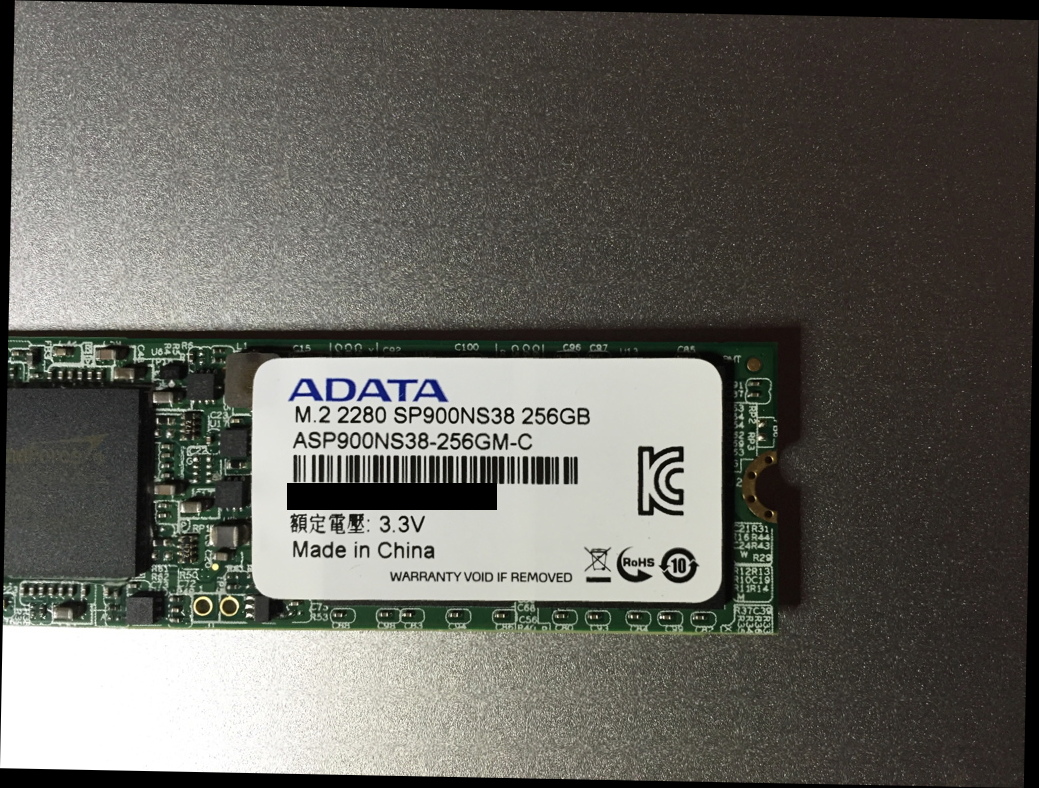
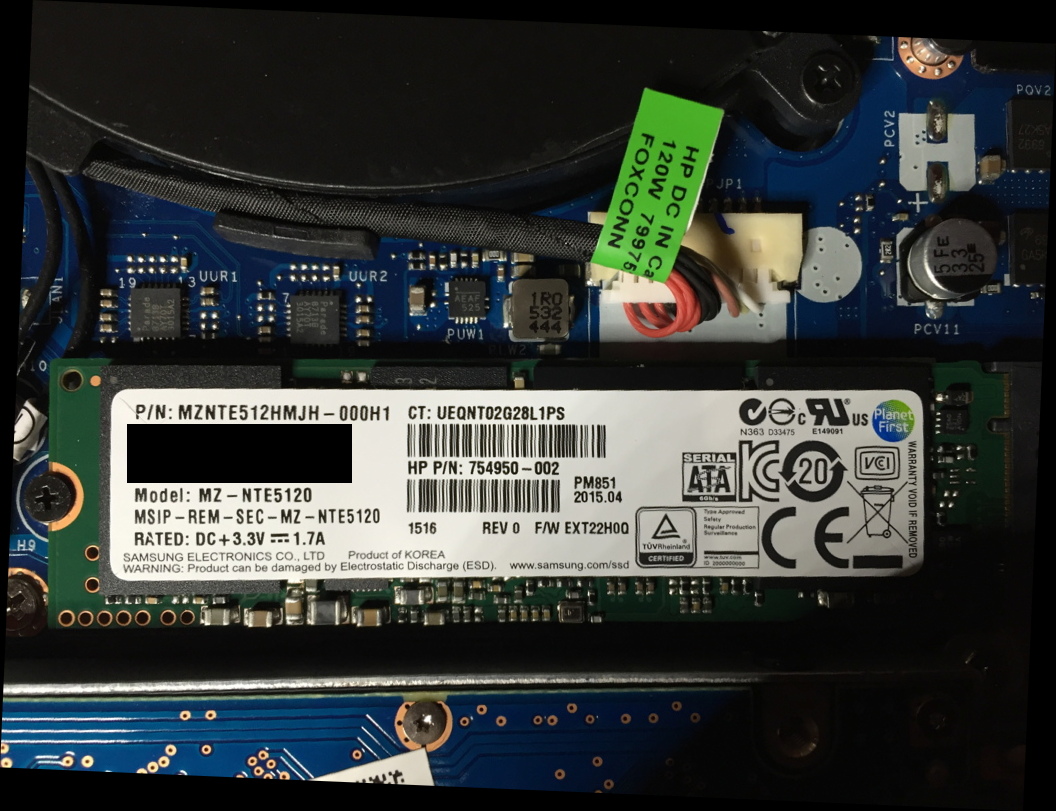
Below are two pictures of SSDs I have tried most recently.
The first is of the AData card I purchased from Amazon.
The Second is the part I ordered from HP parts. I looked up the part number on page 51 of the service manual. It appears to be a Samsung card based on the bottom of the label.
None of the five cards I have purchased worked in either of the two m7-n109dx computers at my disposal.
- Samsung 950 Pro (I know, this will never work)
- Samsung 850 EVO - 120
- Samsung 850 EVO - 250
- Generic 128 GB SATA
- AData 256 GB
- HP 512GB
jeff


01-26-2016 12:18 AM
HP Recommended
I know that I'm not the only one who has this discussion bookmarked.
While I myself haven't decided to upgrade the storage of my 17-n108tx, I did buy it with the understanding that I could in the future.
Having a functioning M.2 port was one of the reasons I chose HP.
Given that HP physically remove the 2.5" HDD brackets from the M.2 SSD-only model, I can only pray that your joke isn't closer to the truth than we think.
PS: whose bright idea was it to hide the advanced BIOS options, anyway?
01-27-2016 01:03 AM
HP Recommended
I just bought an Envy 17t-n000 with a single 1TB HDD from Amazon. The whole reason I chose it was I like the exterior design; it comes with Windows 7 Professional x64 (I just returned an Acer Aspire V 17 Nitro I bought from Newegg, because I HATED Windows 10!), and because I thought it supported an M.2 SSD, as well as dual 2.5" SSDs.
If I buy an M.2 SATA III SSD, and I can't even get the laptop to recognize it, I'm going to be REALLY upset with HP, and I'll think twice before ever buying another HP product.
If I buy an M.2 SATA III SSD, and I can't even get the laptop to recognize it, I'm going to be REALLY upset with HP, and I'll think twice before ever buying another HP product.

02-02-2016 01:39 PM - edited 02-02-2016 01:41 PM
HP Recommended
Yeah, so I finally got around to doing a little "digging" in this laptop (Envy 17t-n000 CTO):
Under Boot Option Menu, it lists the following -
Boot From EFI File
Notebook Hard Drive
In the BIOS, Under Boot Options, Legacy Support is Enabled.
Then it says:
UEFI Boot Order (I think it said because Lagacy Support is enabled, UEFI Boot is always given priority over Legacy Boot)
OS boot Manager
Internal CD/DVD ROM Drive
USB Diskette on Key/USB Disk
USB CD/DVD ROM Drive
! Network Adapter
Legacy Boot Order
Notebook Hard Drive
Internal CD/DVD ROM Drive
USB Diskette on Key/USB Stick
USB CD/DVD ROM Drive
! Network Adapter
Not sure what Network Adapter is, but the (!) indicates it's disabled. I see nothing about a SSD (2.5" or M.2), but I'm assuming (hoping) that's because none is installed. I guess my only recourse is to just go ahead and purchase one, then try installing and see what happens!
I found this SanDisk 1TB M.2 SATA III SSD on Amazon that I think I'm going to give a try, as soon as I can afford to buy it!
02-02-2016
03:27 PM
- last edited on
03-15-2017
05:23 PM
by
 OscarFuentes
HP Recommended
Please post the BIOS level for your laptop and the exact product number.
Please post the HP product number for your PC. How to Find the HP Model Number and the HP Product Number or let HP automatically find your PC model number and HP network attached printers. This will allow others to review your issue, make suggestions and review your responses. This is usually the best way to get assistance.
HP ENVY 6055, >Custom PC - Z690, i9-12900K, 32GB DDR5 5600, quad NVMe drives 4K screen, NVIDIA 3080 10GB

Be alert for scammers posting fake support phone numbers and/or email addresses on the community.
If you think you have received a fake HP Support message, please report it to us by clicking on "Flag Post".
† The opinions expressed above are the personal opinions of the authors, not of HP. By using this site, you accept the Terms of Use and Rules of Participation.


Didn't find what you were looking for?
Ask the community
† The opinions expressed above are the personal opinions of the authors, not of HP. By using this site, you accept the <a href="https://www8.hp.com/us/en/terms-of-use.html" class="udrlinesmall">Terms of Use</a> and <a href="/t5/custom/page/page-id/hp.rulespage" class="udrlinesmall"> Rules of Participation</a>.