
-
×InformationNeed Windows 11 help?Check documents on compatibility, FAQs, upgrade information and available fixes.
Windows 11 Support Center. -
-
×InformationNeed Windows 11 help?Check documents on compatibility, FAQs, upgrade information and available fixes.
Windows 11 Support Center. -
- HP Community
- Notebooks
- Notebook Hardware and Upgrade Questions
- Re: Potentially dumb USB question

Create an account on the HP Community to personalize your profile and ask a question
Your account also allows you to connect with HP support faster, access a personal dashboard to manage all of your devices in one place, view warranty information, case status and more.
Common problems for Battery
We would like to share some of the most frequently asked questions about: Battery Reports, Hold a charge, Test and Calibrating Battery . Check out this link: Is your notebook plugged in and not charging?

It has been a while since anyone has replied. Simply ask a new question if you would like to start the discussion again.

06-12-2020 08:27 PM
 HP Recommended
Product: HP Pavilion 17-e067cl
Operating System: Microsoft Windows 10 (64-bit)
I am going to be using this laptop (if it works well enough) to help my church live stream our services on the internet. Currently I'm using my personal laptop and things are going well but as we improve, we're adding more sources, or at least better sources. Right now I have an SD video source on a USB 3.0 port, an HD video source on the other USB 3.0 port and an audio source on the USB 2.0 port. I'm out of USB ports. And I would like to move this task from my personal laptop (an HP Notebook - 17-by0062cl) to this Pavilion.
So here is my question. Do all of the ports share the same controller and thus the same max throughput? Or does each individual port get the full (I suppose theoretical) 5 Gbits/second?
Basically what I want to know is should I just get a 8 or more port powered USB 3.0 hub and connect it to one of the ports, then use it for all my sources? Or should I get two smaller powered USB 3.0 hubs and balance my sources between the two USB 3.0 ports. I can use the USB 2.0 port for my mouse again.
Any USB education would help.
Thanks,
David Chamberlain
8 REPLIES 8


06-12-2020 08:54 PM - edited 06-12-2020 08:55 PM
HP Recommended
USB 3.0 or 3.1 ports(5 Gbps) have much more throughput than USB 2.0 USB ports (480 Mbps).
What you should check before making all of the USB connections is the maximum current draw allowed on the ports. Invoke the Device Manager and then click on Universal Serial Bus Controllers. Right Click on a USB Root Hub, properties and then left click on it. In the dialog window that opens click on the power tab to see how much current in micro amperes that port has available. You will see how much the device connected to it is drawing. Do that to each SB Root Hub to ssee what is being used.
" Do all of the ports share the same controller and thus the same max throughput? " No.
"Or should I get two smaller powered USB 3.0 hubs and balance my sources between the two USB 3.0 ports. " Yes. That way you will avoid drawing too much current on a port and damaging it on the notebook's system board.
Power USB hubs are the safest option for expanding a notebook's USB ports.
I am a volunteer forum member. If my suggestion helped you solve your issue, help others by marking that post as the accepted solution. Say thanks by clicking on the Yes button next to the "was this reply helpful?"


06-15-2020 01:44 PM - edited 06-15-2020 01:46 PM
HP Recommended
Thank you for your reply.
I'm not too concerned about power. None of the devices I'm using draw anything significant. The HDMI video capture device is externally powered, so it shouldn't be drawing anything, and I can check power so I know if it becomes a problem. It's a given that any hubs I'll be using will be powered.
My interest is more in throughput. The basic question is if I have two 3.0 ports, do I get 5 Gbs per port or do the ports share 5 Gbs from the controller.
And this is somewhat all theoretical anyway. Right now I'm running a 1080p video stream, a 480i video stream and an audio stream. I want to up the SD stream to HD and I might be adding a dual band USB WiFi adapter. But I don't think I'll be adding any additional streams. So I'm probably never going to get anywhere near 5Gb total throughput on my USB.
06-15-2020 02:35 PM
HP Recommended
It should be noted also that it appears you cannot see USB power usage in Windows 10. The tab is not there in the device manager. A Google search appears to confirm this.
There are some 3rd party applications that you can use, but I didn't spend a lot of time looking at them to see what there is.
06-15-2020 04:25 PM - edited 06-15-2020 04:28 PM
HP Recommended
The Google search did not provide you with accurate information. "Appeared" is indeed the operative word.
See the following image from the PC I am typing this on. It is a Windows 10 Pro ver. 2004 machine.
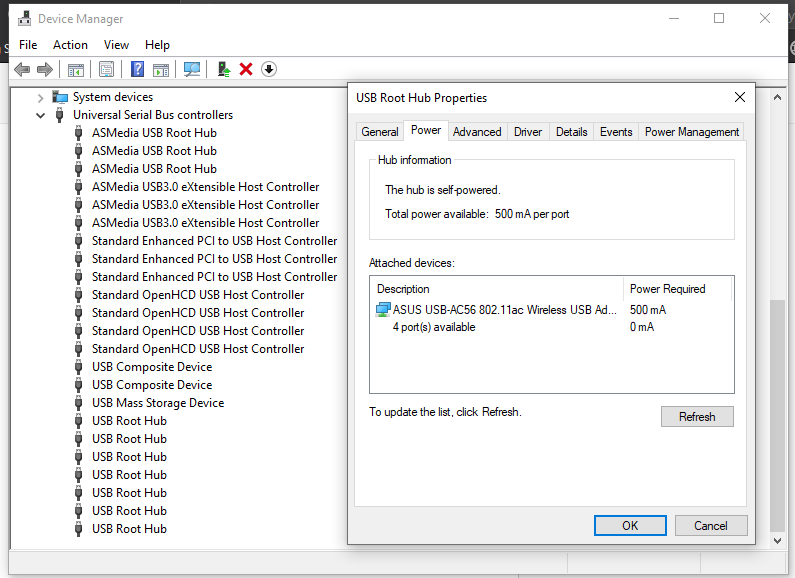
If you won't bother to take some time to look to see what power USB is using on your PC, then perhaps you should do a little reading instead of just asking. The tab is there as sen in the image above. You appear to have looked in the wrong place.
HDMI provides the digital video signal and an audio signal, so it does use some power as well.
I am a volunteer forum member. If my suggestion helped you solve your issue, help others by marking that post as the accepted solution. Say thanks by clicking on the Yes button next to the "was this reply helpful?"
06-15-2020 08:54 PM
HP Recommended
I've been working with computers professionally for somewhere in the neighborhood of 35 years. I have a pretty decent idea of what I'm doing. When I said it's not there, it's because I looked and it's not there. When I do a Google search and tons of people are saying the same thing, I think it's safe to conclude that it's a problem. Perhaps not like initially thought with Windows 10 entirely, but at least for many people. My Windows is the latest that is known to me, Windows 1909. And it is the Home version. Because you don't seem to believe I'm smart enough to actually look and see, this is what I looked and saw. There is no "Power" tab there. I have not looked for this in every Windows 10 version I've used, because it hasn't come up. But I know I've looked at this before in previous versions of Windows 10 and not seen it.
If I am somehow looking in the wrong place, perhaps just saying that without the derision would be helpful.
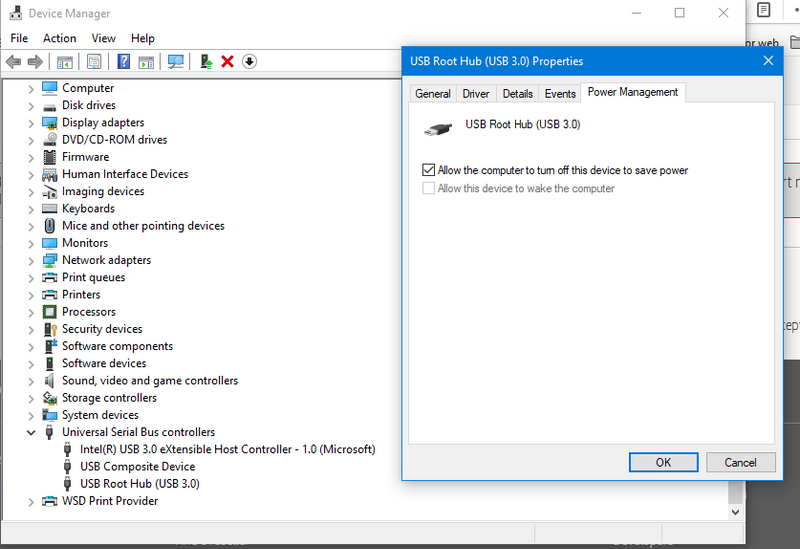
Now, it would kind of be kind of nice if someone would actually answer the question I asked, instead of berating me for thinking I don't understand the answer I got. I'm not stupid and if it were something that I had found in the hour or so I spent searching before I came here, I wouldn't have come here.
06-17-2020 09:00 AM
HP Recommended
I never made or do make any reference to any member's level of intelligence. No derision was meant. Sorry it came across that way. I may have unintentionally reacted to the tone you set in a previous post. Usually my skin is thicker.
I took the screenshot from a desktop with Windows 10 Pro ver 2004. There must be a difference in the way Windows Device Manager is setup for laptops. My HP Spectre x360-13-ap0xxx ultrabook shows something similar to what you showed in the screen shot. I agree with you. it is not there for laptops.
As far as bandwidth goes, the USB wiki may be the best place to locate that information.
I am a volunteer forum member. If my suggestion helped you solve your issue, help others by marking that post as the accepted solution. Say thanks by clicking on the Yes button next to the "was this reply helpful?"
06-17-2020 10:10 AM
HP Recommended
Thank you. No problems, sometimes tone is misunderstood in text.
I didn't think about it being different in laptops vs desktops. It's odd, I don't know why it would be different. It's just USB hardware like any other, only smaller.
I found a utility for those that don't have it the Device Manager that shows a bunch of information about USB devices and it shows power consumption. It's called USBDView. It's rough and poorly organized but the information is there. There is also a pretty nice utility in the Windows SDK.
I'll try to find the USB Wiki and see what it says. Thank you.
06-17-2020 12:42 PM
HP Recommended
No worries. It is a worldwide Pandemic time and we are all somewhat under stress as a species.
Parts of the Windows Toolkit are indeed quite handy.
I am a volunteer forum member. If my suggestion helped you solve your issue, help others by marking that post as the accepted solution. Say thanks by clicking on the Yes button next to the "was this reply helpful?"

Be alert for scammers posting fake support phone numbers and/or email addresses on the community.
If you think you have received a fake HP Support message, please report it to us by clicking on "Flag Post".
† The opinions expressed above are the personal opinions of the authors, not of HP. By using this site, you accept the Terms of Use and Rules of Participation.


Didn't find what you were looking for?
Ask the community
† The opinions expressed above are the personal opinions of the authors, not of HP. By using this site, you accept the <a href="https://www8.hp.com/us/en/terms-of-use.html" class="udrlinesmall">Terms of Use</a> and <a href="/t5/custom/page/page-id/hp.rulespage" class="udrlinesmall"> Rules of Participation</a>.