
-
×InformationNeed Windows 11 help?Check documents on compatibility, FAQs, upgrade information and available fixes.
Windows 11 Support Center. -
-
×InformationNeed Windows 11 help?Check documents on compatibility, FAQs, upgrade information and available fixes.
Windows 11 Support Center. -
- HP Community
- Notebooks
- Notebook Video, Display and Touch
- Re: Erratic Synaptics Mouse Pointer moves by it self, select...

Create an account on the HP Community to personalize your profile and ask a question
Your account also allows you to connect with HP support faster, access a personal dashboard to manage all of your devices in one place, view warranty information, case status and more.

It has been a while since anyone has replied. Simply ask a new question if you would like to start the discussion again.


10-07-2020 01:50 PM
 HP Recommended
Thank you for posting back.
Use the following steps to open the Component Tests menu.
-
Hold the power button for at least five seconds to turn off the computer.
-
Turn on the computer and immediately press Esc repeatedly, about once every second. When the menu appears, press the F2 key.
-
On the main menu, click Component Tests.
-
The Component Tests menu displays.
Your Component Tests menu might be different, depending on the components installed on your computer.
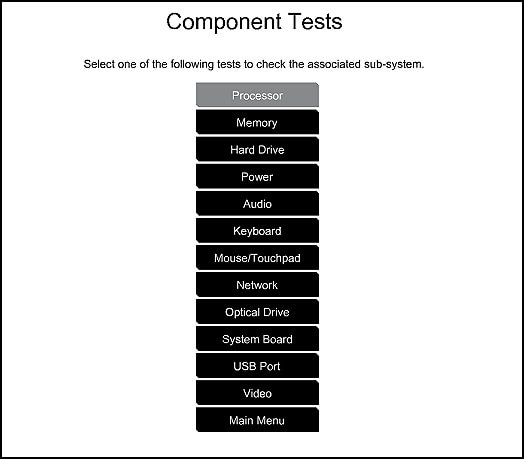
To run the tests, click Mouse/Touchpad. Select the test you want to run, and then click Run once. Follow the instructions to complete the test.
Hope this helps! Keep me posted for further assistance.
Please click “Accept as Solution” if you feel my post solved your issue, it will help others find the solution.
ECHO_LAKE
I am an HP Employee

10-09-2020 11:30 AM
HP Recommended
Did the Mouse/Touchpad test already but doing it again now anyway. The test log showed it passed again. Ran the long systems test that takes 4 hours. All was good. No errors. I need Spock to say "Fascinating" and fix this. I have had AVG techs do a remote service to fix this but they find no fix. Just direct me back to HP. I am going to see if I can turn off AVG to see if that is the issue. If that is no help then I am willing to reset to factory original. Is there a detailed instruction for returning the computer to the original factory settings that I can print. I would also need to print what to do if something goes wrong. Like a how to recover a dead computer. Still wondering about web posts that claim this is a Windows software glitch.

10-09-2020 02:21 PM
HP Recommended
I understand your concerns.
In that case, I would suggets you perform the system reset.
Windows 10 has a reset feature that repairs your computer by reinstalling the operating system. This feature is recommended for recovery because it reinstalls Windows 10 while either preserving your personal data and customizations or removing all your personal data.
You have a choice of two methods to reset your computer.
-
If Windows 10 loads correctly, see the section titled Perform a Windows 10 system reset in Windows in this document.
-
If Windows 10 does not start correctly, see the section titled Perform a Windows 10 system reset through Windows Recovery Environment in this document.
Have a nice day!!
10-10-2020 03:09 PM
HP Recommended
I see that a windows 10 reset will delete any apps that were not installed with the HP factory Windows 10. So I would have to reinstall those apps in addition to a full windows update and Intel updates. If I was sure this would work I would do it but my understanding is that you and the other techs think this is a malware issue. I have scanned this computer for malware regularly with the full AVG product. HP remote tech support also used another malware scan the first time I called in 2019 and found none. I also had three remote sessions with AVG tech support and they were unable to find any malware. They even tried using one of their competitors scanners. So anyway I am hoping HP could talk to Synaptics before I do the nuclear option Windows reset. Sorry but I have a really bad feeling about doing the reset and still having this issue. Replacing the touchpad board would be easier for me but I don't think its bad.
10-10-2020 04:44 PM
HP Recommended
Thank you for posting back.
I appreciate your efforts to try and resolve the issue. As we have limited support boundaries in the support community as of now.
I would request you to contact our Support and our Support Engineers should be able to sort this out. HP Support can be reached by clicking on the following link: www.hp.com/contacthp/
Please feel free to contact us here anytime you need any further assistance. Please click “Accept as Solution” if you feel my post solved your issue, it will help others find the solution.
ECHO_LAKE
I am an HP Employee
10-12-2020 10:42 AM
HP Recommended
Out of warranty so the HP support sends me back to HP Community. There is no contact information to talk to an engineer. There is only virtual support that ends with a cold reboot. That only works for a very short time. There is message bar which I have used to send messages but I never get a response. So what can I do?
10-13-2020 04:16 PM
HP Recommended
Thank you for posting back.
Don't worry as I'll be glad to help, in order to bring your issue to the attention of an appropriate team within HP. I am sending you a private message. Please check the mailbox icon in the top-right corner of this screen.
ECHO_LAKE
I am an HP Employee
- « Previous
-
- 1
- 2
- Next »

Be alert for scammers posting fake support phone numbers and/or email addresses on the community.
If you think you have received a fake HP Support message, please report it to us by clicking on "Flag Post".
† The opinions expressed above are the personal opinions of the authors, not of HP. By using this site, you accept the Terms of Use and Rules of Participation.


Didn't find what you were looking for?
Ask the community
† The opinions expressed above are the personal opinions of the authors, not of HP. By using this site, you accept the <a href="https://www8.hp.com/us/en/terms-of-use.html" class="udrlinesmall">Terms of Use</a> and <a href="/t5/custom/page/page-id/hp.rulespage" class="udrlinesmall"> Rules of Participation</a>.