-
×InformationNeed Windows 11 help?Check documents on compatibility, FAQs, upgrade information and available fixes.
Windows 11 Support Center. -

-
×InformationNeed Windows 11 help?Check documents on compatibility, FAQs, upgrade information and available fixes.
Windows 11 Support Center. -
- HP Community
- Printers
- Printer Ink Cartridges & Print Quality
- Help changing print size

Create an account on the HP Community to personalize your profile and ask a question
10-18-2024 04:17 PM
Welcome to the HP English Community --
Product / Printer Model: HP OfficeJet Pro 8135e All-in-One Printer
Operating System: ?
Software / Application: ?
Connection Type: ?
Content / File Type: ?
Job type: Print Size
----------------------------------------------------
If you cannot find the settings you need, there is a common cause:
HP Smart - Mobile - does not include a print-to-scale settings.
At best, you can fit the print content to the paper.
That does not mean the content will change its structure (font size, for example) -- it means the content can be "fitted" to the paper size.
Caveat: HP Smart - Mobile - iPadOS - includes a manual resize option (at least for photos) -- emphasis on manual.
HP_Smart_Mobile_Image_Print_Resize-Move_10
---------------------------------------------------------------------
What else?
Printing to Scale is supported in most (at least some) browsers - whether that includes a mobile device running a mobile version of the browser is something you have to check in the browser's Print Settings.
Open your content and reduce the size of the page -- for example, view the webpage at no larger than 100%.
Then try printing.
Windows
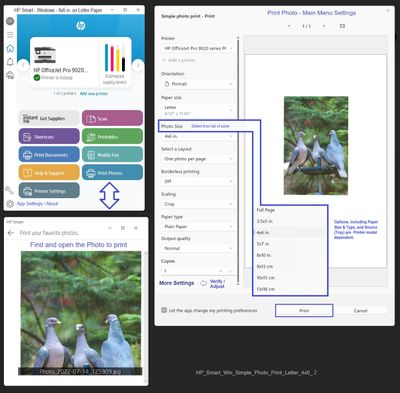
Printing to Scale, percentage of 100%, and selected size options is supported in HP Smart, other HP applications, Windows Print Pictures (a revamp of the old Windows Print Viewer), Paint, Adobe Reader, and many third party software programs. Oh, and browsers support Scale, too.
HP_Smart_Win_Simple_Photo_Print_Letter_4x6_2
PDF_Reader_Main_Menu_Border_6
=--=--=--=--=--=--=--=--=--=--=--=--=--=--=--=--=--=
References / Resources
HP Printer Home Page - References and Resources
Learn about your Printer - Solve Problems
“Things that are your printer”
When the website support page opens, Select (as available) a Category > Topic > Subtopic
NOTE: Content depends on device type and Operating System
Categories: Warranty Check, Alerts, Troubleshooting, Ink & Paper, HP Software & Drivers / Firmware Updates, Setup & User Guides, Product Specifications, Account & Registration, Warranty & Repair
Open
Enter the device type and model name of your HP product
OR
Select a saved product from HP Account Dashboard
HP OfficeJet Pro 8135e All-in-One Printer