• ×
    Information
    Need Windows 11 help?
    Check documents on compatibility, FAQs, upgrade information and available fixes.
    Windows 11 Support Center.
  • post a message
  • ×
    Information
    Need Windows 11 help?
    Check documents on compatibility, FAQs, upgrade information and available fixes.
    Windows 11 Support Center.
  • post a message
Guidelines
Here is the solution for the error: "Encryption Credentials have expired" when attempting to print or scan from Mac OS or iOS devices: Click here to view the troubleshooting steps!
Check some of the most frequent questions about Instant Ink: HP INSTANT INK, HP+ PLANS: INK AND TONER.


Check out our WINDOWS 11 Support Center info about: OPTIMIZATION, KNOWN ISSUES, FAQs AND MORE.
HP Recommended
Office Jet Pro 6978
macOS 11.0 Big Sur

Apparently my printer's default setting is for duplex printing...I need to do one-sided but none of the settings that pop up give me any options to change the setting. I am using Word software.

1 REPLY 1
HP Recommended

Hi @nanzam1,


I'd like to help!


I understand you would like to disable duplex printing.


I believe we can disable two-sided printing from the print dialogue windows. Let's try these steps:

1.) Open the document you want to print, click File, click Print, and then click Show Details, if necessary.


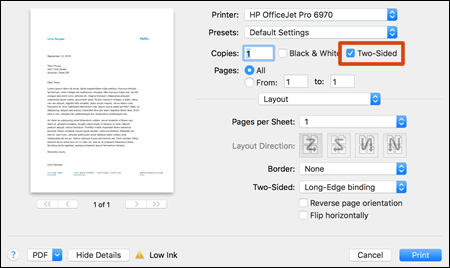
2.) Look for a Two-Sided option in the print dialog and then Un-check the Two Sided box.

Two-Sided option in the print settings


3.) Click Layout in the unnamed print options menu at the center of the dialog. Click Two-Sided and select Off.


4.) Click Print.


Once the print job is complete, these settings will be set as default for future print jobs until you select a new preset or change settings.

You can also save your settings for future print jobs, click the Presets menu, and then select Save Current Settings as Preset.

Let me know how it goes!


Hope this helps! Keep me posted. 


And, Welcome to the HP Support Community. 


Please click “Accept as Solution” if you feel my post solved your issue, it will help others find the solution.

Click the “Kudos, Thumbs Up" on the bottom right to say “Thanks” for helping

† The opinions expressed above are the personal opinions of the authors, not of HP. By using this site, you accept the <a href="https://www8.hp.com/us/en/terms-of-use.html" class="udrlinesmall">Terms of Use</a> and <a href="/t5/custom/page/page-id/hp.rulespage" class="udrlinesmall"> Rules of Participation</a>.