• ×
    Information
    Need Windows 11 help?
    Check documents on compatibility, FAQs, upgrade information and available fixes.
    Windows 11 Support Center.
  • post a message
  • ×
    Information
    Need Windows 11 help?
    Check documents on compatibility, FAQs, upgrade information and available fixes.
    Windows 11 Support Center.
  • post a message
Guidelines
Ready to level up? Join the Expert Program—
Common problems for Connectivity Issues
We would like to share some of the most frequently asked questions about Printer Wi-Fi, Connectivity Issues and Offline Status. Check out this link: HP printer is offline or unavailable.
HP Recommended
HP DeskJet 2710 All-in-One Printer

Hi 

My wife got us a new network in our house- and now my wireless printer can't fint it !!!

How can I solve this, so I can use my printer again ???

Now it's just keep saying, that the printer cannot be found/offline

1 REPLY 1
HP Recommended

@Olman75 


Welcome to the HP Community Forum.


If your wife is the sysadmin,

Ask your wife to reconfigure the devices in the network using the previous router's device / IP list.

If you have not managed the network yourself, ask to sit in on the session so you can learn the process.


Refer to the router's user guide and perhaps the router's support team for help -- these are generally good resources.


Next,


Generally using the same SSID names, the same device list IP addresses, and a similar setup reduces the stress of replacing your router. 


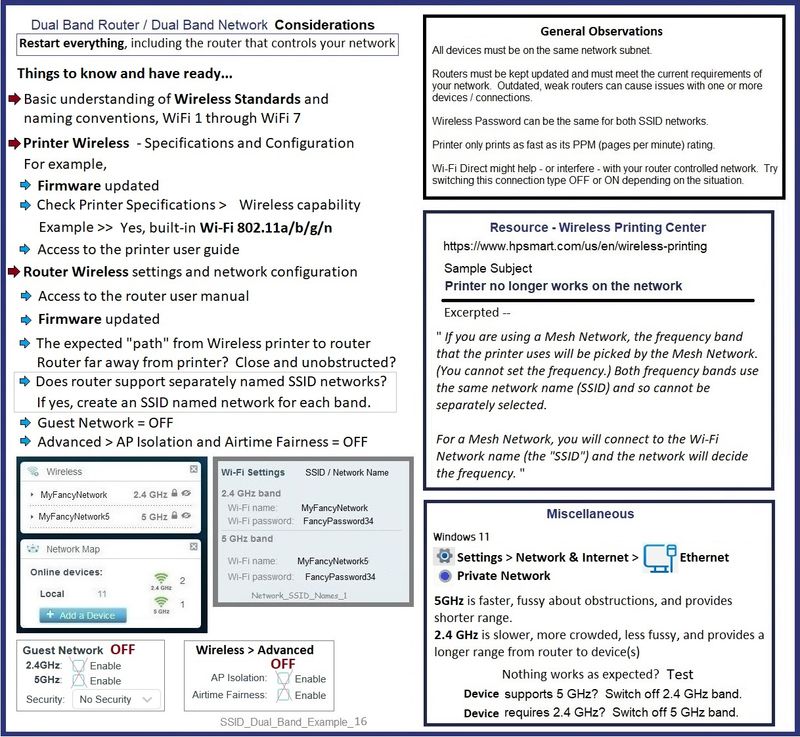
If you have switched to a Dual Network configuration and if the network supports it, be sure to create a separately named SSID network for each frequency (band) - connect the printer to the SSID network you want it to use.


At the least, even if the router is set up and the network is configured the way you want it, you will perhaps have to Restart everything.  For example, your printer, your computer, and maybe other devices that use that printer.


What else?


Video Help

HP DeskJet 2752 | 2755 | 2720 AiO printer : Restore wireless to default or Reset to setup mode


HP DeskJet 2720 | 2752 | 2755 AiO printer : Connect Printer to wireless network using HP Smart app


Next,


Next,

If all else fails to get you the result you expect,

Consider

If you have not done so,

Uninstall the full driver printer software from Programs and Features

Restart computer and log in

Install the Full Feature Software / full driver printer software.

Restart computer and log in


Video - How to install full driver printer software

HP DeskJet 2700 series printer : Download Offline Copy of Software and Install on Win 10 computer


+=+=+=+=+=+=+=+=+=+=+=+=+=+=+=+=+=+=+=+=

Reference / Resources


User Guide


HP - Wireless Printing Center > Common Questions > Wireless Connection Issues

AND

HP - Wireless Printing Center – Static IP Address


Some of the more common remedies grouped here:

HP - Wireless Printing Center > Common Questions > Printer no longer works on network


Easy to read articles on the subject of different Wireless standards

Wi-Fi 1 - 7

SignalBoosters - What are IEEE 802.11 Standards? : 802.11a/b/g/n/ac/ax


Example - Dual Band Network - Considerations

SSID_Dual_Band_Example_16SSID_Dual_Band_Example_16


HP Printer Home Page - References and Resources

Learn about your Printer  - Solve Problems

“Things that are your printer”

When the website support page opens, Select (as available) a Category > Topic Subtopic

NOTE:  Content depends on device type and Operating System

Categories:  Alerts, Access to the Print and Scan Doctor (Windows), Warranty Check, HP Drivers / Software / Firmware Updates, How-to Videos, Bulletins/Notices, Lots of How-to Documents, Troubleshooting, Manuals > User Guides, Product Information (Specifications), Supplies, and more

Open

HP DeskJet 2710 All-in-One Printer 


Thank you for participating in the HP Community --

People who own, use, and support HP devices.

Click Yes to say Thank You

Question / Concern Answered, Click "Accept as Solution"


Dragon-Fur

† The opinions expressed above are the personal opinions of the authors, not of HP. By using this site, you accept the <a href="https://www8.hp.com/us/en/terms-of-use.html" class="udrlinesmall">Terms of Use</a> and <a href="/t5/custom/page/page-id/hp.rulespage" class="udrlinesmall"> Rules of Participation</a>.