
-
×InformationNeed Windows 11 help?Check documents on compatibility, FAQs, upgrade information and available fixes.
Windows 11 Support Center. -
-
×InformationNeed Windows 11 help?Check documents on compatibility, FAQs, upgrade information and available fixes.
Windows 11 Support Center. -
- HP Community
- Printers
- Printing Errors or Lights & Stuck Print Jobs
- Re: Can no longer print duplex in MS WORD

Create an account on the HP Community to personalize your profile and ask a question
Your account also allows you to connect with HP support faster, access a personal dashboard to manage all of your devices in one place, view warranty information, case status and more.
Check some of the most frequent questions about Instant Ink: HP INSTANT INK, HP+ PLANS: INK AND TONER.
Check out our Black or Color Ink Not Printing, Other Print Quality Issues info about: Print quality and Cartridge Issues.

It has been a while since anyone has replied. Simply ask a new question if you would like to start the discussion again.

12-05-2017 11:16 AM
 HP Recommended
Product: HP Officejet 5740e
Operating System: Other
I have a MacBook Pro OS High Sierra version 10.13.1
Last night, my ISP re-set my router remotely because of cable internet phone issues and after the re-set, my wireless HP printer lost all connectivity. Apple could not assist me, but they got me a case number for HP and I spent 40 mins on the phone with HP. The HP tech fixed everything and downloaded drivers for it. The printer works wirelessly once again although some print features seem to have changed. However, the main thing that has vanished is that there is no longer an option to print in duplex using MS WORD. I can print solely single pages on WORD.
I have exactly the same situation as this HP poster at this link and I also have exactly the same screens as he posted about what he sees when he is trying (unsuccesffuly) to configure to print duplex in WORD:
Is there a fix for this issue that does not involve uninstalling everything and then reinstalling something else?
Appreciate any replies with guidance/advice, thanks!
9 REPLIES 9


12-06-2017 04:59 PM
HP Recommended
Welcome to the HP Forums. I would be happy to help you with your HP Officejet 5740 Printer. I understand that your are unable to print two sided from MS WORD and you have already done some preliminary troubleshooting.
However, I will need a few details to provide an accurate solution,
Are you able to print double sided from other applications like PDF.
Meanwhile:
-
Click the Apple menu, click System Preferences, and then click Print & Scan or Printers & Scanners.
-
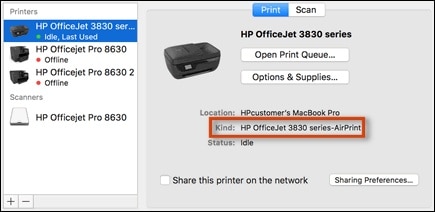
Locate your printer name next to Kind in the right pane.
Figure : Example of an HP printer using the AirPrint driver
-
If AirPrint is not in the name, you are using the HP driver. Continue to the next step.
-
If AirPrint is in the name, re-add the printer with the HP driver.
Select your printer name in the Printers list, click the minus sign
 at the bottom of the Printers pane to remove the printer, click the plus sign
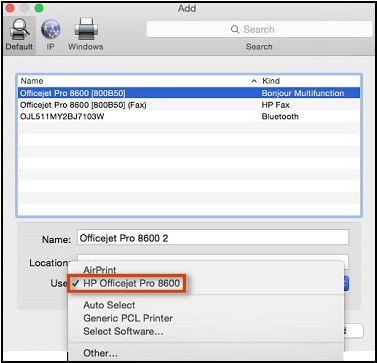
  , click the name of your printer in the Add window, click the Use menu and select the name of your printer in the pop-up menu, and then click Add. Continue to the next step.
Figure : The Use pop-up menu in the Add window
-
-
Select your printer name in the Printers list, and then click Options & Supplies.
Figure : Click Options & Supplies in the Printers & Scanners window

-
Click Options, and then select the check box next to HP Two-sided Printing Accessory (Duplexer).
NOTE:
If the accessory does not display, your printer does not support automatic duplexing or the accessory is not compatible with the currently selected printer driver. Use the manual duplexing steps in this document to print.
Figure : Select the duplexer in the Options menu

-
Print a multi-page document to confirm the Two-Sided setting is available.
Let me know if that helps.
Cheers.
Sandytechy20
I am an HP Employee
12-06-2017 05:23 PM
HP Recommended
My printer is using HP drivers; they were installed by the HP tech support staff who assisted me online using remote control of my MacBook to do this.
I am able to do duplex printing in just about everything. There is an option to select duplex in every print window I have used so far in Safari, PPT, Excel, etc. I can also check the print dialogue box marked "Last Used Settings" and it will remember to do duplex printing if I selected that previously.
However there is NO option to duplex print from within MS WORD.
When I go into System Preferences, there is no option to select duplex in "Options & Supplies." I have three tabs there: General, Supply Levels, Utility. There is NO "Options" tab as you displayed in your post like this:
12-06-2017 11:57 PM
HP Recommended
Hi, not sure which Word version you're using - in mine the print dialog has a drop down menu where you have "Copies & Pages", ... "Layout"... In Layout, there is a "Two-Sided" option. Do you see this, and is it "Off" by any chance?
I am an HP employee.
12-07-2017 07:48 AM
HP Recommended
My version of WORD is 16.8 under my Office 365 subscription.
I looked inside the Print >Copies & Pages > Layout > within WORD, and the two sided was OFF so I clicked it to each of the two-sided options; first on the long edge and then on the short edge. Both printed out on one side only.
Thanks for your post. Any other ideas appreciated.
This is mystifying, how I can do double sided/duplex with just about any app except for MS WORD. This only started happening after HP tech staff changed the drivers for me in fixing my wireless printer issue.
12-07-2017 11:31 AM
HP Recommended
Here is a possible workaround. From the Word print dialog, click on the PDF dropdown bottom left, then Open in Preview. This will open a PDF version of the document in Apple's native Preview app from where you should be able to print with the familiar print options you find from other apps (the two-sided checkbox should be there). From here, in the presets menu after selecting "two-sided" you should be able to save a new preset ("Save Current Settings as Preset") and name it something refering to Duplex printing. You could then select that preset from the word print Dialog and see if this addresses your problem. If possible, I would recommend using AirPrint, that would require you to reinstall your printer which you may not want to do at that point, but I can provide guidance if you want to go that route.
I am an HP employee.
12-07-2017 01:23 PM
HP Recommended
Hi, Printez,
Thanks for your follow-up post. I did exactly as you suggested in this post, and it worked for PDF printing, but did not work at all in WORD. I saved a duplex setting as "Duplex Custom" but when I assigned it to the print command in WORD, my printer still produced only one sided print outs.
I appreciate the Air Print offer, but am not sure I wish to go through the whole regime again. It was unbelievable watching what the HP tech folks did remotely to fix my wireless issue and instal the printer drivers. I don't think I dare touch it and cannot be sure I could follow the guidance, no matter how detailed or well intended!
Thanks again
JS
12-07-2017 04:15 PM
HP Recommended
Trying to pull more information on possible root cause for you, will post here if I have additional insights. Not ideal, but glad the PDF detour from Word still is an option that works for you. Just curious, when you created that "Duplex Custom" presets, did you additionaly select the "Long-Edge binding" option in the Word print dialog (under the layout submenu)?
I am an HP employee.
12-11-2017 03:16 PM
HP Recommended
Hi, an additional tip. Please under "Paper Handling" select "Scale to fit paper size" with US letter as destination (see attached). In addition to having selected the "Long Edge Binding" into the Layout menu. If this works, after selecting both, you could save as a preset. Hope this works.
I am an HP employee.

Be alert for scammers posting fake support phone numbers and/or email addresses on the community.
If you think you have received a fake HP Support message, please report it to us by clicking on "Flag Post".
† The opinions expressed above are the personal opinions of the authors, not of HP. By using this site, you accept the Terms of Use and Rules of Participation.


Didn't find what you were looking for?
Ask the community
† The opinions expressed above are the personal opinions of the authors, not of HP. By using this site, you accept the <a href="https://www8.hp.com/us/en/terms-of-use.html" class="udrlinesmall">Terms of Use</a> and <a href="/t5/custom/page/page-id/hp.rulespage" class="udrlinesmall"> Rules of Participation</a>.