• ×
    Information
    Need Windows 11 help?
    Check documents on compatibility, FAQs, upgrade information and available fixes.
    Windows 11 Support Center.
  • post a message
  • ×
    Information
    Need Windows 11 help?
    Check documents on compatibility, FAQs, upgrade information and available fixes.
    Windows 11 Support Center.
  • post a message
Guidelines
Here is the solution for Blue screen error 83C0000B on HP OfficeJet Pro 8010e, 9020e Printer Series: Click here to view.
Check some of the most frequent questions about Instant Ink: HP INSTANT INK, HP+ PLANS: INK AND TONER.


Check out our Black or Color Ink Not Printing, Other Print Quality Issues info about: Print quality and Cartridge Issues.
HP Recommended
HP OfficeJet Pro 8025e All-in-One Printer
iOS

I cant print tax returns ... please help!


1 REPLY 1
HP Recommended

@Itsme2022 


Welcome to the HP Community Forum.


OK -- so, why not?


Checking...


Tax Return files as stored on your device might be stored as (for example) a PDF file.

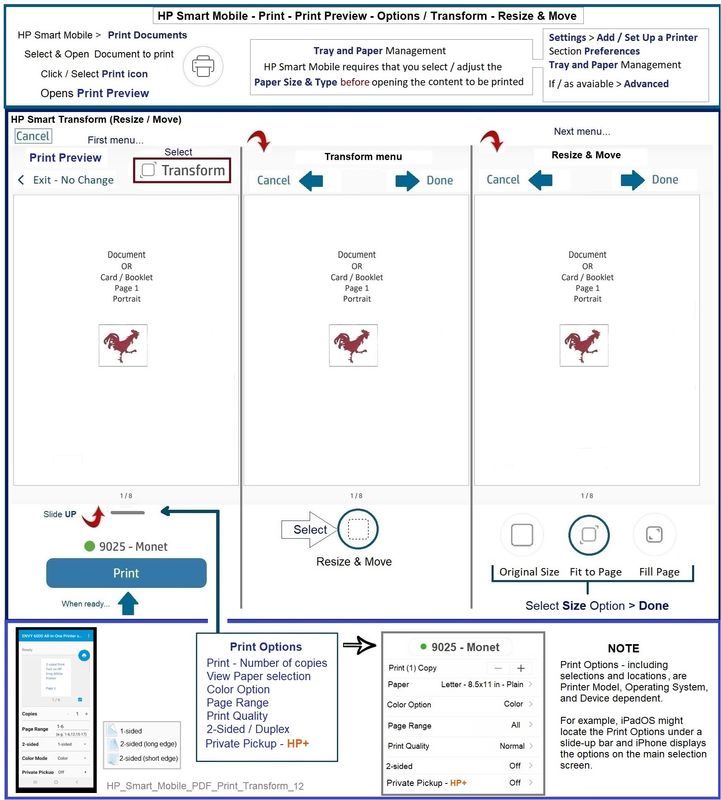
In general, HP Smart Mobile certainly supports printing PDF files.


HP_Smart_Mobile_PDF_Print_Transform_12HP_Smart_Mobile_PDF_Print_Transform_12


A couple of guesses:


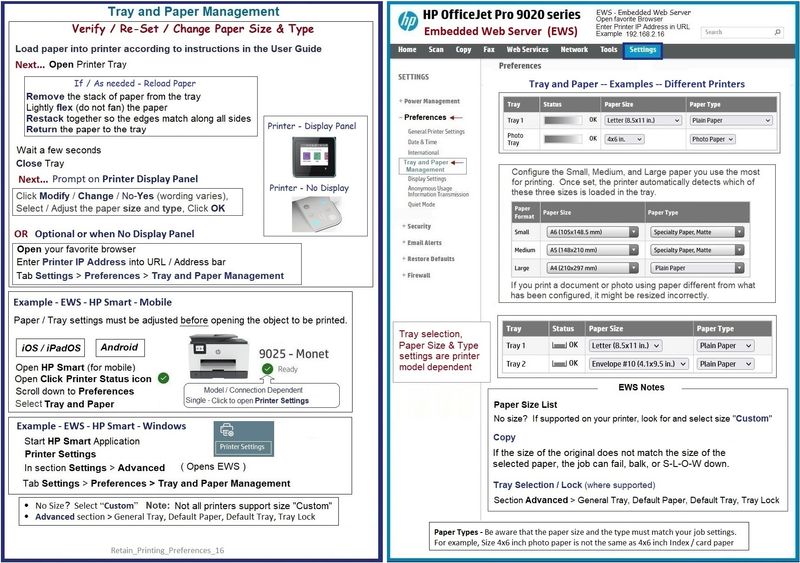
The paper size must be adjusted before the content is opened to be printed.

If, for example, you are trying to print on paper size Legal, that paper size must be selected before you open your PDF file.


Adjust the paper size on the printer control panel or using EWS (Embedded Web Server).


EWS is available from your browser and from within the HP Smart application > Settings > Advanced > Advanced Settings


Retain_Printing_Preferences_16Retain_Printing_Preferences_16


What else?

The files, if they originated (came from) outside of your control, might include security protection against copying or printing.


IF that is the reason the file(s) cannot be printed, you must obtain the document security password to unlock the file so it can be printed.

.

The password would be available from the originator of the data (who created / provided the file).


=+=+=+=+=+=+=+=+=+=+=+=+=+=+=+=+=+=+=+=+=+=+=+=+=+=+=+=+=+=+=+=+=+=+=+=+

HP Printer Home Page - References and Resources – Learn about your Printer  - Solve Problems

 “Things that are your printer”

When the website support page opens, Select (as available) a Category > Topic > Subtopic

NOTE:  Content depends on device type and Operating System

Categories:  Alerts, Access to the Print and Scan Doctor (Windows), Warranty Check, HP Drivers / Software / Firmware Updates, How-to Videos, Bulletins/Notices, Lots of How-to Documents, Troubleshooting, Manuals > User Guides, Product Information (Specifications), Supplies, and more

Open

HP OfficeJet Pro 8025e All-in-One Printer 


Thank you for participating in the HP Community.

Our Community is comprised of volunteers - people who own and use HP devices.

Click Helpful = Yes to say Thank You

Question / Concern Answered, Click "Accept as Solution"


Dragon-Fur

† The opinions expressed above are the personal opinions of the authors, not of HP. By using this site, you accept the <a href="https://www8.hp.com/us/en/terms-of-use.html" class="udrlinesmall">Terms of Use</a> and <a href="/t5/custom/page/page-id/hp.rulespage" class="udrlinesmall"> Rules of Participation</a>.