
-
×InformationNeed Windows 11 help?Check documents on compatibility, FAQs, upgrade information and available fixes.
Windows 11 Support Center. -
-
×InformationNeed Windows 11 help?Check documents on compatibility, FAQs, upgrade information and available fixes.
Windows 11 Support Center. -
- HP Community
- Printers
- Printing Errors or Lights & Stuck Print Jobs
- Re: Instant Ink interferes with troubleshooting wireless con...

Create an account on the HP Community to personalize your profile and ask a question
Your account also allows you to connect with HP support faster, access a personal dashboard to manage all of your devices in one place, view warranty information, case status and more.
Check some of the most frequent questions about Instant Ink: HP INSTANT INK, HP+ PLANS: INK AND TONER.
Check out our Black or Color Ink Not Printing, Other Print Quality Issues info about: Print quality and Cartridge Issues.

It has been a while since anyone has replied. Simply ask a new question if you would like to start the discussion again.

05-20-2022 01:17 PM - edited 05-20-2022 04:28 PM
 HP Recommended
Product: HP OfficeJet Pro 9015 All-in-One Printer
I'm trying to troubleshoot a wifi connectivity issue with my printer. The printer turns on, and it immediately displays the message 'Cartridge cannot be used until printer is enrolled in HP Instant Ink.' The next message is that it tries to print a test page, which it can't do, so the display either remains attempting to print an alignment page, or it reverts to the HP Instant Ink message. Failure! Failure! Failure!!!
The problem is, the printer cannot connect to my wifi, and I cannot get the menu display on the printer because of the error message, which won't resolve because the next problem is that it I'm not connected. I have tried disconnecting and reconnecting numerous times. I've tried rebooting the printer, the wifi, and the computer numerous times. I tried updating via USB cable, and so on. I have tried updating the drivers and the firmware. The virtual help desk is worse than useless because it presumes I can print a printer information page, which I can't due to the instant ink restriction.
My next try will be to replace the HP Instant Ink cartridges with ones that I buy off the shelf today. At which point I will cancel my subscription to Instant Ink.
My question is how do I cancel my subscription? This issue has shown that instant ink is great until it becomes a miserable failure in that it interferes with troubleshooting.
5 REPLIES 5


05-23-2022 09:17 AM
HP Recommended
Hi @BigGlenno,
Welcome to the HP Support Community
I'd like to help!
I understand you are unable to connect the printer to the instant ink server.
Follow the instructions to cancel the instant ink service.
Use your HP Instant Ink account to cancel your HP Instant Ink service.
Sign in to hpinstantink.com/signin.
Your HP Instant Ink account page opens.
In the Status area of your HP Instant Ink account page, a printer drop-down menu is available when there are multiple printers enrolled. Click the drop-down menu, and then select the printer you want to cancel.
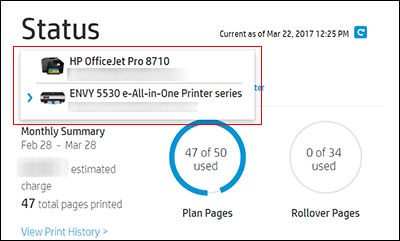
Check the Print History or the HP ePrint address of the printer to confirm you have selected the correct printer.
Click My Account, and then click Account Settings.
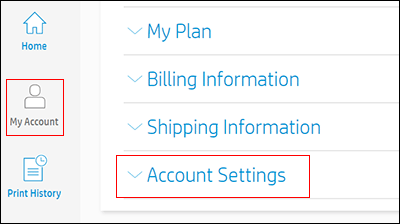
Click Cancel my HP Instant Ink Subscription.
You receive an email confirmation of the cancellation. The cancellation finalizes at the end of the current billing cycle when the final charge processes successfully.
You may also refer to -Cancel Your HP Instant Ink Service
Please send us a private message with your Instant Ink account details or you may also respond to the private message I've sent out and I'll help you out, accordingly. Check next to your profile name, you should see a little blue envelope, please click on it.
Hope this helps!
Keep me posted!
Please click “Accept as Solution” if you feel my post solved your issue, it will help others find the solution.
Click the “Yes" on the bottom right to say “Thanks” for helping!
Have a great day!
05-23-2022 01:55 PM
HP Recommended
I would like to say that this was a helpful solution. I already cancelled. What I should have asked is why the HP OfficeJet Pro 9015/Instant Ink combination causes such problems? I replaced the ink cartridges with off the shelf ones and then and only then was I able to access the printer's menu. With Instant Ink and no wifi connection, the menu did not display, and I then could not enter the wifi password to re-establish my connection. The 9015 display should be reconfigured so that the printer's menu can be accessed at any time, especially for re-entering passwords, and for other non-printing functions such as scanning, faxes and so on. I see a software or firmware problem here.
Without Instant Ink, I was able to easily fix the problem. With Instant Ink, the problem was impossible to solve. I already spent $106.00 on replacement cartridges, so why should I continue with Instant Ink?
05-29-2022 02:37 PM
HP Recommended
I understand you have been facing issues with instant ink cartridges and using regular cartridges resolved the issue.
Please share your instant ink details, so i look into your acount and check what exactly the issue was.
Please send us a private message with your Instant Ink account details or you may also respond to the private message I've sent out and I'll help you out, accordingly. Check next to your profile name, you should see a little blue envelope, please click on it.
Let me know.
06-07-2022 05:00 PM
HP Recommended
Sorry to bother you, but I responded per the instructions of your last communication and it got flagged as a duplicate. I'm concerned that a technical problem may have gotten lost in the e-mail exchange. If you can respond with something regarding my previous message, I would appreciate it.

Be alert for scammers posting fake support phone numbers and/or email addresses on the community.
If you think you have received a fake HP Support message, please report it to us by clicking on "Flag Post".
† The opinions expressed above are the personal opinions of the authors, not of HP. By using this site, you accept the Terms of Use and Rules of Participation.


Didn't find what you were looking for?
Ask the community
† The opinions expressed above are the personal opinions of the authors, not of HP. By using this site, you accept the <a href="https://www8.hp.com/us/en/terms-of-use.html" class="udrlinesmall">Terms of Use</a> and <a href="/t5/custom/page/page-id/hp.rulespage" class="udrlinesmall"> Rules of Participation</a>.