• ×
    Information
    Need Windows 11 help?
    Check documents on compatibility, FAQs, upgrade information and available fixes.
    Windows 11 Support Center.
  • post a message
  • ×
    Information
    Need Windows 11 help?
    Check documents on compatibility, FAQs, upgrade information and available fixes.
    Windows 11 Support Center.
  • post a message
Guidelines
Seize the moment! nominate yourself or a tech enthusiast you admire & join the HP Community Experts!
HP Recommended
HP Sprocket
iOS

It wasn't turning off before and wouldn't pair to my phone so I reset it. Now I can't turn it on! It's fully charged so it should turn on. Not sure what my next step is 

1 REPLY 1
HP Recommended

@mnc92,


Welcome to HP Forums,


I understand that the sprocket is not turning on.


I'll need a few more details to dissect your concern & provide an accurate solution: 


Is the sprocket fully charged?


If the printer does not turn on when you press the power button, reset the printer with a straight pin to clear any errors.

  1. Turn on the printer.

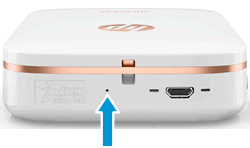
  2. Locate the reset button near the charging port.

    Figure : Locating the reset button

    Locating the reset button
  3. Gently insert the straight pin into the reset button access point, and then press the reset button for 3 seconds.

    The printer resets and turns off.

  4. Turn on the printer.

I sincerely hope this information helps. Please feel free to keep me posted.

Cheers! 🙂

Raj1788
I am an HP Employee 

† The opinions expressed above are the personal opinions of the authors, not of HP. By using this site, you accept the <a href="https://www8.hp.com/us/en/terms-of-use.html" class="udrlinesmall">Terms of Use</a> and <a href="/t5/custom/page/page-id/hp.rulespage" class="udrlinesmall"> Rules of Participation</a>.