• ×
    Information
    Need Windows 11 help?
    Check documents on compatibility, FAQs, upgrade information and available fixes.
    Windows 11 Support Center.
  • post a message
  • ×
    Information
    Need Windows 11 help?
    Check documents on compatibility, FAQs, upgrade information and available fixes.
    Windows 11 Support Center.
  • post a message
Guidelines
Seize the moment! nominate yourself or a tech enthusiast you admire & join the HP Community Experts!
HP Recommended
Sprocket 200 Printer

Hello! I’ve been trying to get my sprocket to connect to my phone for a while now. I have tried everything on your website that was recommended but it still hasn’t worked. 

1 REPLY 1
HP Recommended

@Leyajackson12


Welcome to HP support community.


Reset your mobile device and Sprocket

  1. Turn off your mobile device, and then turn it back on.

  2. Turn on the Sprocket.

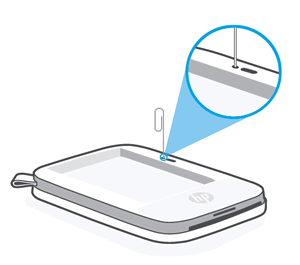
  3. Remove the Paper Cover, and then use a narrow object, such as a pen or paperclip, to press and hold the Reset button for 3 seconds until the Sprocket turns off.

    NOTE: 

    The location of the Reset button varies by Sprocket model. Typically, the button is located underneath the Paper Cover, but can also be found on the outside next to the charging port.

    Example of resetting the HP Sprocket Select Photo Printer

    Example of resetting the HP Sprocket Select Photo Printer

  4. Turn on the Sprocket.

You can refer this HP document for more assistance:- Click here


I hope that helps.

To thank me for my efforts to help you, please mark my post as an accepted solution so that it benefits several others.

Cheers.

Sandytechy20
I am an HP Employee

† The opinions expressed above are the personal opinions of the authors, not of HP. By using this site, you accept the <a href="https://www8.hp.com/us/en/terms-of-use.html" class="udrlinesmall">Terms of Use</a> and <a href="/t5/custom/page/page-id/hp.rulespage" class="udrlinesmall"> Rules of Participation</a>.