• ×
    Information
    Need Windows 11 help?
    Check documents on compatibility, FAQs, upgrade information and available fixes.
    Windows 11 Support Center.
  • post a message
  • ×
    Information
    Need Windows 11 help?
    Check documents on compatibility, FAQs, upgrade information and available fixes.
    Windows 11 Support Center.
  • post a message
Guidelines
Ready to level up? Join the Expert Program—
HP Recommended

I am trying to install my sprocket. The sprocket is connected to my Bluetooth, but the app is saying he cannot find the sprocket. 

1 REPLY 1
HP Recommended

Hi @rloch1979,


Welcome to the HP Support Community. 


I'd like to help!


Check your mobile device settings

Make sure your mobile device is near the printer. Bluetooth signals can weaken with distance.

On your mobile device, open the Bluetooth settings menu, and then make sure Bluetooth is enabled.

NOTE: 

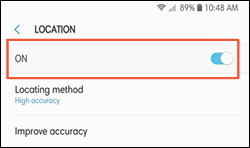
You can turn location permission on to connect and print, and then turn it off when you are not using the printer.

Location menu example on Android

On your mobile device, open the HP sprocket app.

Tap the Menu icon , tap sprocket, and then tap Manage Printers.

If your printer displays, the printer is connected.

If your printer does not display, tap Add New Printer, and then tap the name of your printer.

Upgrade the printer firmware

HP regularly releases firmware updates. Upgrading the printer firmware might resolve the issue.

If you are using the optional HP Sprocket Studio Power Bank, disconnect it, and then connect the power cord to your printer and a wall outlet.

Connecting the power cord to the printer

Turn on the printer, and then make sure your mobile device is connected to the Internet.

On your mobile device, open the HP sprocket app.

Tap the Menu icon , and then tap sprocket.

Tap Manage Printers, make sure your Sprocket is selected, and then tap Printer Settings.

In Printer Settings, look for a firmware upgrade.


Hope this helps! Keep me posted for further assistance.
Please click “Accepted Solution” if you feel my post solved your issue, it will help others find the solution. Click the “Kudos/Thumbs Up" on the bottom right to say “Thanks” for helping!

Nal_NR-Moderator
I am an HP Employee

† The opinions expressed above are the personal opinions of the authors, not of HP. By using this site, you accept the <a href="https://www8.hp.com/us/en/terms-of-use.html" class="udrlinesmall">Terms of Use</a> and <a href="/t5/custom/page/page-id/hp.rulespage" class="udrlinesmall"> Rules of Participation</a>.