• ×
    Information
    Need Windows 11 help?
    Check documents on compatibility, FAQs, upgrade information and available fixes.
    Windows 11 Support Center.
  • post a message
  • ×
    Information
    Need Windows 11 help?
    Check documents on compatibility, FAQs, upgrade information and available fixes.
    Windows 11 Support Center.
  • post a message
Guidelines
Seize the moment! nominate yourself or a tech enthusiast you admire & join the HP Community Experts!
HP Recommended

My sprocket is not charging and it continues flashing red and green light flashing and not turning on 

Please help

1 REPLY 1
HP Recommended

@Isnitishkumar,


Welcome to the HP Support Community!


I recommend you follow the steps to reset the Sprocket and check if it helps.


Here is how it is done.

  1. Turn on the printer.

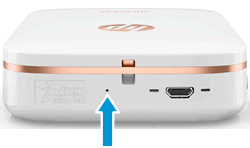
  2. Locate the Reset button near the charging port.

    Locating the reset button

  3. Gently insert the straight pin into the reset button access point, and then press the Reset button for 3 seconds.

    The printer resets and turns off.

  4. Turn on the printer.

Let me know how it goes and you have a great day!


If you wish to show appreciation for my efforts, mark my post as Accept as Solution. Your feedback counts!


Cheers!

The_Fossette
I am an HP Employee

† The opinions expressed above are the personal opinions of the authors, not of HP. By using this site, you accept the <a href="https://www8.hp.com/us/en/terms-of-use.html" class="udrlinesmall">Terms of Use</a> and <a href="/t5/custom/page/page-id/hp.rulespage" class="udrlinesmall"> Rules of Participation</a>.