
-
×InformationNeed Windows 11 help?Check documents on compatibility, FAQs, upgrade information and available fixes.
Windows 11 Support Center. -
-
×InformationNeed Windows 11 help?Check documents on compatibility, FAQs, upgrade information and available fixes.
Windows 11 Support Center. -
- HP Community
- Archived Topics
- Notebooks Archive
- Re: Windows7 Upgrade Guide for dv2000 models

Create an account on the HP Community to personalize your profile and ask a question
Your account also allows you to connect with HP support faster, access a personal dashboard to manage all of your devices in one place, view warranty information, case status and more.
 This topic has been archived. Information and links in this thread may no longer be available or relevant. If you have a question create a new topic by clicking here and select the appropriate board.

03-09-2010 12:06 PM
 HP Recommended
@jml31415
You have Nvidia 6150, the file and instructions for it are on the first page below the 195.62 DL
Modded drivers for nVidia GeForce GO 6150M, 7150M, 7200M cards (ver 186.81):
How to install them under Win7?
1. Download driver here (for Win7 32 bit) or here (for Win7 64 bit ) double click and select extract,
2. Download from this site with drivers also INF Modified and replace original INF in extracted folder,
3. Install & reboot.
**Click Accept as Solution on a Reply that solves your issue**
***Click the "YES" button if you think this response was helpful.***

03-14-2010 11:48 AM
HP Recommended
Hello,
I have a dv2415nr. I just upgraded to Win 7. I have these devices not working.
I got these full ids from my Anti-Virus/PC-Performance software.
Base system devices:
PCI \ VEN_1180&DEV_0843&SUBSYS_30B5103C&REV_01 \ 4&3A3249AB&0&4A80
PCI \ VEN_1180&DEV_0592&SUBSYS_30B5103C&REV_0A \ 4&3A3249AB&0&4B80
Thanks!
PS. Thanks for the chipset driver!
03-14-2010 12:36 PM
HP Recommended
@GoBlue_ece117
Hi,
You need to install driver for card reader. You may find it on first page in second post.
03-15-2010 02:20 AM
HP Recommended
Hi
I have DV2310CA
I cannot install Nvidia Geforce Go 6150
I tried all recommended way including 186.81 driver and modified driver
What I see is on NVidia wizard, it always ends up with something along this "Installer did not make any modification ... "
please help
also I did not see an option to output to a secondary display.
thank you
03-15-2010 09:06 PM
HP Recommended
@ndondo
Go to Control Panel and open Windows Update. Choose to see also Optional Updates.You should get Nvidia graphics.
**Click Accept as Solution on a Reply that solves your issue**
***Click the "YES" button if you think this response was helpful.***
03-18-2010 06:04 PM
HP Recommended
I've got a dv2000 which I upraded to Win7 using this thread as a guide. Generally, everything works on boot.
However, after I wake from sleep/hibernate, the audio and mic stops working. Using the Conexant Audio drivers from this driver page It's a pain because I need to reboot to use Skype.
Any solutions?
03-18-2010 08:08 PM - edited 03-18-2010 08:09 PM
HP Recommended
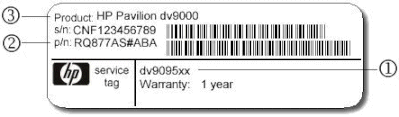
Please post your full model number in Section 1 of the Service Tag on bottom of laptop.
**Click Accept as Solution on a Reply that solves your issue**
***Click the "YES" button if you think this response was helpful.***
03-18-2010 09:22 PM
HP Recommended
CTO machine, with no way to check Specs.
If you have Intel processor, try this Conexant(after uninstalling current driver):
ftp://ftp.hp.com/pub/softpaq/sp39501-40000/sp39972.exe
If you have AMD processor,try this:
ftp://ftp.hp.com/pub/softpaq/sp39501-40000/sp39520.exe
**Click Accept as Solution on a Reply that solves your issue**
***Click the "YES" button if you think this response was helpful.***
This topic has been archived. Information and links in this thread may no longer be available or relevant. If you have a question create a new topic by clicking here and select the appropriate board.
† The opinions expressed above are the personal opinions of the authors, not of HP. By using this site, you accept the Terms of Use and Rules of Participation.


Didn't find what you were looking for?
Ask the community
† The opinions expressed above are the personal opinions of the authors, not of HP. By using this site, you accept the <a href="https://www8.hp.com/us/en/terms-of-use.html" class="udrlinesmall">Terms of Use</a> and <a href="/t5/custom/page/page-id/hp.rulespage" class="udrlinesmall"> Rules of Participation</a>.