
-
×InformationNeed Windows 11 help?Check documents on compatibility, FAQs, upgrade information and available fixes.
Windows 11 Support Center. -
-
×InformationNeed Windows 11 help?Check documents on compatibility, FAQs, upgrade information and available fixes.
Windows 11 Support Center. -
- HP Community
- Archived Topics
- Notebooks Archive
- probook 4530s bluetooth not working

Create an account on the HP Community to personalize your profile and ask a question
Your account also allows you to connect with HP support faster, access a personal dashboard to manage all of your devices in one place, view warranty information, case status and more.
 This topic has been archived. Information and links in this thread may no longer be available or relevant. If you have a question create a new topic by clicking here and select the appropriate board.

07-03-2012 05:56 AM
 HP Recommended
I bought a HP Probook 4530s. The sales clerk told me it has bluetooth device. The original OS installed on it was LINUX. But since I change the OS to Win 7 Ultimate, I had to install drivers from scratch. I got some driver installation files from the sales clerk and ran them. But now on the device manager, there is an exclamation mark on the bluetooth device and it has the error "Windows has stopped this device because it has reported problems. (Code 43)". What can I do to solve this?
Thanks
Solved! Go to Solution.
1 ACCEPTED SOLUTION
Accepted Solutions
05-11-2013 10:05 AM - edited 05-11-2013 10:53 AM
HP Recommended
On the startup press F10 key to run BIOS setup.
Go to System Configurations -> Built-in Device Options.
Check are there enabled two things. Wireless Button State and Embedded WLAN Device.
If not then enable them, save new settings, exit from BIOS and start the operating system.
Download and install HP Software Framework from here and restart system.
Download and install HP Connection Manager from here and restart system.
Check the color of the LED on the key of the wireless communication.
If it's:
- amber (like on the below picture) then all wireless devices are off. Press this key to change it into white.


- white ( like on below picture) then integrated wireless device, such as a wireless local area network (WLAN) device and/or a Bluetooth® device, is on. Status is ok so you may go to the next step.

Click the Start 
Type in the search filed ' hp connection ' and choose ' HP Connection Manager '.

Check the status of the Bluetooth module. If it's:
- ' Off ' then right-click the switch on button which is pointed by the arrow on the below picture.
When you will change the status to ' On ' then built-in Windows 7 driver will install and after that you will need to reinstall again Qualcomm Atheros Bluetooth driver from here.

- ' On ' then the Bluetooth module is working correctly and should be listed in the device manager.

- not listed in the HP Connection Manager application then your model has no integrated Bluetooth module and the Bluetooth driver should be uninstalled.
25 REPLIES 25
07-26-2012 12:16 PM
HP Recommended
Hi,
Go to:
Control Panel -> Device Manager
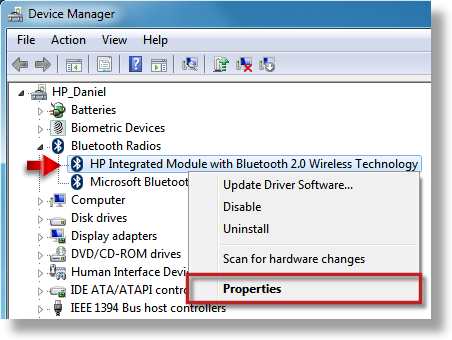
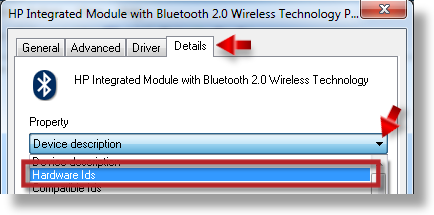
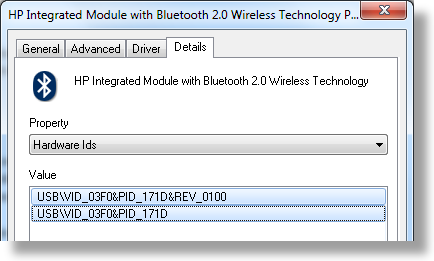
Right click each device with yellow exclamation mark ( ) and choose ' Properties '. Next select ' Details ' tab, use the dropdown selector to choose Hardware Ids and paste all the values from there to the next reply. This way I will be able to find out which driver you need.
Below you've got example how to do it:
10-31-2012 05:46 PM
HP Recommended
Hi,
Please download and install the Qualcomm Atheros Bluetooth 4.0+HS drver from here.
05-03-2013 11:15 AM
HP Recommended
Hi,
I have the same problem, with the same hardware:
generic bluetooth adapter
USB\VID_0CF3&PID_311D&REV_0001
USB\VID_0CF3&PID_311D
I have downloaded i installed the driver that you posted, but after that my bluetooth adapter still doesn't work, and disappeared completely from device manager...
I'm looking forward to your reply.
Thanks.
05-03-2013 12:29 PM
HP Recommended
Hello Ovtza,
I understand you are having issues with the Bluetooth on your computer.
Because you are using a commercial/business based computer, you will probably get better help from our commercial forum for Probooks. We have experts there who deal with primarily HP Probooks, the link below will direct you to the proper location.
Thanks
Clicking the White Kudos star on the left is a way to say Thanks!
Clicking the 'Accept as Solution' button is a way to let others know which steps helped solve the problem!
Clicking the 'Accept as Solution' button is a way to let others know which steps helped solve the problem!
05-03-2013 04:45 PM
HP Recommended
@ovtza
Hi,
Which notebook model you have? HP ProBook 4530s? Other?
Which operating system is installed on it?
05-11-2013
02:16 AM
- last edited on
02-23-2017
06:25 PM
by
 OscarFuentes
HP Recommended
Uninstall current driver for the bluetooth device.
Resource:
Uninstalling Software in Windows 7
Try to download and install this driver.
05-11-2013 08:23 AM
HP Recommended
Hi,
I uninstalled previous driver and installed the one that you pointed, but problem seems to be the same. There is no bluetooth device listed in device manager, and i can't open bluetooth suit in any way (i can see that BtTray.exe process is running in task manager, but it doesn't appear in tray and i can't find any other way to access it).
This topic has been archived. Information and links in this thread may no longer be available or relevant. If you have a question create a new topic by clicking here and select the appropriate board.
† The opinions expressed above are the personal opinions of the authors, not of HP. By using this site, you accept the Terms of Use and Rules of Participation.


Didn't find what you were looking for?
Ask the community
† The opinions expressed above are the personal opinions of the authors, not of HP. By using this site, you accept the <a href="https://www8.hp.com/us/en/terms-of-use.html" class="udrlinesmall">Terms of Use</a> and <a href="/t5/custom/page/page-id/hp.rulespage" class="udrlinesmall"> Rules of Participation</a>.