HP Support Forum
Reply
This HP Community is for Customer to Customer Product Support. First Time Here? Check Out Videos on How to Search, Register, Post and More.

Re: black ink not working (56180 Views)
Shell741
Honor Student
Posts: 4
Registered: 01-03-2011
Message 1 of 223 (56,225 Views)
Accepted Solution

HP 6500 Office jet E709a - Black printer cartridge HP 920 not working

[ Edited ]

My blck ink is not out, the panel shows that it's about 2/3 full. But it won't print anything black. I turned the printer off and back on, and I remmoved the ink cartridge and put it back in. I don't know what else to do.

Please use plain text.
Bob_Headrick
Associate Dean
Posts: 9,302
Registered: 11-17-2008
Message 2 of 223 (56,216 Views)

Re: blank ink not working

Please read this post then provide some details.  What printer model? Are the cartridges HP or refill/reman?  If HP check the date as shown here.  Is the cartridge years beyond its warranty date?  If refill/reman see here.

Bob Headrick, Microsoft MVP Windows Expert - Consumer.
<----   If my answer was helpful please click the "Kudos" star.
        If your problem is solved please click the "Accept as Solution" button ---->
Please use plain text.
Shell741
Honor Student
Posts: 4
Registered: 01-03-2011
Message 3 of 223 (56,194 Views)
0

Re: blank ink not working

The printer ink doesn't expire until 2012. The other colors work, we uninstalled and reinstalled the printer, and we bought a new black cartridge. It still doesn't work. I am lost. any suggestions? Printer model is HP 6500 Office jet E709a. Printer cratridges are HP 920.

Please use plain text.
Bob_Headrick
Associate Dean
Posts: 9,302
Registered: 11-17-2008
Message 4 of 223 (56,180 Views)

Re: black ink not working

[ Edited ]

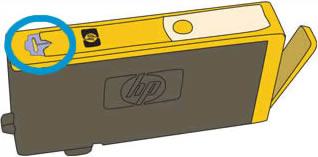
I would suggest the following:  first check the ink cartridge vents are properly cleared as shown in Solution 2 here.  After checking the vents run up to three cleaning cycles from the toolbox or printer front panel.


If the problem is still present then soaking the printhead as described below may resolve the issue.  Read the entire instructions and prepare the necessary materials before starting.  The entire process should be completed in less than 30 minutes as leaving the printhead and cartridges outside the printer for longer may cause issues.  Be gentle with the printhead assembly, it is fragile and can be damaged by dropping or scratching the printhead.


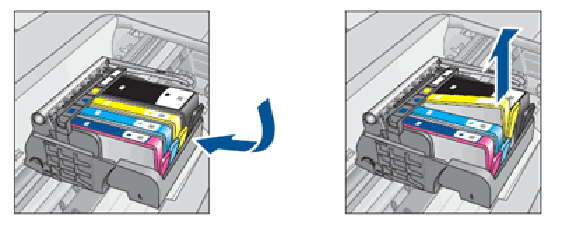
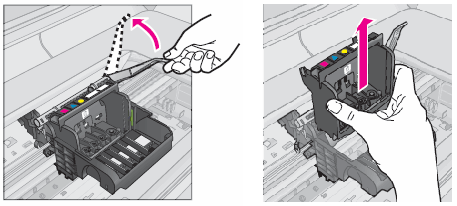
Get a pan and put a soft paper towel in the bottom.  Fill with 1.5" of very hot (not boiling) water.  If your water is "hard water" then distilled water would be best.   Remove all the ink cartridges, then remove the printhead assembly.  Instructions for removing the printhead can be found in Step 2, items 1-5 of this link. Gently put the printhead nozzles down in the water and let it soak for five minutes [not five hours, not overnight....].  Remove the printhead from the water and gently dry the electrical contacts.  Do not touch the nozzle area.  Put the printhead back in the printer and then reinstall the ink cartridges.  After reinstalling the printhead and the cartridges you may need to run up to three cleaning cycles from the front panel or toolbox to restore proper operation.


Note: the above applies to printers with individual ink cartridges and separate removable printheads.  Example printers include the following:


This printhead soak method DOES NOT apply to printers that have fixed, non-removable printheads such as the following:


Bob Headrick, Microsoft MVP Windows Expert - Consumer.
<----   If my answer was helpful please click the "Kudos" star.
        If your problem is solved please click the "Accept as Solution" button ---->
Please use plain text.
Shell741
Honor Student
Posts: 4
Registered: 01-03-2011
Message 5 of 223 (56,175 Views)

Re: black ink not working

We did as you suggested, and the printer says the printhead appears to be damaged. We did see a lot of black ink come off the printhead. A lot.  And there is still a glob of black on the printhead cartridge.

Please use plain text.
Bob_Headrick
Associate Dean
Posts: 9,302
Registered: 11-17-2008
Message 6 of 223 (56,174 Views)

Re: black ink not working

You can gently clean the gobs of ink with a moistened q-tip.  Do not contact the nozzle area.  Clean the contacts on the printhead and dry the assembly before reinstalling the printhead.

Bob Headrick, Microsoft MVP Windows Expert - Consumer.
<----   If my answer was helpful please click the "Kudos" star.
        If your problem is solved please click the "Accept as Solution" button ---->
Please use plain text.
Shell741
Honor Student
Posts: 4
Registered: 01-03-2011
Message 7 of 223 (56,172 Views)
0

Re: black ink not working

It worked, it worked!!!! Thank you sooo much!!!!!!!

Please use plain text.
alerta2011
Student
Posts: 1
Registered: 01-04-2011
Message 8 of 223 (56,129 Views)
0

Re: black ink not working

Hi,

we have the same problem here at UCSC (cartridges appear full, but do not print color on the paper), but a different model: HP color laserjet 2840. Can you suggest something about that problem? I guess what you suggested on the officejet 6500 does not apply to us since we have a laserjet?

Thank you,

D.B.

Please use plain text.
tracertimestar
Student
Posts: 1
Registered: 01-04-2011
Message 9 of 223 (56,036 Views)
0

Re: blank ink not working

I just tried the hot water and dried all the components and I STILL have NO way to print anything.  All text is invisible.


H-E-L-P! This has been a great printer up to now.


Seriously in need of printing ASAP.


T

Please use plain text.
Bob_Headrick
Associate Dean
Posts: 9,302
Registered: 11-17-2008
Message 10 of 223 (56,081 Views)
0

Re: black ink not working

[ Edited ]


alerta2011 wrote:

we have the same problem here at UCSC (cartridges appear full, but do not print color on the paper), but a different model: HP color laserjet 2840. Can you suggest something about that problem? I guess what you suggested on the officejet 6500 does not apply to us since we have a laserjet?.


That is correct, the suggestions here only apply to printers that use the 564 or 920 style cartridges.  For a laserjet issue I would suggest you post a new thread with an appropriate title such as "No Color Printing in Color Laserjet 2840".  Be sure to specify the operating system and drivers being used and details about the issue:  do colored areas print blank or do they print in grayscale?


Bob Headrick, Microsoft MVP Windows Expert - Consumer.
<----   If my answer was helpful please click the "Kudos" star.
        If your problem is solved please click the "Accept as Solution" button ---->
Please use plain text.


† The opinions expressed above are the personal opinions of the authors, not of HP. By using this site, you accept the Terms of Use and Rules of Participation