
-
×InformationNeed Windows 11 help?Check documents on compatibility, FAQs, upgrade information and available fixes.
Windows 11 Support Center. -
-
×InformationNeed Windows 11 help?Check documents on compatibility, FAQs, upgrade information and available fixes.
Windows 11 Support Center. -
- HP Community
- Poly Video Conferencing
- Collaboration & Conferencing Platforms
- Polycom RSS 4000 in System Recovery Mode

Create an account on the HP Community to personalize your profile and ask a question
Your account also allows you to connect with HP support faster, access a personal dashboard to manage all of your devices in one place, view warranty information, case status and more.

It has been a while since anyone has replied. Simply ask a new question if you would like to start the discussion again.

Not applicable
08-19-2015 12:01 PM
 HP Recommended
The Polycom RSS 4000 is in "System Recovery Mode." (I had to enter the Rescue Account password "SUPPORT" to get into System Recovery Mode on the web interface.)
Message once in System Recovery Mode:
Server Status: IDLE
======= System automatically Enter System Recovery Mode because of Error found! =======
Failed to mount /dev/sda1 to media path, please contact with admin!
From the Left Menu, I ran Hardware Diagnose.
Results from Hardware Diagnose
RAID 1 Check......................................failed
CPU Number Check..................................passed
Memory Size Check.................................passed
Getting the number of cards in the system.........
Left riser card count getting.....................no card found
Right riser card count getting....................1 card found
Getting the count of plx8618......................1 found
Card in system verfication........................
Left riser card number verification...............passed
Right riser card number verification..............passed
Meridian card number verification.................passed
Scaler card number verification...................passed
Right riser card verification.....................
Plx8624 root port verification....................passed
Plx8624 root config verification..................open file error
open plx device error
reg read failed
failed
hardware check done
Does RAID 1 Check failed mean that the hard drive in the RSS 4000 needs to be replaced?
I ran Check File System from the left. It found a few orphaned files. I rebooted the RSS after the file system check, and it still came back up in System Recovery Mode. I have not yet tried Reset Database, as I'd rather not lose those settings. Trying to keep the database would be a moot point if the hard drive is bad. I even tried Upload RSS Package at the left because I have the backup of a version 7_0 RSS software update package.
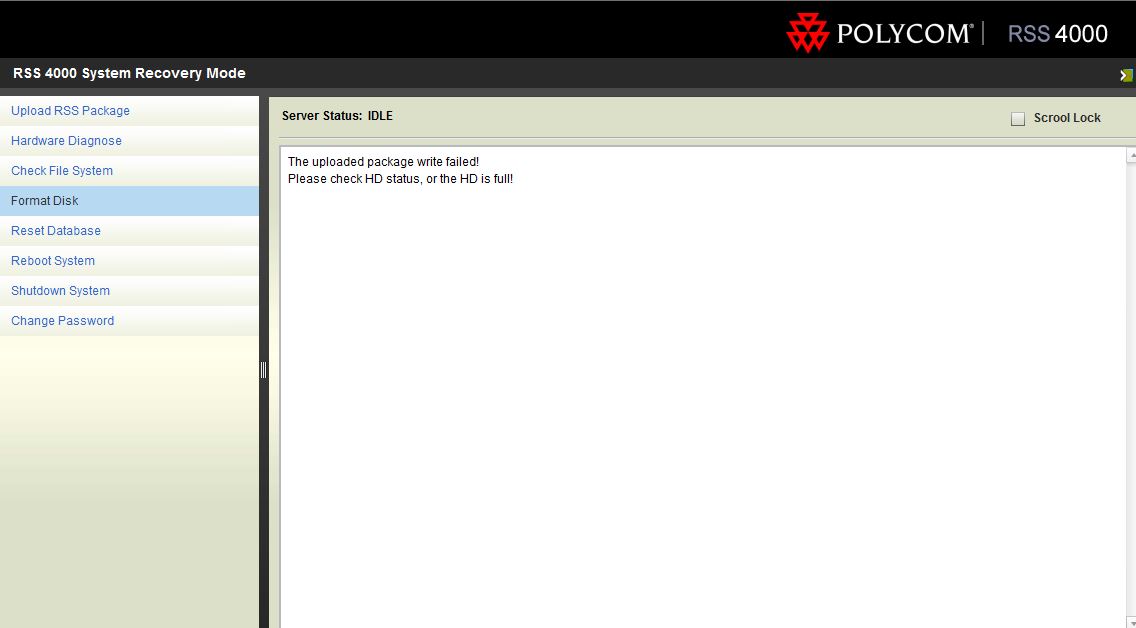
The results from the attempted Upload RSS Package are:
The uploaded package write failed. Please check HD status, or the HD is full!
Any help would be appreciated.
Thanks,
Becky Grindstaff
5 REPLIES 5

09-01-2015 09:45 AM
HP Recommended
The RAID 1 status message could mean that a drive has failed or it could just mean that the drives are out of sync. If they are out of sync the RAID BIOS should rebuild the array automatically. The message regarding not being able to mount /dev/sda1 could indicate that even though you ran the File System check, the file system still contains some corruption. Run the FIle System Check until it runs without error. If you get an error saying the file system can't be read then you will most likely need an RMA to replace the system.
Author
Not applicable
02-14-2017 05:10 AM
HP Recommended
I have the same problem.
In BIOS raid status is optimal. No error in File System Check, but RSS4000 still can't mount disk.
It is look like no file system is on raid massive. Can you help make right files system on this raid?
02-20-2017 06:38 AM
HP Recommended
You say that there was no error when you performed the file system check. Which file systems were checked? There should have been two; /dev/sda1 and /dev/sda2. What are you seeing that makes you think that a file system isn't being mounted?
MIke
Author
Not applicable
10-06-2017 01:20 AM
HP Recommended
Hi Mike
I am also facing same issue . RSS keep on restarting . Now it is loging in to recovery mode and getting error saying "======= System automatically Enter System Recovery Mode because of Error found! =======
Failed to mount /dev/sda2".
what we can do furthere.
Thanks and regards
Anoop C Vaslan
† The opinions expressed above are the personal opinions of the authors, not of HP. By using this site, you accept the Terms of Use and Rules of Participation.



Didn't find what you were looking for?
Ask the community
† The opinions expressed above are the personal opinions of the authors, not of HP. By using this site, you accept the <a href="https://www8.hp.com/us/en/terms-of-use.html" class="udrlinesmall">Terms of Use</a> and <a href="/t5/custom/page/page-id/hp.rulespage" class="udrlinesmall"> Rules of Participation</a>.