
-
×InformationNeed Windows 11 help?Check documents on compatibility, FAQs, upgrade information and available fixes.
Windows 11 Support Center. -
-
×InformationNeed Windows 11 help?Check documents on compatibility, FAQs, upgrade information and available fixes.
Windows 11 Support Center. -
- HP Community
- Poly Video Conferencing
- Accessories & Cameras
- Need P21 cable specs to get longer cable

Create an account on the HP Community to personalize your profile and ask a question
Your account also allows you to connect with HP support faster, access a personal dashboard to manage all of your devices in one place, view warranty information, case status and more.

It has been a while since anyone has replied. Simply ask a new question if you would like to start the discussion again.

07-09-2025 12:05 PM - edited 07-09-2025 12:55 PM
 HP Recommended
Operating System: Microsoft Windows 11
Recently bought new and have been successfully using the P21 (Poly Studio P21). Second monitor recently died and I am very happy with my choice and its functions (as a freelancer I've been under pressure to communicate via Zoom and the flattering light is a real boon). However, I need a longer cable to connect the P21, and am unable to find any cable that matches what little I can find on it.
The only information on the cable in any of the user manuals or any online information is that it is a USB 3.0 USB-C (P21 side) to USB-A (computer side) DIRECTIONAL cable. I had purchased an expensive longer cable, but it doesn't work because it is not DIRECTIONAL (the only word in the literature that describes the cable). I am unable to find any cables labeled "directional" (only find "bi-directional"), so there must be some other name for this? Please help.
P.S. The specs do say that it is USB-C 3.0 / 3.1/3.2 Gen 1. The cable I purchased that didn't work is Gen 1. I kept thinking maybe it required Gen 2, but no.
Thank you for your time.
--Vic
Solved! Go to Solution.
1 ACCEPTED SOLUTION
Accepted Solutions

07-14-2025 09:33 AM
HP Recommended
Thank you for the confirmation, @Victoria-nola.
I completely understand how disappointing this situation can be, especially when you're just trying to find the right specifications to make things work smoothly. I'm glad to hear you found a temporary workaround.
I'll definitely keep you informed if we receive any further details about the specific cable used with this product. I appreciate your patience.
I hope this helps! Keep me posted for further assistance. If you find the information provided useful or it solves your problems, help other users find the solution more easily by giving Kudos/Thumbs Up and marking my post as an Accepted Solution.
Regards,
Salman
I am an HP Employee.
Click Helpful = Yes to say Thank You.
Question / Concern Answered, Click "Accept as Solution"
Click Helpful = Yes to say Thank You.
Question / Concern Answered, Click "Accept as Solution"
6 REPLIES 6
07-09-2025 06:01 PM
HP Recommended
Hi @Victoria-nola, Welcome to the Poly HP Support Community.
Thanks for sharing your experience—glad to hear the Poly Studio P21 is working well for you, especially with its Zoom-friendly features!
Regarding the cable: you're correct that the P21 uses a directional USB-C to USB-A 3.0 cable, which can be tricky to replace. Most standard USB cables are bi-directional and may not support the specific data flow the P21 requires, even if the USB version matches.
If you want further support or you want to contact our support, HP Support can be reached by clicking on the following link.
https://support.hp.com/us-en/poly
I hope this helps! Keep me posted for further assistance. If you find the information provided useful or it solves your problems, help other users find the solution more easily by giving Kudos/Thumbs Up and marking my post as an Accepted Solution.
Regards,
Salman
I am an HP Employee.
Click Helpful = Yes to say Thank You.
Question / Concern Answered, Click "Accept as Solution"
Click Helpful = Yes to say Thank You.
Question / Concern Answered, Click "Accept as Solution"
07-09-2025 11:24 PM
HP Recommended
Thank you very much for your reply, and it lets me know that "I'm not crazy" for having this problem. Unfortunately, my serial number isn't being accepted by HP support. At this point I'm assuming that in buying a scratch-n-dent from B&HPhoto, the serial number is rendered caput (and btw they suggested this might be a proprietary cable since it can't be found). Or, maybe none of the P21s are registering properly. But, HP Support won't give me any options for support, not even a chat, without a valid serial number. I came to the community because I couldn't get through. Not sure what to do. I'm able to use the P21 with the 3' cable but it's stretched across my desk to do it-- not really workable as a permanent thing. Again thanks, and if you have any suggestions about how to reach support I'd be grateful.
--Vic
07-10-2025 09:45 AM - edited 07-10-2025 09:50 AM
HP Recommended
Thank you for your response. @Victoria-nola
Please follow the steps outlined below to contact support without a serial number. Begin by navigating to the Contact Us using the link provided, and then proceed with the following steps.
https://support.hp.com/us-en/poly
1. Please navigate to the section that says, "If you can’t enter your serial number, click here to select your product type" and click on the provided link.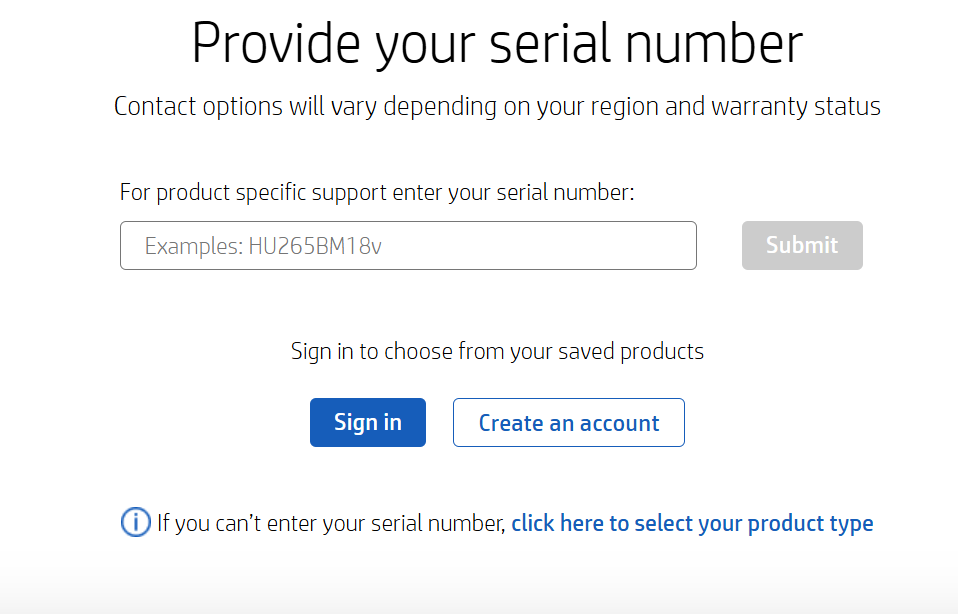
2. On the next page, select the appropriate product type, product category or series, and product name from the available options.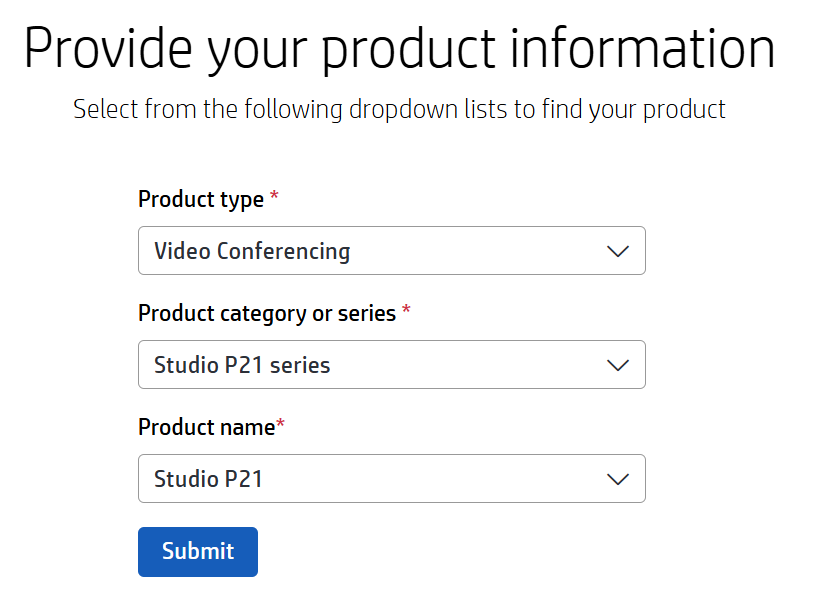
I hope this helps! Keep me posted for further assistance. If you find the information provided useful or it solves your problems, help other users find the solution more easily by giving Kudos/Thumbs Up and marking my post as an Accepted Solution.
Regards,
Salman
I am an HP Employee.
Click Helpful = Yes to say Thank You.
Question / Concern Answered, Click "Accept as Solution"
Click Helpful = Yes to say Thank You.
Question / Concern Answered, Click "Accept as Solution"
07-11-2025 07:29 PM - edited 07-12-2025 04:08 PM
HP Recommended
Thank you for your help. I was able to get through to HP Support using your directions. After a couple of days and several tries, I finally received back an email that there is no alternative cable available. The thing is, I didn't expect HP to have a cable on sale. I wanted the specs so I would know what to buy that would work. So, I am feeling frustrated.
LATER: I moved the cable to a USB slot on the front of the computer tower and moved my thumb drive (running backup location for work in progress) to the back of the tower. That gave me enough slack I could move the cable back behind my primary monitor, so that is at least an improvement. I don't like not being able to visually confirm that my thumb drive is writing the files I send over, but at least the monitor cable is not running over my workspace anymore.
I appreciate your help and if any information should come to light about what cable is actually used on this, that would be great. I knew going in that I was taking a chance on this product given the history, but didn't realize I'd have a cable issue. Ok, thanks again.
07-14-2025 09:33 AM
HP Recommended
Thank you for the confirmation, @Victoria-nola.
I completely understand how disappointing this situation can be, especially when you're just trying to find the right specifications to make things work smoothly. I'm glad to hear you found a temporary workaround.
I'll definitely keep you informed if we receive any further details about the specific cable used with this product. I appreciate your patience.
I hope this helps! Keep me posted for further assistance. If you find the information provided useful or it solves your problems, help other users find the solution more easily by giving Kudos/Thumbs Up and marking my post as an Accepted Solution.
Regards,
Salman
I am an HP Employee.
Click Helpful = Yes to say Thank You.
Question / Concern Answered, Click "Accept as Solution"
Click Helpful = Yes to say Thank You.
Question / Concern Answered, Click "Accept as Solution"
07-14-2025 03:27 PM
HP Recommended
You've been very helpful and I appreciate it. I would be very interested if any information becomes available. Thank you so much for your help. It's meant I kept trying things instead of giving up. All best wishes. --Vic
† The opinions expressed above are the personal opinions of the authors, not of HP. By using this site, you accept the Terms of Use and Rules of Participation.


Didn't find what you were looking for?
Ask the community
† The opinions expressed above are the personal opinions of the authors, not of HP. By using this site, you accept the <a href="https://www8.hp.com/us/en/terms-of-use.html" class="udrlinesmall">Terms of Use</a> and <a href="/t5/custom/page/page-id/hp.rulespage" class="udrlinesmall"> Rules of Participation</a>.