• ×
    Information
    Need Windows 11 help?
    Check documents on compatibility, FAQs, upgrade information and available fixes.
    Windows 11 Support Center.
  • post a message
  • ×
    Information
    Need Windows 11 help?
    Check documents on compatibility, FAQs, upgrade information and available fixes.
    Windows 11 Support Center.
  • post a message
Guidelines
Join the HP Community Solve‑a‑thon | Help Others & Share Your Solutions | Live on Zoom | 2:30 PM to 2:30 AM IST | Every Wednesday Click here to know more
HP Recommended

Can I adjust ANC level on this V80 headset? ANC works great when I have calls, but when I need moment for work that requires silence, I would prefer the more powerful ANC.


Would it be possible to have functionality on software that mutes everything around me?

3 REPLIES 3
HP Recommended

Hello @HannuLeskinen, Welcome to the HP Poly Support Community. 


Thanks for reaching out about your query regarding the Poly Voyager Surround 80.


We're thrilled to have the opportunity to assist you and provide a solution. We hope our assistance has been helpful! 


To help us get started on resolving your issue, could you please try a few troubleshooting steps provided below so that I can assist you further?


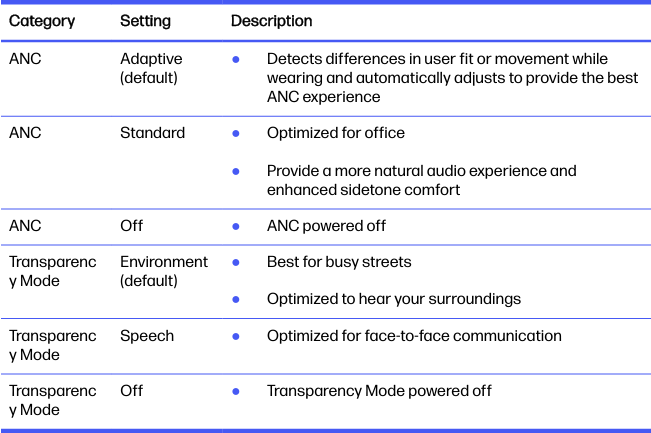
ANC and Transparency Mode 


Active Noise Canceling (ANC) reduces external noise and enhances your music and sound quality. Transparency Mode allows you to hear your surroundings while wearing your headset.


1. Tap the Custom button with two fingers for 2 seconds to toggle between modes.


NOTE: Your headset's Custom button is located in the center of the right earcup.


2. Tap the Custom button with two fingers for 2 seconds to toggle between modes. NOTE: Your headset's Custom button is located in the center of the right earcup. Swipe up/down on the right earcup to adjust Transparency Mode level when active.


ANC and Transparency Mode settings 


Choose your preferred settings for ANC and Transparency Mode in HP Poly Studio.


Take care and have an amazing day! 

I'm an HP Employee.


If this reply helped resolve your issue, please select the Accept as Solution as it helps others in the community quickly find the answer they’re looking for.


And if you found this reply helpful, clicking Yes below is a great way to let us know we’re providing the support you need, as it encourages us to keep improving and sharing helpful guidance.

HP Recommended

Thanks, but this is not the solution I am looking for. What I want to do is to adjust ANC mode, so that I would not hear anything from surrounding environmet. Seems that it is impossible. 


HP Recommended

Thank you for your response @HannuLeskinen 

We totally understand the importance of the custom feature of the ANC, however as of now we have only these basic features mentioned above for the headset. 
However, if you have any other issues please let us know we will be happy to help you. 


Have a great day ahead!

Regards,
Meghana 

I'm an HP Employee.


If this reply helped resolve your issue, please select the Accept as Solution as it helps others in the community quickly find the answer they’re looking for.


And if you found this reply helpful, clicking Yes below is a great way to let us know we’re providing the support you need, as it encourages us to keep improving and sharing helpful guidance.

† The opinions expressed above are the personal opinions of the authors, not of HP. By using this site, you accept the <a href="https://www8.hp.com/us/en/terms-of-use.html" class="udrlinesmall">Terms of Use</a> and <a href="/t5/custom/page/page-id/hp.rulespage" class="udrlinesmall"> Rules of Participation</a>.