• ×
    Information
    Need Windows 11 help?
    Check documents on compatibility, FAQs, upgrade information and available fixes.
    Windows 11 Support Center.
  • post a message
  • ×
    Information
    Need Windows 11 help?
    Check documents on compatibility, FAQs, upgrade information and available fixes.
    Windows 11 Support Center.
  • post a message
Guidelines
Checkout the HP Cool Control for HP Spectre Notebooks Click here for tips and tricks to keep your device cool.
HP Recommended
HP ZBook 15 G5
Microsoft Windows 10 (64-bit)

Zbook 15 G5 - Second usb-c port (right side)  is disabled when connecting the docking station


Reproduction:


1 - While the docking station is connected:

      a connect any usb-c device (ssd disk, phone...)

       b device is not detected.

2 - Disconnect the docking station

      a- DIsconnect and connect the usb-c device

      b- In device manager uninstall usb-drivers (remove all attached usb devices previously)

      c - Connect the usb-c device

      d- The device is detected.

       e- Connect the rest of the USB devices with the exception of the docking station.

       f - The usb-c device remains detected.

3- Connect the docking station

       a - The usb-c device is disconnected.


The docking station usb-c port works fine.


Will appreciate any suggestions.

Thanks

4 REPLIES 4
HP Recommended

I tried to replicate your situation without success. i connected a usb-c to ethernet adapter to the 2nd usb-c port while a zbook 15 g5 is connected to a HP Thunderbolt dock with display, kbd, mouse, etc. attached, and the ehternet adapter worked immediately


before going any further, i would run HP Image Assistant and update BIOS and drivers and test again


also, what version of Windows 10 are you running?

I work for HP. However, all opinions and comments are my own.
HP Recommended

Product Number: 3AX12AV

System BIOS: Q70 Ver. 01.10.00 - 01/03/2020

OS: Windows 10 Pro Version 1909 Build 18363.815


The BIOS detects the device (it is shown as a boot option), but it is not detected under Windows.

Tested with both a Sandisk SSD storage device as well as a Galaxy 10 phone.


The above steps are 100% reproducible (not sporadic).

It seems it is related with thunderbolt security, but I cannot figure why.

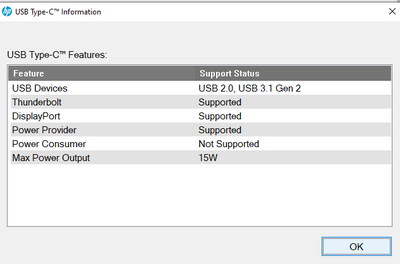
The following is the [FN+Esc] usb-c output:


drwainer_0-1588662902333.png

Daniel


HP Recommended

The settings you are looking for are the Thunderbolt Security Level in the BIOS, i believe it is located in the Port Options menu selection


I work for HP. However, all opinions and comments are my own.
HP Recommended

Yes, I know, the question is what are the correct settings?


† The opinions expressed above are the personal opinions of the authors, not of HP. By using this site, you accept the <a href="https://www8.hp.com/us/en/terms-of-use.html" class="udrlinesmall">Terms of Use</a> and <a href="/t5/custom/page/page-id/hp.rulespage" class="udrlinesmall"> Rules of Participation</a>.