• ×
    Information
    Need Windows 11 help?
    Check documents on compatibility, FAQs, upgrade information and available fixes.
    Windows 11 Support Center.
  • post a message
  • ×
    Information
    Need Windows 11 help?
    Check documents on compatibility, FAQs, upgrade information and available fixes.
    Windows 11 Support Center.
  • post a message
Guidelines
Join the HP Community Solve‑a‑thon | Help Others & Share Your Solutions | Live on Zoom | 2:30 PM to 2:30 AM IST | Every Wednesday Click here to know more
Get help with Large Format Printers, with direct access to all Large Format Knowledge Center· Ask anything · Find anything · Share anything at HP LKC
HP Recommended
Designjet t520

Hi Forum

I have the dreaded T520 blue screen. (why would HP introduce a blues screen, they should have learned from microsoft lol)


any way, does any one have a lsiting for these errors?

Surely HP did not introduce these errors with out any documentation?


are these error code random? or is there an order to these codes?


thanks


1 ACCEPTED SOLUTION

Accepted Solutions
HP Recommended


Hello

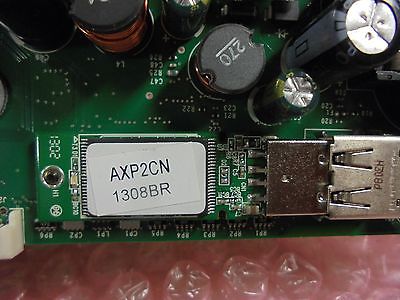
All blue screen errors are  beacuse Designjet Encrypted Chip failed .

You need to replace it 

It is located on the mainboard 

It is very easy usb  slot 

$_1.JPG


You can find it on ebay 

http://www.ebay.co.uk/itm/HP-Designjet-T520-Blue-Screen-Error-Solution-Encrypted-chip-/282319068692

View solution in original post

2 REPLIES 2
HP Recommended


Hello

All blue screen errors are  beacuse Designjet Encrypted Chip failed .

You need to replace it 

It is located on the mainboard 

It is very easy usb  slot 

$_1.JPG


You can find it on ebay 

http://www.ebay.co.uk/itm/HP-Designjet-T520-Blue-Screen-Error-Solution-Encrypted-chip-/282319068692

HP Recommended

Hi,


Isolate the printer, remove ink cartridge, printhead and paper

Try another power cable and power outlet


If the issue persist use the CQ890-67105 USB New Module with F/W SV


Make sure that


1- USB installed incorrectly

2- Main PCA is broken when removing the screw of the USB PCA


If you continue with the problem, replace the Main PCA


Best regards

Mike G

I'm an HP Inc employee. But my response is not in behalf of HP Inc
† The opinions expressed above are the personal opinions of the authors, not of HP. By using this site, you accept the <a href="https://www8.hp.com/us/en/terms-of-use.html" class="udrlinesmall">Terms of Use</a> and <a href="/t5/custom/page/page-id/hp.rulespage" class="udrlinesmall"> Rules of Participation</a>.