-
×InformationNeed Windows 11 help?Check documents on compatibility, FAQs, upgrade information and available fixes.
Windows 11 Support Center. -

-
×InformationNeed Windows 11 help?Check documents on compatibility, FAQs, upgrade information and available fixes.
Windows 11 Support Center. -
- HP Community
- Desktops
- Desktop Boot and Lockup
- Hard Drive failure?

Create an account on the HP Community to personalize your profile and ask a question
04-07-2020 02:56 PM
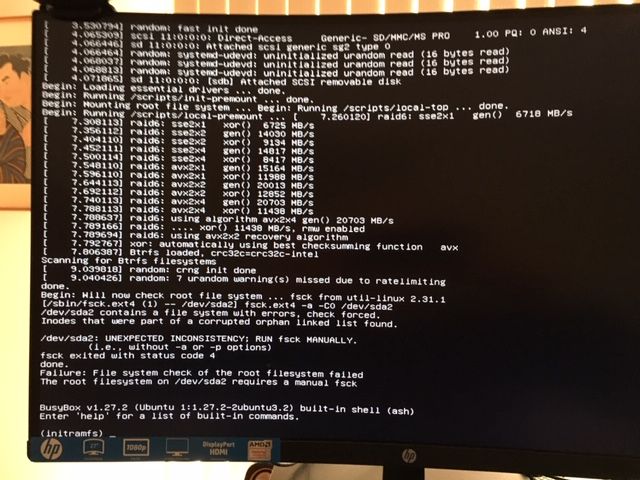
I cannot boot neither from a DVD as a Live system nor from a bootable USB. The Linux recovery boot give the indication of a Hard Drive failure:
Therefore, I ran the HP PC Diagnostics HD check which showed a failure:
Do you think that the hard drive needs replacing?
If yes, I would appreciate information what unit I should buy and instructions on how to install it.
04-12-2020 01:27 AM
Hi @Clawinus
Welcome to the HP Support Community.
The Failure ID is related to the Hard Drive. You need a 1 TB SATA Hard Drive. Part# 848195-800
You may order the replacement parts on the HP Parts Store, use the HP Parts Surfer to find the part number and If you've already looked for it and couldn't find it on the HP Parts Store, you may want to get it locally at the online store such as Amazon or eBay, etc...as the part numbers are universal.
Alternatively, you may also Contact HP in your region regarding the Hard Drive replacement.
If you are having trouble navigating through the above options, it's most likely because the device is out of warranty. If yes? please send me a private message with the region you are contacting us from. Check next to your profile Name, you should see a little blue envelope, please click on it.
Have a great day!
Please click “Accept as Solution” if you feel my post solved your issue, it will help others find the solution.
Click the “Kudos, Thumbs Up" on the bottom right to say “Thanks” for helping!
Asmita
I am an HP Employee