-
×InformationNeed Windows 11 help?Check documents on compatibility, FAQs, upgrade information and available fixes.
Windows 11 Support Center. -

-
×InformationNeed Windows 11 help?Check documents on compatibility, FAQs, upgrade information and available fixes.
Windows 11 Support Center. -
- HP Community
- Desktops
- Desktop Hardware and Upgrade Questions
- Adding hard drive to DF0003w

Create an account on the HP Community to personalize your profile and ask a question
02-17-2021 12:38 PM - edited 02-17-2021 05:09 PM
I need a link to the proper SATA /Power cable to the hard drive on a DF0003w AIO unit....and it would be great to have a diagram for the unit!!!
02-21-2021 08:54 AM - edited 02-21-2021 12:54 PM
Hi@WGJBNH-1, Welcome to the HP Support Community!
I understand you want to upgrade the HDD for your notebook.
https://support.hp.com/in-en/document/c06614076
Keep me posted. Happy to help!
Please click “Accept as Solution” if you feel my post solved your issue, it will help others find the solution.
Click the “Kudos, Thumbs Up" on the bottom right to say “Thanks” for helping!
Have a great day!
.,,,
02-21-2021 12:20 PM
I'm sorry, your very wrong. Not only is the a space for a hard Drive, there are connectors for one near it. Also, before I bought it, I found an ad for it that stated you could add a hard drive to it....The HP you link to cannot be the same model....DF0003w
02-21-2021 12:59 PM
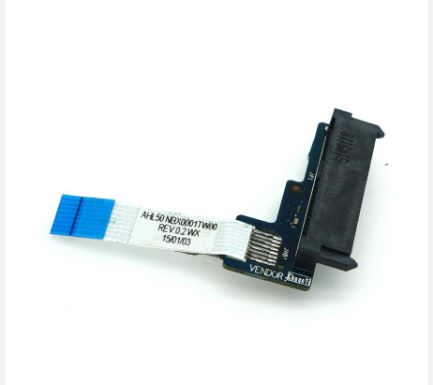
I understand that is the SATA Hard Drive Cable HDD Connector Board for HPhat you are referring to
You may order the replacement parts on the HP Parts Store, use the HP Parts Surfer to find the part number and If you've already looked for it and couldn't find it on the HP Parts Store, you may want to get it locally at the online store such as Amazon or eBay, etc...as the part numbers are universal.
02-22-2021 08:20 AM
As this is a hardware issue, I'd suggest you Contact HP in your region regarding the service options for your computer.
If you are having trouble navigating through the above options, it's most likely because the device is out of warranty. If yes? please send me a private message with the region you are contacting us from. Check next to your profile Name, you should see a little blue envelope, please click on it.
Have a great day!
Please click “Accept as Solution” if you feel my post solved your issue, it will help others find the solution.
Click the “Kudos, Thumbs Up" on the bottom right to say “Thanks” for helping!