• ×
    Information
    Need Windows 11 help?
    Check documents on compatibility, FAQs, upgrade information and available fixes.
    Windows 11 Support Center.
  • post a message
  • ×
    Information
    Need Windows 11 help?
    Check documents on compatibility, FAQs, upgrade information and available fixes.
    Windows 11 Support Center.
  • post a message
Guidelines
Join the HP Community Solve‑a‑thon | Help Others & Share Your Solutions | Live on Zoom | 2:30 PM to 2:30 AM IST | Every Wednesday Click here to know more
HP Recommended
24-df0044ur
Microsoft Windows 10 (64-bit)

MB SSID: 87A4

BIOS: F.10

Any connected sata disk is not displayed in the system (not in BIOS, not in Windows). Does anyone know why it happens? Or sata support at bios is absent?

2 REPLIES 2
HP Recommended

you posted lacking any clue what is plugged in, and how.

tell what sata disks this is, maker and model,  ( I guess you mean it is  M.2 SSD card, not a drive nor is it SATA port )

is it USB connected or direct, is it 2.5" spinning HDD?  real, or something else ( I have here vast things like that can talk them all out)

first is the PC 24-df0044ur, and AIO fake desktop and limits there In.

 it has two,  m.2 ports

  • One M.2 socket 1, 2230 type for WLAN and Bluetooth
  • One M.2 socket 3, 2280 type for SSD (PCIe x2 or SATA x1)

it has 4 USB ports using those?

IT HAS NO SATA ports at all, just 1 M.2 (drive port, only) '

so I can ONLY GUESS is you plugged in a M.2, SSD or HDD into the WLAN SLOT and it fails well sure it does. by design.


NO warranty answers by me.
HP Recommended

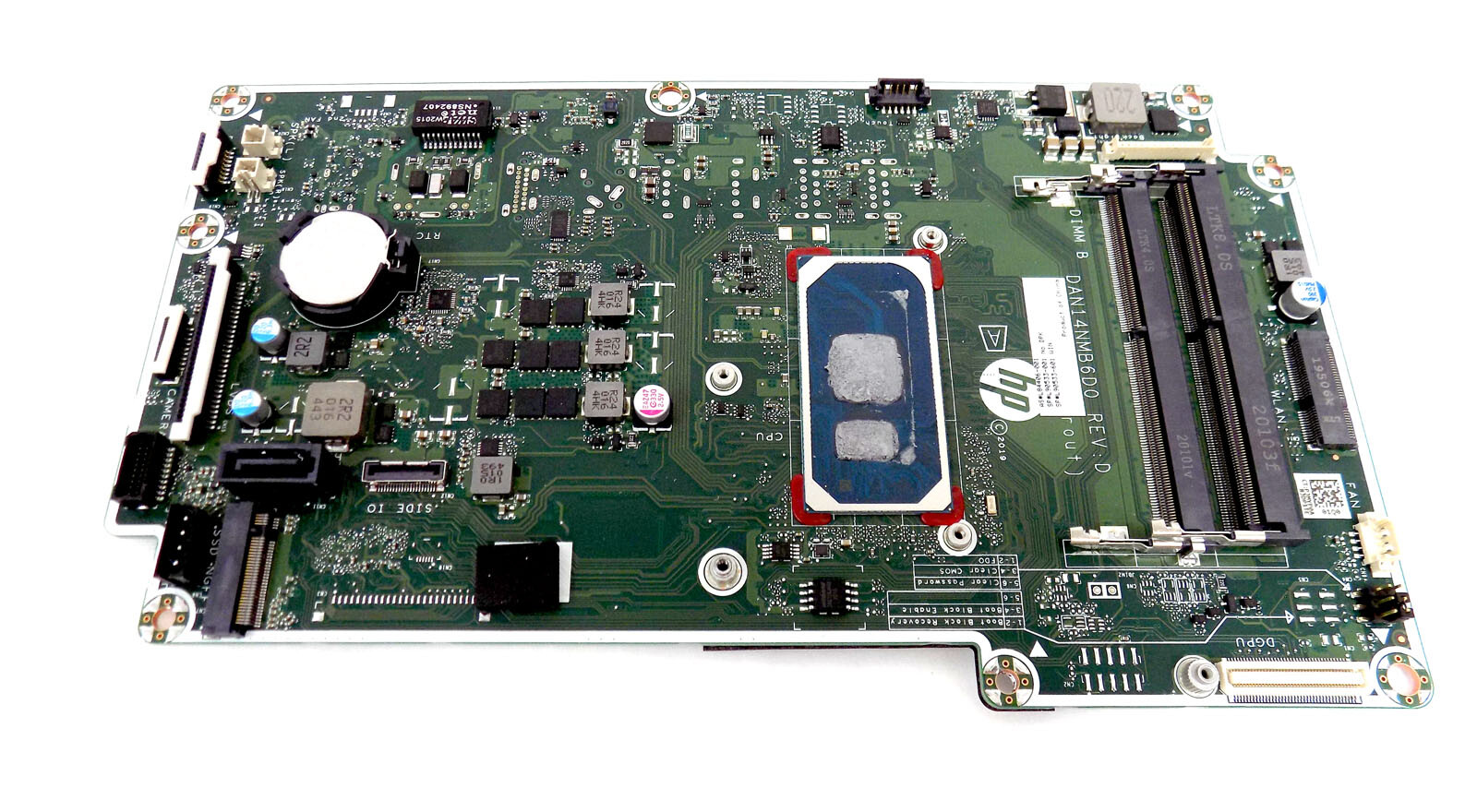
I perfectly understand what I'm talking about. you can look at the photo of the motherboard here and make sure that there is a SATA connector: I did not connect disks via the usb connector, but connected them directly to the sata connector! It HAS SATA port!

† The opinions expressed above are the personal opinions of the authors, not of HP. By using this site, you accept the <a href="https://www8.hp.com/us/en/terms-of-use.html" class="udrlinesmall">Terms of Use</a> and <a href="/t5/custom/page/page-id/hp.rulespage" class="udrlinesmall"> Rules of Participation</a>.