• ×
    Information
    Need Windows 11 help?
    Check documents on compatibility, FAQs, upgrade information and available fixes.
    Windows 11 Support Center.
  • post a message
  • ×
    Information
    Need Windows 11 help?
    Check documents on compatibility, FAQs, upgrade information and available fixes.
    Windows 11 Support Center.
  • post a message
Guidelines
Join the HP Community Solve‑a‑thon | Help Others & Share Your Solutions | Live on Zoom | 2:30 PM to 2:30 AM IST | Every Wednesday Click here to know more
HP Recommended
KG-1450 Keyboard
Microsoft Windows 10 (32-bit)

I've had my HP Pavilion all in one computer for a little over a week and have had to change the batteries in the wireless keyboard three times now along with spending countless hours trying to figure out what is going on (whether it's a sync problem and so on).  Turns out each time I buy new batteries and replace them in keyboard works.  What is going on here?  This can't be cost effective.  Please someone help and do not just show a video.  Thank you.


TG

1 REPLY 1
HP Recommended

Hi @TheGooch


Welcome to the HP Forums!


This is a wonderful place to converse with the community, get assistance and find tips.


I reviewed your post and understand that the keyboard batteries are getting drained quickly.


I’d love to help!


Use the following tips to get more life out of your keyboard and mouse batteries:

  • Move the keyboard and mouse closer to the receiver when it is not in use.

  • Use alkaline batteries when replacing the batteries. Rechargeable batteries, or other types, might not last as long.

  • Do not use the mouse on a glass surface.

  • Do not use the mouse over a dark surface. Instead, use the mouse over a lighter colored opaque surface.

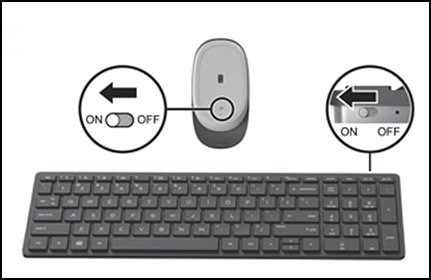
  • Make sure the mouse or keyboard switch is set to Off when the computer is not used for extended periods of time (30 minutes or longer), if the mouse has an On/Off switch.

    Figure : Examples of On/Off switches

    On/off switch on wireless mouse and keyboard


Let me know how it goes and you have a great day!


To simply say thanks, please click the "Thumbs Up" button to give me a Kudos to appreciate my efforts to help. If this helps, please mark this as “Accepted Solution” as it will help several others with the same issue to get it resolved without hassles. Take care now and have a splendid week ahead.


Good day! Take care 🙂


Cheers!

The_Fossette
I am an HP Employee

† The opinions expressed above are the personal opinions of the authors, not of HP. By using this site, you accept the <a href="https://www8.hp.com/us/en/terms-of-use.html" class="udrlinesmall">Terms of Use</a> and <a href="/t5/custom/page/page-id/hp.rulespage" class="udrlinesmall"> Rules of Participation</a>.