• ×
    Information
    Need Windows 11 help?
    Check documents on compatibility, FAQs, upgrade information and available fixes.
    Windows 11 Support Center.
  • post a message
  • ×
    Information
    Need Windows 11 help?
    Check documents on compatibility, FAQs, upgrade information and available fixes.
    Windows 11 Support Center.
  • post a message
Guidelines
Join the HP Community Solve‑a‑thon | Help Others & Share Your Solutions | Live on Zoom | 2:30 PM to 2:30 AM IST | Every Wednesday Click here to know more
HP Recommended
HP Pavilion 590-p0024
Microsoft Windows 10 (64-bit)

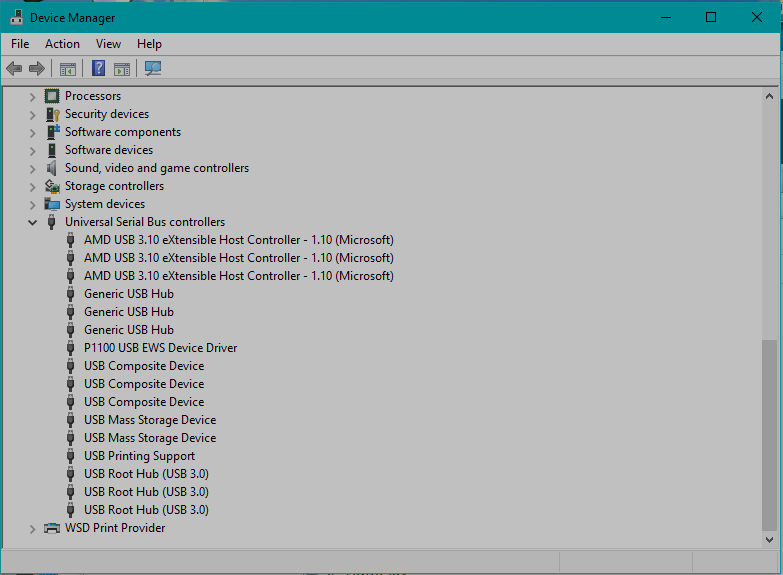
I purchased this computer and hooked up 4 Seagate drives to each of the 4 usb 3.1 ports on the back of the unit. The system recognized the drives but then constantly disconnects and connects. I contacted HP support and Seagate and they had me do the same thing, uninstall and have the OS reinstall, but nothing works. I do have a Samsung Bluray player/burner connected and it is fine. I had all 4 Seagate drives hooked up to a 2.0 USB hub that was connected to an HP laptop and the drives worked fine. I need help before my warranty runs out.device manager-usb.png

Thank you for your attention in this matter.

3 REPLIES 3
HP Recommended

@doveman63

Thank you for posting on HP Support Community.


Don't worry as I'll be glad to help, I have a few troubleshooting steps we could try to fix the issue:  

  1. Press Windows and X key together and select Device Manager.

  2. Locate the External Hard drive and right click on the driver and click on Properties.

  3. Navigate to Power Management tab and uncheck the option that says “Allow this computer to turn off this device to save power”.

  4. Click on OK.

Hope this helps! Keep me posted for further assistance.
Please click “
Accept as Solution” if you feel my post solved your issue, it will help others find the solution.

ECHO_LAKE
I am an HP Employee

HP Recommended

The solution suggested did not work. I am going to have the CPU sent to HP for service.

HP Recommended

@doveman63

Thank you for posting back.


Once you get the computer back from service center please feel free to contact us here anytime you need any further assistance.

ECHO_LAKE
I am an HP Employee

† The opinions expressed above are the personal opinions of the authors, not of HP. By using this site, you accept the <a href="https://www8.hp.com/us/en/terms-of-use.html" class="udrlinesmall">Terms of Use</a> and <a href="/t5/custom/page/page-id/hp.rulespage" class="udrlinesmall"> Rules of Participation</a>.