
-
×InformationNeed Windows 11 help?Check documents on compatibility, FAQs, upgrade information and available fixes.
Windows 11 Support Center. -
-
×InformationNeed Windows 11 help?Check documents on compatibility, FAQs, upgrade information and available fixes.
Windows 11 Support Center. -
- HP Community
- Desktops
- Desktop Hardware and Upgrade Questions
- Re: upgrade videocard

Create an account on the HP Community to personalize your profile and ask a question
Your account also allows you to connect with HP support faster, access a personal dashboard to manage all of your devices in one place, view warranty information, case status and more.

It has been a while since anyone has replied. Simply ask a new question if you would like to start the discussion again.

02-08-2021 04:19 AM
 HP Recommended
Product: HP Pavilion Desktop 595-p0049nb
Operating System: Microsoft Windows 10 (64-bit)
Can i put a graphic card in to pci expres slot and boot normal ? i try with a ati radeon hd 5440 ( exact model unknow ) but when i reboot the pc dont starts but after 2 seconds it stop an nothing happen no beeps , nothing on screen while connething screen with hdmi port or vga port . must i change or chekking settings in bios . i now when i put a graphic card the onboard card is disable , is their a block from hp to put only brands allowed by hp ? is their a problem with power supply from mu desktop becausse these is only 180 watt ? fans turn on graphic card and pc also but nothings happing . normally the card must work with windows driver at boot up . sorry for my bad englisch but i do my best .
Solved! Go to Solution.
1 ACCEPTED SOLUTION

6 REPLIES 6


02-08-2021 09:16 AM
HP Recommended
You will need to provide the exact model and onboard memory of the video card to get a specifically accurate answer from any of us.
Since your desktop has an anemic 180W internal PSU, that means any video card that has more than 1 or 2 GB onboard will not work as the more powerful versions of PCIe video cards (i.e. 4-16GB onboard VRAM) require a PCIe connection from the PSU to the video card.
So, given that information I can tell you that it is likely that the 180 watt PSU just isn't enough. Powerful video cards need 400 watts or greater and a PCIe connector from the PSU.
I am a volunteer forum member. If my suggestion helped you solve your issue, help others by marking that post as the accepted solution. Say thanks by clicking on the Yes button next to the "was this reply helpful?"


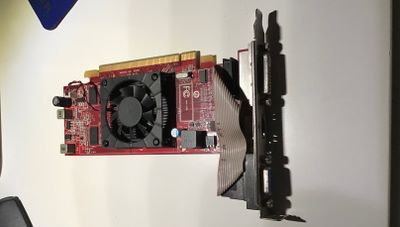
02-08-2021 12:32 PM
HP Recommended
fortunately, the photo doesn't help since it doesn't show any part numbers.
AFAIK ATI does not make a Radeon HD 5440 video card.
Some motherboards work well with NVIDIA video cards but will not support ATI video cards.
I am a volunteer forum member. If my suggestion helped you solve your issue, help others by marking that post as the accepted solution. Say thanks by clicking on the Yes button next to the "was this reply helpful?"


Be alert for scammers posting fake support phone numbers and/or email addresses on the community.
If you think you have received a fake HP Support message, please report it to us by clicking on "Flag Post".
† The opinions expressed above are the personal opinions of the authors, not of HP. By using this site, you accept the Terms of Use and Rules of Participation.


Didn't find what you were looking for?
Ask the community
† The opinions expressed above are the personal opinions of the authors, not of HP. By using this site, you accept the <a href="https://www8.hp.com/us/en/terms-of-use.html" class="udrlinesmall">Terms of Use</a> and <a href="/t5/custom/page/page-id/hp.rulespage" class="udrlinesmall"> Rules of Participation</a>.