
-
×InformationNeed Windows 11 help?Check documents on compatibility, FAQs, upgrade information and available fixes.
Windows 11 Support Center. -
-
×InformationNeed Windows 11 help?Check documents on compatibility, FAQs, upgrade information and available fixes.
Windows 11 Support Center. -
- HP Community
- Desktops
- Desktop Operating Systems and Recovery
- Re: HP Omen 870-244 Compatible SSD

Create an account on the HP Community to personalize your profile and ask a question
Your account also allows you to connect with HP support faster, access a personal dashboard to manage all of your devices in one place, view warranty information, case status and more.
Check out our WINDOWS 11 Support Center info about: OPTIMIZATION, KNOWN ISSUES, FAQs, VIDEOS AND MORE.

It has been a while since anyone has replied. Simply ask a new question if you would like to start the discussion again.

02-08-2018 03:57 PM
 HP Recommended
Product: HP OMEN 870-244
Operating System: Microsoft Windows 10 (64-bit)
I have been trying to find an afforable and compabile SSD and after having bought two I am a little frsutrated. I have a free m.2 slot key M and I have bought an SSD key M 2280 and it is not showing up in disk management and there are no options in the BIOS. the SSD is :
https://umass.amazon.com/gp/product/B01L80DH4G/ref=oh_aui_detailpage_o00_s00?ie=UTF8&psc=1
If this is incompalible can you tell me of any ssd with similar price and store that is?
Solved! Go to Solution.
1 ACCEPTED SOLUTION
Accepted Solutions
02-09-2018 04:24 PM
HP Recommended
> Would this work on the computer?
Absolutely. It's just a piece of bent-up metal -- nothing electronic.
-----------
Welcome to this forum.
Please click the purple/white "Thumbs Up" icon for every response that is helpful.
Also, please click "Accept As Solution" for the best response.
11 REPLIES 11
02-08-2018 05:43 PM - edited 02-08-2018 05:46 PM
HP Recommended
Your computer: OMEN by HP Desktop PC - 870-244 Product Specifications
states:
Motherboard: Thimphu-K motherboard
- Form factor: uATX: 24.0x24.0 cm (9.4x9.4 in)
- Chipset: Z170
- Memory sockets: 4 x DDR4
- Processor socket: LGA1151
- Expansion Slots:
- 1 PCI Express x16 (Gen3.0)
- 1 PCI Express x1 (Gen3.0)
- One M.2 socket 1, key A
- One M.2 socket 3, key M
- For more details, see Thimphu-K motherboard specifications
I think that you need to open "Disk Management", select the SSD, "initialize" it, and then create a partition on it, so that Windows will recognize it.
I am surprised that it does not show up during BIOS SETUP, even before it is "initialized".
____________________________
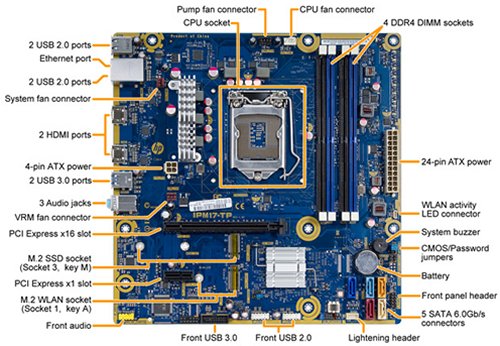
I wonder -- if you attach a helium-filled balloon to that marked "lightening" header, will the motherboard better handle floating-point arithmetic? 
02-08-2018 07:51 PM
HP Recommended
Is this ssd incompabile so i sould send it back or should i troubleshoot this.
Also how do I go to BIOS Setup because I have not tries that to see if it shows up there.
Last thing is should I try disabing secure boot or does that not matter?
I chatted with HP online and apparently they said it is not compaible, but they did not tell me why.
02-08-2018 08:16 PM
HP Recommended
> Is this SSD incompatible ...
Your motherboard that came to market in 2017. So, it should be able to handle such solid-state devices of similar vintage.
> ... so i should send it back or should i troubleshoot this?
It depends. What's your tolerance for "pain and suffering" ? 
> Also how do I go to BIOS Setup because I have not tries that to see if it shows up there.
> Last thing is should I try disabing secure boot or does that not matter?
Well, if you get to the point where you can enable/disable "secure boot", you have entered BIOS SETUP mode.
Note that the Windows Installer will write a "secure boot" system onto any "spinning" disk-drive or onto any SSD.
Enabling "secure boot" prevents your computer from booting from "non-secure" media.
02-08-2018 10:38 PM
HP Recommended
I tried going into the bios and m.2 is enable so I am STUMPED. I left the ssd in there for a while and it seems to be drawing power so i dont get it. I put it in a a 30 degree angle and pushed it in and made sure it was srewed using a screw that fit. I guess I will just return it and get an non m.2 ssd.
02-09-2018 12:33 AM
HP Recommended
> I put it in a a 30 degree angle and pushed it in and made sure it was srewed using a screw that fit.
A friend called me, because her brand-new Dell apparently did not have Windows installed.
Eventually, when we removed the video-card, to expose the M.2 device, we noticed that it was NOT FULLY SEATED in its socket, even though the mounting screw seemed fine. We removed the screw, firmly pushed the stick into the slot, and re-attached the screw. Voila! Dell had installed Windows onto the M.2, and the 1TB "spinning" disk-drive was 100% empty.
So, check that your M.2 card is fully inserted into its slot -- you should not see any part of the gold connector pins.
02-09-2018 01:11 PM
HP Recommended
> If i mount a normal sata III like the 850 EVO, is there no chance for incompability there so long as it is a sata interface?
IMHO, none.
> Also how hard is it to mount an ssd to the drive bay.
> Will i be able to slide it in or do I have to screw it to the drive bay on one side or both?
The SSD is usually the size of a "laptop" disk-drive, rather than the size of a "desktop" disk-drive.
So, you should purchase a metal "bracket":

that holds the narrow SSD, and fits into the 3.5-inch "desktop" drive-bay.
Note that the pictured bracket actually holds TWO disk-drives -- but you only need to hold ONE.
Of course, since the SSD has no moving parts, you could just screw it to one side of the 3.5-inch drive-bay, or not screw it to anything, just as long it does not physically contact any fan-blades. Rube Goldberg, indeed. 
02-09-2018 02:41 PM
HP Recommended
would this work on the computer?

Be alert for scammers posting fake support phone numbers and/or email addresses on the community.
If you think you have received a fake HP Support message, please report it to us by clicking on "Flag Post".
† The opinions expressed above are the personal opinions of the authors, not of HP. By using this site, you accept the Terms of Use and Rules of Participation.


Didn't find what you were looking for?
Ask the community
† The opinions expressed above are the personal opinions of the authors, not of HP. By using this site, you accept the <a href="https://www8.hp.com/us/en/terms-of-use.html" class="udrlinesmall">Terms of Use</a> and <a href="/t5/custom/page/page-id/hp.rulespage" class="udrlinesmall"> Rules of Participation</a>.