• ×
    Information
    Need Windows 11 help?
    Check documents on compatibility, FAQs, upgrade information and available fixes.
    Windows 11 Support Center.
  • post a message
  • ×
    Information
    Need Windows 11 help?
    Check documents on compatibility, FAQs, upgrade information and available fixes.
    Windows 11 Support Center.
  • post a message
Guidelines
Seize the moment! nominate yourself or a tech enthusiast you admire & join the HP Community Experts!
Check out our WINDOWS 11 Support Center info about: OPTIMIZATION, KNOWN ISSUES, FAQs, VIDEOS AND MORE.
HP Recommended
HP 260-a114
Microsoft Windows 10 (64-bit)

Hello, I want to clone the hard drive of this slim line tower via USB port. The Acronis cloning software says its not compatible.

Does anyone know of a solution? Thanks


Specs:  AMD A8-7410 APU with AMD Radeon R5   2.20 GHZ

1 REPLY 1
HP Recommended

@Chiptimer 

That's just one of the reasons I quit using Acronis and switched over to Macrium Reflect.


Here is some text I wrote about cloning using that:  


1) Download and install Macrium Reflect (MR) from here: https://www.macrium.com/reflectfree
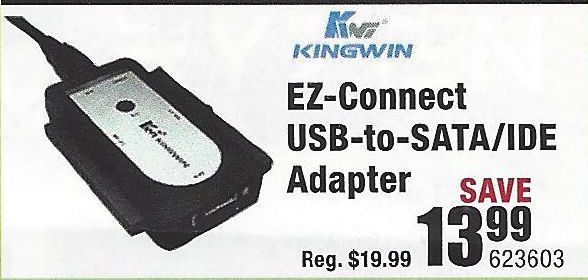
2) Connect the new drive to the PC using a USB-to-SSD drive adapter (like the one illustrated below)
3) Follow the instructions in this link: http://knowledgebase.macrium.com/display/KNOW/Cloning+a+disk
4) Shutdown the PC when done
5) Swap the drives and reboot the PC.

NOTE: To do this easily, the SDD has to be the same capacity as the HDD.  IF you get an SDD that is a lot smaller, then before you do the cloning, you have to shrink the largest partition on the HDD (usually the OS partition), to the size such that it, and the other partitions, fit easily on the SSD.


You should boot from the new drive without any problems.

Typical USB-to-SSD adapter:

USB-Drive-Adapter.jpg
NOTE: If your SSD is an M.2 SSD, then you will have to also get a second SATA SSD to M.2 SSD adapter.

Good Luck


I am a volunteer and I do not work for, nor represent, HP
† The opinions expressed above are the personal opinions of the authors, not of HP. By using this site, you accept the <a href="https://www8.hp.com/us/en/terms-of-use.html" class="udrlinesmall">Terms of Use</a> and <a href="/t5/custom/page/page-id/hp.rulespage" class="udrlinesmall"> Rules of Participation</a>.