• ×
    Information
    Need Windows 11 help?
    Check documents on compatibility, FAQs, upgrade information and available fixes.
    Windows 11 Support Center.
  • post a message
  • ×
    Information
    Need Windows 11 help?
    Check documents on compatibility, FAQs, upgrade information and available fixes.
    Windows 11 Support Center.
  • post a message
Guidelines
Seize the moment! nominate yourself or a tech enthusiast you admire & join the HP Community Experts!
Check out our WINDOWS 11 Support Center info about: OPTIMIZATION, KNOWN ISSUES, FAQs, VIDEOS AND MORE.
HP Recommended
Pavilion AIO 24-G214
Microsoft Windows 10 (64-bit)

I recently had a hard drive failure (outside of warranty) and replace with a new SSD.  I had downloaded and built a USB Recovery drive to rebuild partitions and reinstall Windows 10. However it failed every time.  I looked into the error on the HP Forums site and found that because it is not the OEM Hard Drive that the failure is expected/intentional and I would need to use the Media Creation Toolkit to make a Windows 10 installation USB drive and install Windows manually.  Did this  no problem and everything is working with the exception of the Touch Screen.  I can find no driver anywhere for the Touchscreen.  I've read different suggested items on this site and nothing seems to work, and it appears I am not the only one that has had this problem.  In my Device Manager I have no touch screen option under my HID devices however I have an "Unknown USB Device (Device Descriptor Request Failed)" under my Universal Serial Bus controllers.  Having removed ALL USB items and the unknown still comes back as well as looking at different forums, I have determined this is my TouchScreen device.  Is the actual driver available anywhere?  I have tried everything on HP's driver page and even gone to Intel's site directly for drivers with no luck.  The screen worked perfectly before hard drive replacement.  


Thank you!

7 REPLIES 7
HP Recommended

@MTDave


I suggest you download and run the HP Support Assistant from this Link: https://www8.hp.com/us/en/campaigns/hpsupportassistant/hpsupport.html?jumpid=va_r602_us/en/any/psg/p...


HPSA will automatically search for all the latest drivers for your Notebook


  1. Click My devices in the top menu, and then click Updates in the My PC or My notebook pane.

    Click Updates in the My notebook pane

  2. Click Check for updates and messages to scan for new updates.

     Updates list in HP Support Center

  3. Review the list of updates. Updates with a yellow information icon are recommended. Updates with a blue information icon are optional.

  4. Click the update name for a description, version number, and file size.

  5. Select the box next to any updates you want to install, and then click Download and install.

Also ensure Windows is up to date.


Select the Start  button, and then go to Settings  > Update & security  > Windows Update , and select Check for updates. If Windows Update says your device is up to date, you have all the updates that are currently available


Keep me posted how it goes


Thank you and have a wonderful day 😊


If the information I've provided was helpful, give us some reinforcement by clicking the "Solution Accepted" on this Post and it will also help other community members with similar issue.

KrazyToad
I Am An HP Employee

HP Recommended

Thank you for your reply.  I should have mentioned that I have ran all updates detected via Microsoft Update as well as have installed the support assistant.  It is not reporting any missing drivers however I still have the same situation as mentioned in my original post.


I have also completely formated my hard drive and reinstalled Windows again to be sure nothing was missed during that step.  

HP Recommended

@MTDave
Thank you forposting back. 


Use the HP PC Hardware Diagnostics UEFI tests to detect problems with the touch screen hardware.

  1. Connect the AC adapter to the computer.

  2. Press the Power button for at least five seconds to turn off the computer.

  3. Turn on the computer and immediately press Esc repeatedly, about once every second. When the Startup menu appears, press F2.

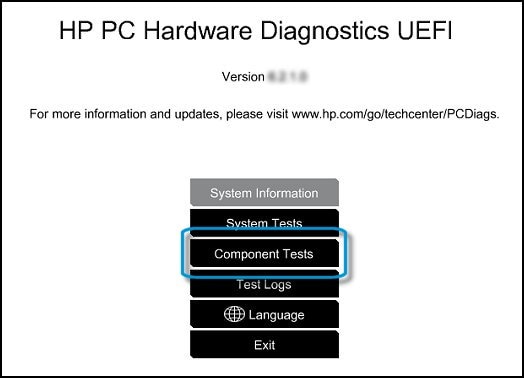
  4. When the HP PC Hardware Diagnostics screen displays, click Component Tests.

    Component Tests in HP PC Hardware Diagnostic UEFI

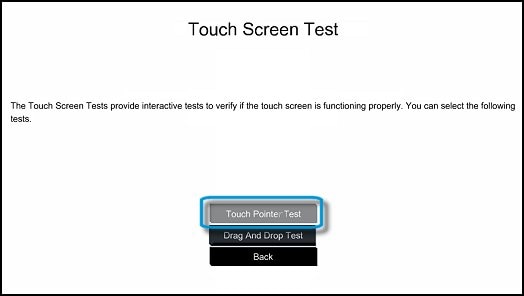
  5. Click Touch Screen.

  6. There are two interactive touch screen hardware tests. Click Touch Pointer Test first.

    Touch Pointer Test in UEFI

  7. Read the on-screen instructions, and then click Run once.

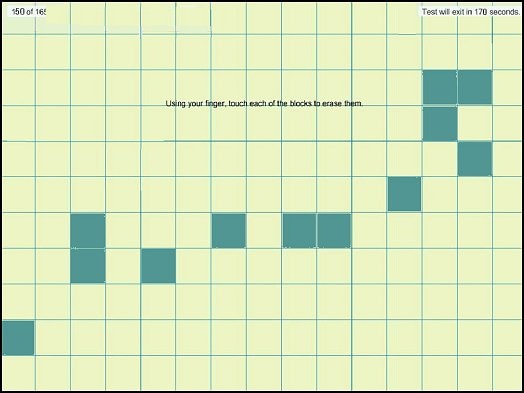
  8. Touch each of the blocks on the screen to erase them. The test ends after you erase all the blocks or after three minutes have passed, and the results display.

    Touch the blocks to erase them

  9. Click Main menu to return to the main screen.

  10. Click Component Tests, and then click Touch Screen.

  11. Click Drag And Drop Test.

    Drag and Drop Test in UEFI

  12. Read the on-screen instructions, and then click Run once.

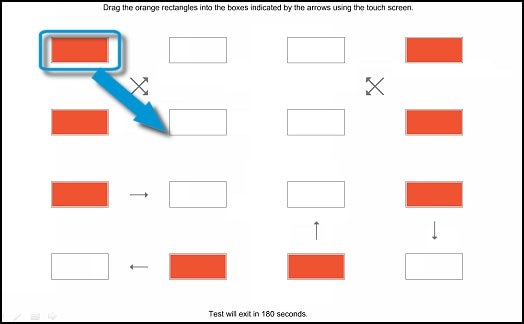
  13. Drag each orange rectangle to the box indicated by the arrows with a finger or a stylus. The test ends after you reposition all the blocks or after three minutes, and the results display.

    Drag the blocks to the correct empty box

  • If the diagnostics tests pass but the touch screen still does not respond during regular use, then computer needs to be servcie. 

Hope this helps! Keep me posted for further assistance.
Please click “
Accept as Solution” if you feel my post solved your issue, it will help others find the solution.

ECHO_LAKE
I am an HP Employee

HP Recommended

Diagnostics do not show a component test option.  Could this because the UEFI partition is gone and could be restored because I was not able to restore the new drive to factory specs?  I did keep a copy of all partitions it attempted to restore before building my PC from Windows 10 ISO.  in my device manager with no USB items connected except for my keyboard/mouse.  I still have the unknown USB which appeared AFTER my touchscreen stopped working when Windows was reinstalled.  I am still no finding any options for Drivers for the touchscreen in the HP Support assistant or Microsoft Update.


Well, I attempted to place a picture in this reply to show you but it is not allowing me to paste an image.

HP Recommended

@MTDave
Thank you for posting back. 


Let's try system factory recovery which will reinstall all original factory shipped software and drivers, this way we can isolate the failure. 
 

The HP Cloud Recovery Tool allows you to download recovery software to a USB drive. You can use the downloaded recovery image file in order to install the Windows operating system. 


Click here: https://support.hp.com/in-en/document/c06162205 to Use the HP Cloud Recovery Tool (Windows 10, 7)

Click here: https://support.hp.com/in-en/document/c04758961#AbT3 to perform a System Recovery (Windows 10)


Hope this helps! Keep me posted for further assistance.
Please click “
Accept as Solution” if you feel my post solved your issue, it will help others find the solution.

ECHO_LAKE
I am an HP Employee

HP Recommended

Hey Echo, thank you for your reply.  As I stated in my initial post, I have attempted the factory restore (twice actually now) and it errors out because I have a replacement Hard drive.  I did keep those partitions that it did create on a separate disk to look at if needed.  I also reinstalled Windows 10 using the media creation toolkit as looking through forums on this site I found that is the only way to do it because the factory restore will not work with replacement hard drives so I have no restore points to go back to.  Would you like me to attempt this for the 3 time this month?  I am 99.999999999999999% certain I will have the same results and will be right back here again.

HP Recommended

@MTDave
Thank you for posting back. 


This sounds like a hardware related issue,

I would request you to reach out to our Support and our Support Engineers should be able to check the available service options in order to diagnose the computer physically. HP Support can be reached by clicking on the following link:  www.hp.com/contacthp/


Please feel free to contact us here anytime you need any further assistance. Please click “Accept as Solution” if you feel my post solved your issue, it will help others find the solution.

ECHO_LAKE
I am an HP Employee

† The opinions expressed above are the personal opinions of the authors, not of HP. By using this site, you accept the <a href="https://www8.hp.com/us/en/terms-of-use.html" class="udrlinesmall">Terms of Use</a> and <a href="/t5/custom/page/page-id/hp.rulespage" class="udrlinesmall"> Rules of Participation</a>.