• ×
    Information
    Need Windows 11 help?
    Check documents on compatibility, FAQs, upgrade information and available fixes.
    Windows 11 Support Center.
  • post a message
  • ×
    Information
    Need Windows 11 help?
    Check documents on compatibility, FAQs, upgrade information and available fixes.
    Windows 11 Support Center.
  • post a message
Guidelines
Seize the moment! nominate yourself or a tech enthusiast you admire & join the HP Community Experts!
Check out our WINDOWS 11 Support Center info about: OPTIMIZATION, KNOWN ISSUES, FAQs, VIDEOS AND MORE.
HP Recommended
Pavilion 590 p0177c
Microsoft Windows 10 (64-bit)

Hi. By accident I deleted the factory installed files on drive D Data that apparently allows/directs data to be saved on drive D
I have almost filled C drive (10 GB of 118 GB) withe 931 GB of 931 GB remaining on drive D.
Where may I find those files to load into D?  Or do I have to reinstall Win 10 to get them back?

Thanks in advance for any help

6 REPLIES 6
HP Recommended

@MrMath2U 

If (D) is your hard drive, you do not need any special files or software from HP to save files to it.


You have to explain specifically what files you are talking about. Because at this point, we have no idea what you are talking about.


I am a volunteer and I do not work for, nor represent, HP
HP Recommended

Hello
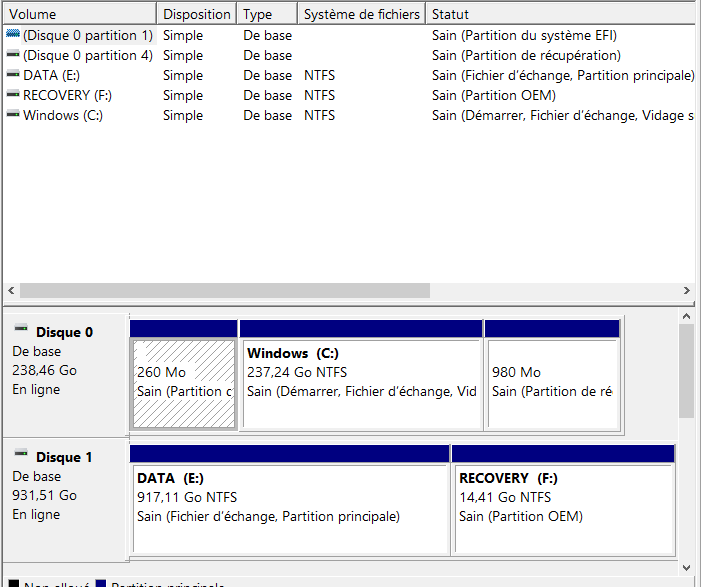
The only thing that could already be on this disk, should not be erased like this, is the recovery partition.

Annotation 2020-06-08 174425.png

so did it look like this ?


 if you have not created the hp recovery kit, you cannot reinstall the computer.
You may be able to use this, check:

HP Consumer PCs - Using the HP Cloud Recovery Tool (Windows 10, 7) | HP® Customer Support

--------------------------------------------- Signature ---------------------------------------------
was this reply helpful , or just say thank you ? Click on the yes button

Please remember to mark the answers this can help other users
please click on the accept as solution button if message provided an answer to the problem


Desktop-Knowledge-Base
Windows 11 22h2 inside , user

------------------------------------------------------------------------------------------------------------
HP Recommended

@Prométhée 

Even if the  (D) drive is the Recovery drive, it would not have "files ...  that apparently allows/directs data to be saved on drive D" -- as claimed by the OP; instead, it would have the HP recovery files.


That's why I asked for an explanation of what the OP is talking about.


I am a volunteer and I do not work for, nor represent, HP
HP Recommended

But @WAWood   that's why I'm asking if that could be what I'm indicating!
I have seen quite a few configurations of this type, and I know very well that there is nothing to install on the Data which automatically manages backups or whatever!


Unless by mistake this has been modified we can have this for example
https://support.hp.com/fr-fr/document/c03737312

the only thing that can be in place of origin on a 2 disk is the recovery partition


--------------------------------------------- Signature ---------------------------------------------
was this reply helpful , or just say thank you ? Click on the yes button

Please remember to mark the answers this can help other users
please click on the accept as solution button if message provided an answer to the problem


Desktop-Knowledge-Base
Windows 11 22h2 inside , user

------------------------------------------------------------------------------------------------------------
HP Recommended

 C drive (10 GB of 118 GB)

> 931 GB of 931 GB remaining on drive D.


It is possible that your computer has 2 disk-drives.

The "C:" disk-drive could be a 128 GB SSD (Solid State Device) that is very fast,

while the "D:" disk-drive probably is a 1000 GB "spinning" disk-drive.


Windows is stored on the "C:" disk-drive, and should be very fast to go from "power-off" to "fully loaded & ready to use".


Usually, in such "two-disk" configurations, there is NOTHING preloaded onto the "D:" disk-drive.


Also, usually the "System Recovery" files are stored on a small partition of the "C:" disk-drive. This partition normally is "hidden", so that you cannot access it, and cannot accidentally delete files/folders.


When using such a "dual-disk" setup, it is your responsibility to choose to save new files to the "D:" disk-drive, to avoid filling-up the limited amount of space available on the "C:" disk-drive.


EDIT: reinstalling Windows probably will NOT store any files onto "D:". Reinstalling might even wipe-out your files that you have been storing on "C:".  Ouch!


HP Recommended

Read my answer carefully @itsmyname 
I gave an image of a configuration with an m2 SSD and an HDD


"In addition, "System Recovery" files are usually stored on a small partition of the "C:" disk drive. "
The partition is not on the m2 SSD disk, because it is the smallest, it is on the HDD disk !


And as we can see in the second link the recovery partition can very well be used by mistake!
Now what is needed is to have an answer from @MrMath2U , to say if he remembers if it looked like the picture I gave above

https://support.hp.com/hr-en/document/c06367809


For the configuration there is no doubt just read the specs

HP Pavilion 590-p0177c Product Specifications 


Internal Storage
1 TB 7200 rpm SATA
Hard drive (2nd)
128 GB PCIe® NVMe™ M.2 SSD
--------------------------------------------- Signature ---------------------------------------------
was this reply helpful , or just say thank you ? Click on the yes button

Please remember to mark the answers this can help other users
please click on the accept as solution button if message provided an answer to the problem


Desktop-Knowledge-Base
Windows 11 22h2 inside , user

------------------------------------------------------------------------------------------------------------
† The opinions expressed above are the personal opinions of the authors, not of HP. By using this site, you accept the <a href="https://www8.hp.com/us/en/terms-of-use.html" class="udrlinesmall">Terms of Use</a> and <a href="/t5/custom/page/page-id/hp.rulespage" class="udrlinesmall"> Rules of Participation</a>.