• ×
    Information
    Need Windows 11 help?
    Check documents on compatibility, FAQs, upgrade information and available fixes.
    Windows 11 Support Center.
  • post a message
  • ×
    Information
    Need Windows 11 help?
    Check documents on compatibility, FAQs, upgrade information and available fixes.
    Windows 11 Support Center.
  • post a message
Guidelines
Seize the moment! nominate yourself or a tech enthusiast you admire & join the HP Community Experts!
Check out our WINDOWS 11 Support Center info about: OPTIMIZATION, KNOWN ISSUES, FAQs, VIDEOS AND MORE.
HP Recommended
Hp all-in-one pc 24-e068cy
Microsoft Windows 7 (32-bit)

Updated BIOS a few days ago and as it was doing it’s updated, the computer automatically restarted and has been black ever since. I tried doing the windows key and B.. doesn’t do anything, tried all the steps hp support put me through and still nothing. When I turn it on it starts to sound like it wants to load but just sounds like the fan is just spinning and nothing is cranking to get the things started. Not sure if I need a new hard drive or not. Anyone got any ideas?? I’ve been searching and trying just about everything! I even took the pc apart and disconnected the hard drive and ram card and re-inserted them. I need this up and running again since I do all my business on here.

4 REPLIES 4
HP Recommended

@AlaskanBeast16
Thank you for posting on the HP Support Community.


Don't worry as I'll be glad to help,  I have a few troubleshooting steps we could try to fix the issue:  
Use another working computer to create a BIOS recovery flash drive to install the latest BIOS file.
 

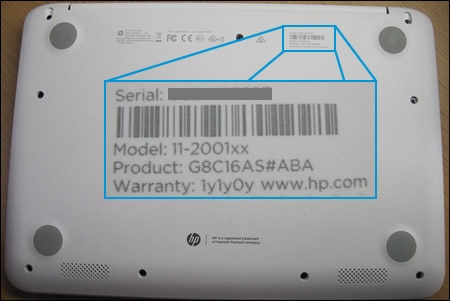
  1. Get the product number for the original notebook that requires a BIOS recovery. This number is typically found on a label on the bottom of the notebook or on the box it shipped in. Go to How Do I Find My Model Number or Product Number? for additional options.

    NOTE: The general or series name near the keyboard or on the frame around the display is not specific enough for identifying correct download files.

    Notebook computer label enlarged to show product information

  2. Insert a blank USB flash drive into an available port on the second computer.

  3. Go to the HP Customer Support - Software and Driver Downloads page.

  4. Navigate to the product page for your computer.

  5. Select BIOS, and then review the details of the latest available version or the specific version recommended for the recovery. Confirm it is the correct BIOS update before proceeding.

       CAUTION: Read the Details section to confirm that it applies to the computer. Installing the wrong BIOS could cause the computer to stop working.
  6. Click Download, and then click Run.

  7. Click Yes on the User Account Control screen.

  8. On the InstallShield Wizard window, click Next.

  9. Select I accept the terms in the license agreement and then click Next.

  10. In the HP BIOS Update and Recovery window, click Next.

  11. Select Create Recovery USB flash drive, and then click Next.

  12. Select your USB flash drive, and then click Next.

  13. Wait while the BIOS files copy to the USB flash drive.

  14. When The recovery flash drive was created successfully displays, click Finish.

  15. If necessary, click Cancel to close the update utility.

  16. Remove the flash drive from the computer.

Hope this helps! Keep me posted for further assistance.
Please click “
Accept as Solution” if you feel my post solved your issue, it will help others find the solution.

ECHO_LAKE
I am an HP Employee

HP Recommended

For some reason, when the HP Support assistant wants to update the BIOS it has a higher than usual failure rate.

The Win+B key routine can me finicky, and sometimes does not not work either. Just to confirm: With PC off, hold down WIN key and tap B key furiously then turn PC on. Do this for approx 30-45secs. If this does not do anything, try again this time HOLDING B key instead of tapping.

If this does not work, call HP and ask them to assist with replacing the mainboard, as it was their support assistant and BIOS update utility that bricked the PC.

HP Recommended

So now I can’t find windows 7 version to put bios on a flash drive.. now what? The hp has windows 7.. 

HP Recommended

I have tried the windows b combo in many different ways. And still nothing but yes I will contact hp directly and see if they will give me a main board since it was their bios update that did this to my computer 

† The opinions expressed above are the personal opinions of the authors, not of HP. By using this site, you accept the <a href="https://www8.hp.com/us/en/terms-of-use.html" class="udrlinesmall">Terms of Use</a> and <a href="/t5/custom/page/page-id/hp.rulespage" class="udrlinesmall"> Rules of Participation</a>.