
-
×InformationNeed Windows 11 help?Check documents on compatibility, FAQs, upgrade information and available fixes.
Windows 11 Support Center. -
-
×InformationNeed Windows 11 help?Check documents on compatibility, FAQs, upgrade information and available fixes.
Windows 11 Support Center. -
- HP Community
- Desktops
- Desktop Operating Systems and Recovery
- Upgrading from windows10 to windows 11

Create an account on the HP Community to personalize your profile and ask a question
Your account also allows you to connect with HP support faster, access a personal dashboard to manage all of your devices in one place, view warranty information, case status and more.
Check out our WINDOWS 11 Support Center info about: OPTIMIZATION, KNOWN ISSUES, FAQs, VIDEOS AND MORE.

It has been a while since anyone has replied. Simply ask a new question if you would like to start the discussion again.

01-04-2022 07:57 AM
 HP Recommended
Product: HP Pavilion a6255.it
Operating System: Microsoft Windows 10 (64-bit)
Good morning guys. I am in possession of the somewhat old HP6255it PC, which from windows vista I brought it to windows 10 professional splendidly. Now, to bring it to windows 11, the integrity check gives me three problems:
The PC must support secure boot
2) TPM must be supported and enabled in this PC;
3) The processor is currently not supported for Windows 11 (intel core 2 Quad CPU [email protected].
How can I overcome these problems? Thanks for you
Solved! Go to Solution.
1 ACCEPTED SOLUTION
Accepted Solutions


01-05-2022 06:59 AM
HP Recommended
You're very welcome.
Here are the instructions you need to bypass the hardware requirements to upgrade to W11 Home or Pro on any PC that is currently running fine on W10.
If you want to install W11 on your PC as is, you can bypass the W11 hardware requirements using two easy methods. The first one is the easiest.
I would make a system image of your current W10 installation prior to updating to W11, so you can easily reinstall W10 in the future. I used the free Macrium Reflect software to do that, under the Backup at Home section.
Along with the system image, make sure you create the bootable DVD or USB rescue drive you boot from to access the system image stored on your portable hard drive.
Macrium Software | Reflect Free Edition
Read and follow the instructions at the link below.
Windows 11 Upgrade Hack on Any Hardware | Dong Knows Tech
No registry changes needed. No need to create installation media. Just download the W11 ISO file, and the guy's zip file.
I used the first procedure to do an in-place upgrade an old HP Elitebook 6930p notebook made in 2010 to W11, and I was able to keep my old Office 2010 Starter program that came with the notebook when it had W7 on it, along with all of my other programs, files and settings.
The notebook met none of the enhanced W11 hardware requirements.
That is the 11th unsupported W11 PC I have upgraded to W11, and not one of them have had any issues whatsoever.
They have all gotten all the Windows 11 updates released thus far.
I check those against a PC I have that is fully supported to run W11.
There is also this way you can upgrade to W11, bypassing the hardware checks...
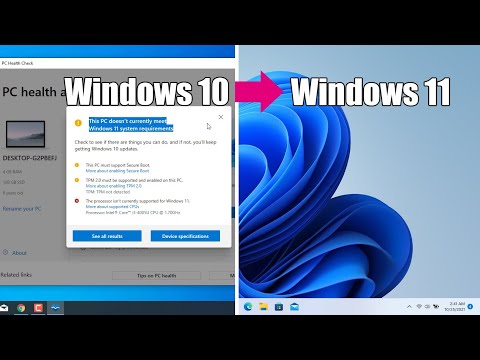
How to upgrade to Windows 11 for unsupported hardware Windows 11 https://amzn.to/3kMVTed 0:00 Introduction 0:13 Download Windows 10 Disk Image (ISO) 0:54 Download Windows 11 Disk Image (ISO) 1:49 Extract ISO Files 2:38 Delete the install.esd file in the Windows 10\source folder 3:04 Copy the ...
8 REPLIES 8

01-04-2022 10:05 AM
HP Recommended
Simple -- you can't! MS has arbitrarily set these requirements for Windows 11 on all PCs.
I understand your issue -- as I have the same situation with an old laptop that meets almost none of the Win11 hardware requirements, and I really wanted to try out Win11 on it but the installer refused.
And while there are workarounds to this, forcing Win11 onto "incompatible" hardware is an "experiment" at best -- not a long-term solution.
Let me explain ...
MS has relented, for now, in enforcing Win11 hardware requirements -- but they already have the code to check hardware because they provide that as a downloadable utility. It would take little effort to package that as a Security Update, push it to the PCs, and after a reboot, we get messages that our PCs are disabled and we have to reinstall Win10 from scratch to get a working PC back. MS has already done this with "insiders" who were running really old hardware on Windows 11. Their PCs were disabled by a Windows Update.
I'm OK because I have a full image backup of the laptop running Windows 10 -- which would take me 5 minutes to restore. Most folks don't even know what that means and will end up with a nonworking PC -- and no simple way to restore it.
I am a volunteer and I do not work for, nor represent, HP


01-04-2022 10:25 AM
HP Recommended
@alba --How can I overcome these problems?
in addition to the great response from @WAWood, I can add that it is time for you to purchase a new computer.
Probably, your disk-drive is quite an "antique", and has served you well.
Windows 7 was released on October 22, 2009.
I presume that you purchased your computer, with Vista preinstalled, before that date.
So, your disk-drive probably is over TWELVE years old.
Personally, I would "proactively" replace any disk-drive that is 84 (dog-years) old.
But, rather than spending money to do that, spend your money on a new computer.
01-05-2022 05:21 AM
HP Recommended
Good morning guys. First of all, thank you for your interest, Watwood, itismyname, Paul_Tikkanen. I meant that my windows vista, a technician took me to windows 10 professional, and, my word, it's a marvel. Now Paul_Tikkanen has suggested to me that there are two ways to update windows 10 without having the requirements. Is this also valid for windows 10 professional? Thank you very much for your help
01-05-2022 06:59 AM
HP Recommended
You're very welcome.
Here are the instructions you need to bypass the hardware requirements to upgrade to W11 Home or Pro on any PC that is currently running fine on W10.
If you want to install W11 on your PC as is, you can bypass the W11 hardware requirements using two easy methods. The first one is the easiest.
I would make a system image of your current W10 installation prior to updating to W11, so you can easily reinstall W10 in the future. I used the free Macrium Reflect software to do that, under the Backup at Home section.
Along with the system image, make sure you create the bootable DVD or USB rescue drive you boot from to access the system image stored on your portable hard drive.
Macrium Software | Reflect Free Edition
Read and follow the instructions at the link below.
Windows 11 Upgrade Hack on Any Hardware | Dong Knows Tech
No registry changes needed. No need to create installation media. Just download the W11 ISO file, and the guy's zip file.
I used the first procedure to do an in-place upgrade an old HP Elitebook 6930p notebook made in 2010 to W11, and I was able to keep my old Office 2010 Starter program that came with the notebook when it had W7 on it, along with all of my other programs, files and settings.
The notebook met none of the enhanced W11 hardware requirements.
That is the 11th unsupported W11 PC I have upgraded to W11, and not one of them have had any issues whatsoever.
They have all gotten all the Windows 11 updates released thus far.
I check those against a PC I have that is fully supported to run W11.
There is also this way you can upgrade to W11, bypassing the hardware checks...
How to upgrade to Windows 11 for unsupported hardware Windows 11 https://amzn.to/3kMVTed 0:00 Introduction 0:13 Download Windows 10 Disk Image (ISO) 0:54 Download Windows 11 Disk Image (ISO) 1:49 Extract ISO Files 2:38 Delete the install.esd file in the Windows 10\source folder 3:04 Copy the ...
01-05-2022 08:53 AM
HP Recommended
Hello Paul_Tikkanen . Thank you for these solutions. I'm a bit inexperienced and so I'll have to get help from some technician. However, this is the right way to switch to Windows 11. So many beautiful things to you all
01-05-2022 09:14 AM - edited 01-05-2022 09:15 AM
HP Recommended
You're very welcome.
The methods I gave you are the easiest ways to upgrade an unsupported PC to W11.
As I wrote above, the first method is the easiest to use. You can do an in-place upgrade in minutes, and keep all of your programs, files and settings.
There is no 'right way.'
The 'right way' is that Microsoft does not want anyone to upgrade any PC that does not meet all of the hardware specs, to W11.
Microsoft suggests that if a person wants to install W11 on an unsupported PC, that they clean install it, and I find that advice not the easiest, or the best.
See the gray shaded area of the article under this heading...Other ways to install Windows 11 (not recommended)
01-05-2022 10:09 AM
HP Recommended
@alba -- a technician took me to windows 10 professional, and, my word, it's a marvel.
Note that MIcrosoft will support Windows 10 until mid-October 2025.
So, given that you like Windows 10, keep using it, and buy a new PC in a few years.
I would be tempted to proactively replace the disk-drive, to gain "reliability".
Your technician would charge about $60 for a new SSD (solid-state disk-drive) and about the same for their time.
Compare to buying new automobile tires BEFORE the current tires are completely "bald" -- a wise thing to do.
Note the long-term trend in pricing of computers.
A very long time ago, I spent $400 for 8 MB (not 8 GB) of RAM.
Compare that $400 to what RAM currently costs.
My point is that what you may purchase in 2025 will have more "bang for the buck" than if you bought a new computer this month.

Be alert for scammers posting fake support phone numbers and/or email addresses on the community.
If you think you have received a fake HP Support message, please report it to us by clicking on "Flag Post".
† The opinions expressed above are the personal opinions of the authors, not of HP. By using this site, you accept the Terms of Use and Rules of Participation.


Didn't find what you were looking for?
Ask the community
† The opinions expressed above are the personal opinions of the authors, not of HP. By using this site, you accept the <a href="https://www8.hp.com/us/en/terms-of-use.html" class="udrlinesmall">Terms of Use</a> and <a href="/t5/custom/page/page-id/hp.rulespage" class="udrlinesmall"> Rules of Participation</a>.