
-
×InformationNeed Windows 11 help?Check documents on compatibility, FAQs, upgrade information and available fixes.
Windows 11 Support Center. -
-
×InformationNeed Windows 11 help?Check documents on compatibility, FAQs, upgrade information and available fixes.
Windows 11 Support Center. -
- HP Community
- Desktops
- Desktop Software and How To Questions
- FREEZING OMEN 875-0014 GAMES

Create an account on the HP Community to personalize your profile and ask a question
Your account also allows you to connect with HP support faster, access a personal dashboard to manage all of your devices in one place, view warranty information, case status and more.
Check out our WINDOWS 11 Support Center info about: OPTIMIZATION, KNOWN ISSUES, FAQs, VIDEOS AND MORE.

It has been a while since anyone has replied. Simply ask a new question if you would like to start the discussion again.

12-13-2019 03:00 PM
 HP Recommended
Product: HP Omen 875-0014
Operating System: Microsoft Windows 10 (64-bit)
My PC freezes when trying to play games on my new pc, tried playing fallout 4 on steam freezes at the screen when you design you player, when i try to play games on Utomik same thing happens, HP hasnt been alot of help yet still waiting
6 REPLIES 6


12-16-2019 01:53 PM
HP Recommended
@guntownpa
Thank you for posting on the HP Support Community.
Don't worry as I'll be glad to help, I have a few troubleshooting steps we could try to fix the issue:
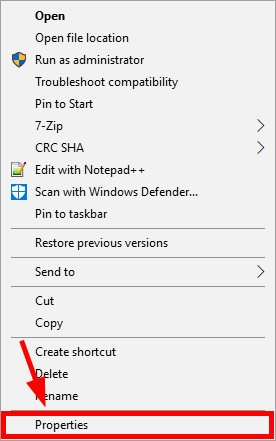
Let's run your game in compatibility mode:
- Right-click the executable (.exe) file or the shortcut for your game, then click Properties.
- Click the Compatibility tab, check Run this program in compatibility mode, and click OK.
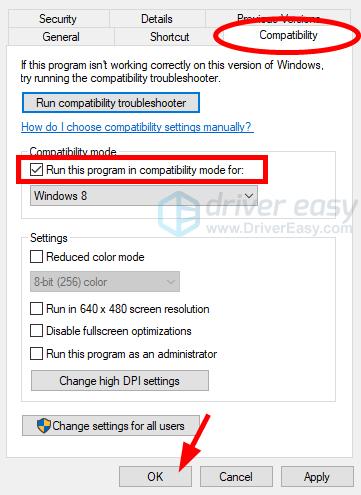
- Run your game to see if this works for you.
And also Update your graphics driver:
Perform Windows Update and HP Support Assistant: ( do not skip any troubleshooting steps if you feel steps are repeating )
To check for updates now, select the Start button, and then go to Settings > Update & security > Windows Update, and select Check for updates.
Install updates from HP Support Assistant: Go to Download HP Support Assistant to install the tool.
- To open the HP Support Assistant, double-click the HP Support Assistant icon
 .
. - Click My devices in the top menu, and then click Updates in the My PC or My notebook pane.
- Click Check for updates and messages to scan for new updates.
- Review the list of updates. Updates with a yellow information icon are recommended. Updates with a blue information icon are optional.
- Click the update name for a description, version number, and file size.
- Select the box next to any updates you want to install, and then click Download and install.
Hope this helps! Keep me posted for further assistance.
Please click “Accept as Solution” if you feel my post solved your issue, it will help others find the solution.
ECHO_LAKE
I am an HP Employee
12-17-2019 12:44 PM
HP Recommended
A friend of mine builds pc's and told me to run the Novabench benchmark test I did and here is the results...its the hard drive thats causing it The SS HD is only transfering 312/mbs...THIS IS A BRAND NEW PC..needs new HD

12-17-2019 07:44 PM
HP Recommended
Thank you for posting back.
Let's test the hard drive using HP PC Hardware Diagnostics:
Please click here to download sp98768.exe, or go to the HP PC Hardware Diagnostics Supporting Website.
- Plug the AC adapter into the computer.
- Press the Power button for at least five seconds to turn off the computer.
- Turn on the computer and start pressing Esc repeatedly, about once every second. When the menu appears, press the F2 key.
- When the HP PC Hardware Diagnostics menu displays, click Component Tests.
- In the Component Tests menu, click Hard Drive.
- Click the Quick Test.
- Click Run once. If the computer has more than one hard drive, click Test All Hard Drives. The Quick Test begins.
- If the computer has more than one hard drive, select the drive you want to test. To test all the hard drives, select Test All Hard Drives.
When a test is complete, the results display on the screen. Test results are also available in the Test Logs on the main menu.
If the hard drive passes the Quick Test, but a problem still exists with the hard drive, run the Extensive Test. This test includes the SMART Check, Short DST, Optimized DST, and Long DST. To run a specific test, select it from the Hard Drive Tests menu.
- HP does not recommend to use Third-party measuring apps as they are not tested by HP and may not be accurate.
Hope this helps! Keep me posted for further assistance.
Please click “Accept as Solution” if you feel my post solved your issue, it will help others find the solution.
ECHO_LAKE
I am an HP Employee

Be alert for scammers posting fake support phone numbers and/or email addresses on the community.
If you think you have received a fake HP Support message, please report it to us by clicking on "Flag Post".
† The opinions expressed above are the personal opinions of the authors, not of HP. By using this site, you accept the Terms of Use and Rules of Participation.


Didn't find what you were looking for?
Ask the community
† The opinions expressed above are the personal opinions of the authors, not of HP. By using this site, you accept the <a href="https://www8.hp.com/us/en/terms-of-use.html" class="udrlinesmall">Terms of Use</a> and <a href="/t5/custom/page/page-id/hp.rulespage" class="udrlinesmall"> Rules of Participation</a>.