• ×
    Information
    Need Windows 11 help?
    Check documents on compatibility, FAQs, upgrade information and available fixes.
    Windows 11 Support Center.
  • post a message
  • ×
    Information
    Need Windows 11 help?
    Check documents on compatibility, FAQs, upgrade information and available fixes.
    Windows 11 Support Center.
  • post a message
Guidelines
Seize the moment! nominate yourself or a tech enthusiast you admire & join the HP Community Experts!
HP Recommended
24w
macOS 10.14 Mojave

Hello


24w Monitor (1CA86AA) is behaving weirdly in some situations


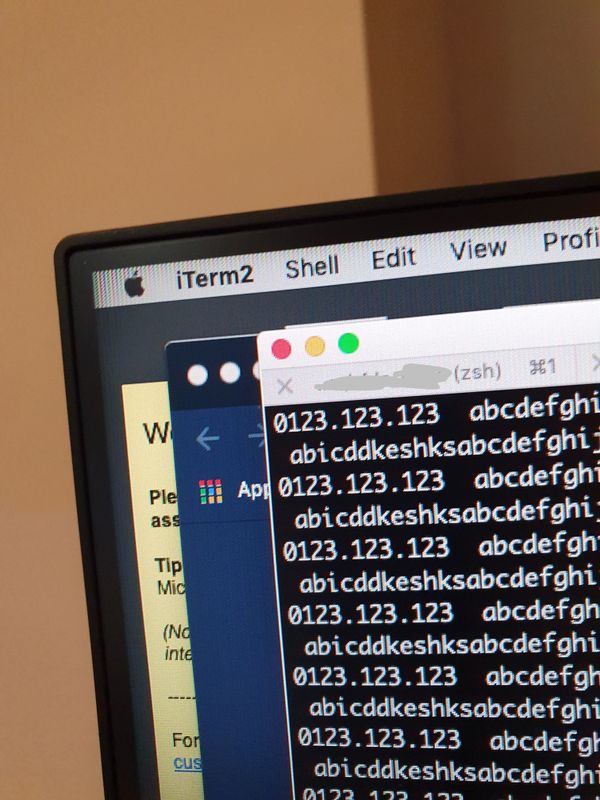
Sometimes the image border will become weird and flicker. I managed to reproduce this when looking at log files (simulated log file being listed, notice the top left corner)


20200429_091239.jpg


This can go from this to a heavier flickering border. Turning the monitor off/on, factory reset, doesn't seem to make it better

I've seen this happen at other occasions with different programs, but after the problem was triggered


Is this a problem with the product?

1 REPLY 1
HP Recommended

@WorriedFromHome That's an interesting pun 😉 Although, I'll be working on getting your worries sorted, here's what you need to do, to identify the issue and resolve it accordingly:

  • Check if it works fine on an alternate monitor, or by connecting the HP monitor to an HP desktop, and check the BIOS screen to identify if it's either a hardware or a software issue:
    • If it works fine on the alternate monitor or the BIOS (Accessed while tapping F10 during a restart for HP computers) it's a software issue & I suggest creating a new user account to check if that works better, for starters or contact the manufacturer or the desktop for support,
    • However, if it doesn't work within the BIOS or the other monitor either, I'm afraid it's a hardware malfunction.
  • Also, if you don't have an HP computer, try lowering the resolution of your Mac OS and check if that helps

P.S: Welcome to HP Community 😉


Keep us posted,

If you would like to thank us for our efforts to help you, 

Give us a virtual high-five by clicking the 'Thumbs Up' icon below, followed by clicking on the "Accept as solution" on this post, 

Have a great day!

Riddle_Decipher
I am an HP Employee


Learning is a journey, not a destination.
Let's keep asking questions and growing together.
† The opinions expressed above are the personal opinions of the authors, not of HP. By using this site, you accept the <a href="https://www8.hp.com/us/en/terms-of-use.html" class="udrlinesmall">Terms of Use</a> and <a href="/t5/custom/page/page-id/hp.rulespage" class="udrlinesmall"> Rules of Participation</a>.