• ×
    Information
    Need Windows 11 help?
    Check documents on compatibility, FAQs, upgrade information and available fixes.
    Windows 11 Support Center.
  • post a message
  • ×
    Information
    Need Windows 11 help?
    Check documents on compatibility, FAQs, upgrade information and available fixes.
    Windows 11 Support Center.
  • post a message
Guidelines
Join the HP Community Solve‑a‑thon | Help Others & Share Your Solutions | Live on Zoom | 2:30 PM to 2:30 AM IST | Every Wednesday Click here to know more
HP Recommended
HP Chromebook - 14-ca003cl
Chrome OS

I have an HP Chromebook - 14 and the middle row of keyboard letters is not working.  Can someone please help me?

1 REPLY 1
HP Recommended

@Valerie614

Thank you for posting on the HP Support Community.


Don't worry as I'll be glad to help,  I understand that keyboard is not working correctly. 

To perform a hardware reset, perform the following steps:

  1. Connect the AC adapter.
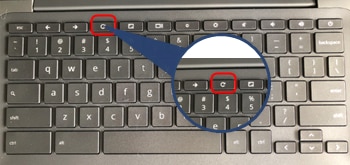
  2. Press and hold the Refresh key and then press Power button.
  3. When the computer starts up, release the Refresh key.


If the issue persists, follow next steps:

  1. Turn off the Chromebook and then turn it back on. 
  2. Use the keys while you browse as a guest. If the keys work, delete the account that has the problem on your Chromebook and then add it again.
  3. Complete a hard reset on your Chromebook hardware.
  4. If the owner account has issues, perform a factory reset on the Chromebook.

If this does not work, or you are not able to do the factory reset, you will need to contact HP phone support for repair options. HP Support can be reached by clicking on the following link: www.hp.com/contacthp/ 
 

Hope this helps! Keep me posted for further assistance.
Please click “
Accept as Solution” if you feel my post solved your issue, it will help others find the solution.

ECHO_LAKE
I am an HP Employee

† The opinions expressed above are the personal opinions of the authors, not of HP. By using this site, you accept the <a href="https://www8.hp.com/us/en/terms-of-use.html" class="udrlinesmall">Terms of Use</a> and <a href="/t5/custom/page/page-id/hp.rulespage" class="udrlinesmall"> Rules of Participation</a>.