-
×InformationNeed Windows 11 help?Check documents on compatibility, FAQs, upgrade information and available fixes.
Windows 11 Support Center. -

-
×InformationNeed Windows 11 help?Check documents on compatibility, FAQs, upgrade information and available fixes.
Windows 11 Support Center. -
- HP Community
- Desktops
- Desktop Video, Display and Touch
- HDMI ports

Create an account on the HP Community to personalize your profile and ask a question
11-12-2018 10:18 AM
This All In One has 2 HDMI ports. It doesn't specify that one is in and the other is output - however, I can only get 1 to work. Are they both supposed to Output or just one of them? Is there something I need to "turn on"?
Solved! Go to Solution.
Accepted Solutions
11-12-2018 03:05 PM
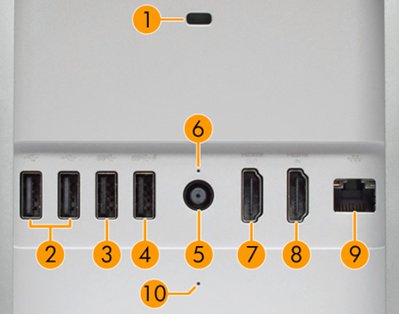
From its specs, there are 2HDMI ports, one IN (#8) and one OUT(#7) as shown:

- Security lock slot
- USB 2.0: 2
- USB 3.1-Type A
- USB 3.1-Type A charging
- DC power in
- Power indicator LED
- HDMI out
- HDMI in
- LAN (Ethernet)
- Disk activity LED
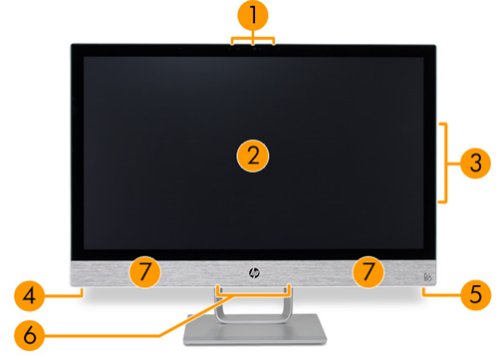
And yes, you have to use a switch as shown (#5)

- Webcam and microphones
- Screen
- Optical disk drive
- Power button
- HDMI source button
- Bottom I/O ports
- Speakers
***
**Click the KUDOS thumb up on the left to say 'Thanks'**
Make it easier for other people to find solutions by marking a Reply 'Accept as Solution' if it solves your problem.
11-12-2018 03:05 PM
From its specs, there are 2HDMI ports, one IN (#8) and one OUT(#7) as shown:

- Security lock slot
- USB 2.0: 2
- USB 3.1-Type A
- USB 3.1-Type A charging
- DC power in
- Power indicator LED
- HDMI out
- HDMI in
- LAN (Ethernet)
- Disk activity LED
And yes, you have to use a switch as shown (#5)

- Webcam and microphones
- Screen
- Optical disk drive
- Power button
- HDMI source button
- Bottom I/O ports
- Speakers
***
**Click the KUDOS thumb up on the left to say 'Thanks'**
Make it easier for other people to find solutions by marking a Reply 'Accept as Solution' if it solves your problem.
11-12-2018 03:11 PM
OK i can see it now lol needed to zoom in closely and get cheaters to see it. The specs online when i bought it just said 2 hdmi so that's kind of a bummer as I anticipated using both for output to 2 other monitors.
Thanks for your help!