• ×
    Information
    Need Windows 11 help?
    Check documents on compatibility, FAQs, upgrade information and available fixes.
    Windows 11 Support Center.
  • post a message
  • ×
    Information
    Need Windows 11 help?
    Check documents on compatibility, FAQs, upgrade information and available fixes.
    Windows 11 Support Center.
  • post a message
Guidelines
Seize the moment! nominate yourself or a tech enthusiast you admire & join the HP Community Experts!
HP Recommended
Pavilion xa0500
Microsoft Windows 10 (64-bit)
I have a pink home screen and text
1 REPLY 1
HP Recommended

Hi @H-e_2


Welcome to the HP Support Community. 


To change the background settings, try these steps -


1) In Windows, search for and open Background image settings. You can also right-click an open area of the desktop and then select Personalize.
2) To change the image or color that displays in the background, select Picture, Solid color, or Slideshow from the drop-down menu. Click Browse to select one of your pictures or a picture folder for a slideshow.

3) To change the way the picture displays on the background, select Fill, Fit, Stretch, Tile, Center, or Span from the drop-down menu.


To change the text color - 


1) In Windows, search for and open Themes and related settings. You can also right-click an open area of the desktop, and then select Personalize.
2) In the Personalization window, select Fonts to open the settings window.
3) Adjust the settings.


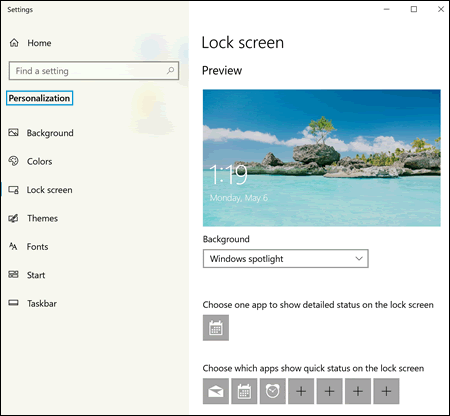
 Personalization displaying the Lock screen settings


You may also refer to this document


Hope this helps! Keep me posted. 


Please click “Accept as Solution” if you feel my post solved your issue, it will help others find the solution.

Click the “Kudos, Thumbs Up" on the bottom right to say “Thanks” for helping!


Have a great day! 

Asmita
I am an HP Employee

† The opinions expressed above are the personal opinions of the authors, not of HP. By using this site, you accept the <a href="https://www8.hp.com/us/en/terms-of-use.html" class="udrlinesmall">Terms of Use</a> and <a href="/t5/custom/page/page-id/hp.rulespage" class="udrlinesmall"> Rules of Participation</a>.