
-
×InformationNeed Windows 11 help?Check documents on compatibility, FAQs, upgrade information and available fixes.
Windows 11 Support Center. -
-
×InformationNeed Windows 11 help?Check documents on compatibility, FAQs, upgrade information and available fixes.
Windows 11 Support Center. -
- HP Community
- Desktops
- Desktop Video, Display and Touch
- Re: Replace Video Card

Create an account on the HP Community to personalize your profile and ask a question
Your account also allows you to connect with HP support faster, access a personal dashboard to manage all of your devices in one place, view warranty information, case status and more.

It has been a while since anyone has replied. Simply ask a new question if you would like to start the discussion again.

12-15-2018 11:19 AM
 HP Recommended
Product: HP ENVY Phoenix 810-350se
Operating System: Microsoft Windows 10 (64-bit)
Hello
Thanks in advance for any help provided.
I have the following desktop. It has been terrific for many years.
Model #: 810-350se
Product #: J6N64AV#ABA
20 Minutes after boot the monitor displays something similar to a bad Pink Floyd acid trip. aka Horizontal colored lines so dense and blinding the screen can no longer be rendered/read. It seems likely the installed video card is about to meet it's maker.
4GB Nvidia GeForce GTX 745 - installed
Request - The above video card is quite old. I am unable and perhaps unwilling to replace it like for like. What is the model number of a current/compatible Nvidia card for my desktop? Does HP.com sell this? I need to purchase before end of year 2018.
9 REPLIES 9


12-16-2018 02:00 PM
HP Recommended
Welcome to HP Forums,
This is a great place to get support, find answers and tips,
Thank you for posting your query, I'll be more than glad to help you out 🙂
I see that your experiencing issue with the display,
Don't worry as I'll be glad to help, however, to provide an accurate resolution, I need a few more details:
- Have you attempted any steps on your own before posting on the HP community?
- Have you updated Graphics and Chipset drivers?
- Have you checked the display on an external monitor?
While you respond to that, let’s try these steps to resolve the problem:
I recommend you attempt to access the BIOS screen by tapping on F10 while the computer is restarting,
If the issue persists in the BIOS screen which is outside windows, it would confirm a hardware failure.
Also, you can check the display on an external monitor(TV)
Keep me posted for further assistance.
ECHO_LAKE
I am an HP Employee
12-21-2018 10:52 AM - edited 12-26-2018 10:52 AM
HP Recommended
@bob_sagget
Thank you for posting back.
Let's update the bios and check:
Search Windows for 'bitlocker', and then click Manage BitLocker in the results.
Click Suspend protection, and then click Yes to suspend protection.
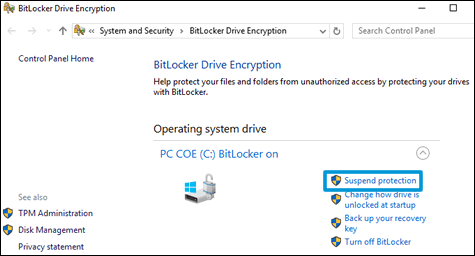
Step 2: Get the computer product number, processor name, and current BIOS version
To find the correct BIOS update, obtain the computer’s product number, the processor name, and BIOS version.
Using the keyboard, press the fn and esc keys to open the HP System Information utility.
NOTE: These keyboard presses do not work if you use a docking station and an external keyboard.
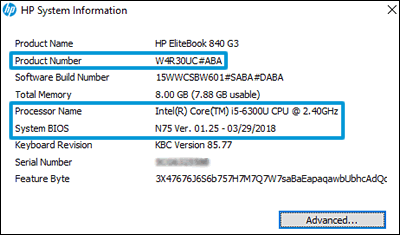
Write down the Product Number, Processor Name, and System BIOS version number.
Step 3: Install the BIOS update
Download and install the latest available BIOS update from the HP Customer Support website.
Go to HP Software & Driver Downloads, and then enter your computer product number.
Look through the available software for BIOS, click it, and then confirm it is a higher version number and it is for your processor type.
If the update is correct, click Download. Follow the on-screen instructions to save the file to your computer. Do not select the option to Run the file.
If the update is not correct, view the details of other available BIOS updates. If there are no other updates, the computer does not require a BIOS update.
If BIOS is not in the list of available software, an update is currently unavailable.
Close any open applications.
Temporarily disable your antivirus software. Search Windows for 'security', open the Security and Maintenance settings, and then click Security to access virus protection settings.
Browse to the folder or desktop where you saved the downloaded BIOS update file.
Find the file name (example: sp12345.exe), and then double-click it to start the installation.
The following behaviors can occur during the update process: the computer beeps, display turns off, cooling fans turn on or off, and the power button light flashes.
CAUTION: Do not shut down or restart the computer until the update process completes.
Follow any on-screen instructions, and then restart the computer when prompted to complete the update.
If Bitlocker was suspended, search Windows for 'bitlocker', and then click Resume Protection.
Re-enable your antivirus software.
Hope this helps! Keep me posted for further assistance.
If I have helped you resolve the issue, feel free to give me a virtual high-five by clicking the 'Thumbs Up' icon below,
Followed by clicking on "Accept as solution" from the drop-down menu on the upper right corner,
Thank you for posting in the HP Support Forum. Have a great day!
ECHO_LAKE
I am an HP Employee
12-24-2018 06:34 AM
HP Recommended
Hi Echo
Thanks for the reply!
Product: 810-350se
Processor: Intel(R) Core(TM)i7-4820K CPU @ 3.70GHz 3.70
BIOS: American Megatrends 2.15.1226
This is a Desktop/Server not a laptop. The link you provided for bios download does not work. Sincere apologies but I cannot accept yours as your reply as a solution. I still have the problem.
What should I do next?

12-25-2018 08:56 AM
HP Recommended
I am responding on behalf of @Echo_Lake as he is out for the day. It is great to have you back and your patience is greatly appreciated.
I recommend you perform a system test on the computer to eliminate any hardware failures.
Follow the steps in the below article to perform a system test.
https://support.hp.com/in-en/document/c03467259
Let me know how it goes and you have a great day!
Good day! Take care 🙂
Cheers!
The_Fossette
I am an HP Employee
12-26-2018 11:08 AM
HP Recommended
Thank you for posting back.
Apologies for the inconvenience caused. I appreciate your efforts to try and resolve the issue.
As you've performed a system test and all the hardware test passed, it sounds like software driver related issue, however as unable to update bios due to website error.
Let's try once again to update the bios from Here
Hope this helps! Keep me posted for further assistance.
ECHO_LAKE
I am an HP Employee
12-26-2018 09:44 PM
HP Recommended
I ran the HP software in the link you provided below. Thank you.
The HP software recommended running a vga card driver older than the driver currently installed for my new NVidia GeForce GTX 1050 which was recently installed.
Is there a possibility my HP ZR30w monitor could be the source of the problem? I let the PC run all day with the monitor turned off. When I turn the monitor on the problem does manifest for some time. Is it possible, when the ZR30w "Warms Up" it can generate the problem?
Can you direct me to the diagnostics for the HP ZR30w?
12-27-2018 02:14 PM
HP Recommended
Thank you for posting back.
I'm sending out a Private message to assist you with the next course of action.
Please check your Private message icon on the upper right corner of your HP Forums profile
Next, to your profile Name, you should see a little blue envelope, please click on it or simply click on this link: https://h30434.www3.hp.com/t5/notes/privatenotespage
ECHO_LAKE
I am an HP Employee

Be alert for scammers posting fake support phone numbers and/or email addresses on the community.
If you think you have received a fake HP Support message, please report it to us by clicking on "Flag Post".
† The opinions expressed above are the personal opinions of the authors, not of HP. By using this site, you accept the Terms of Use and Rules of Participation.


Didn't find what you were looking for?
Ask the community
† The opinions expressed above are the personal opinions of the authors, not of HP. By using this site, you accept the <a href="https://www8.hp.com/us/en/terms-of-use.html" class="udrlinesmall">Terms of Use</a> and <a href="/t5/custom/page/page-id/hp.rulespage" class="udrlinesmall"> Rules of Participation</a>.