-
×InformationNeed Windows 11 help?Check documents on compatibility, FAQs, upgrade information and available fixes.
Windows 11 Support Center. -

-
×InformationNeed Windows 11 help?Check documents on compatibility, FAQs, upgrade information and available fixes.
Windows 11 Support Center. -
- HP Community
- Desktops
- Desktop Video, Display and Touch
- System keeps going to sleep

Create an account on the HP Community to personalize your profile and ask a question
01-28-2020 10:30 AM
brand new tower, windows 10 screen keeps appearing to go to sleep every few minutes when being used and then wakes up/refreshes back to desktop page. but any file downloads stop and connection lost.
All screen saver settings at never or none
01-30-2020 04:46 PM
@prempart Greetings from the HP Community!
I suggest you make a few changes to the way sleep mode works under power options:
- Change - "Put the computer to sleep" to preferred time,
- And Change - "Turn off the monitor" to never.
If the issue persists, try the below steps:
Disabling the hybrid sleep, followed by updating all available Windows updates and the BIOS update from the HP website, please follow the below steps to disable the hybrid sleep after performing a hard reset on the device should help resolve the issue.
-
In Windows, search for and open Control panel.
-
Make sure the View by setting is set to Category, and then click Hardware and Sound.
-
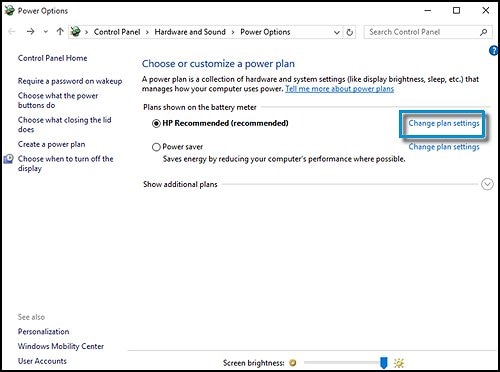
Click Power Options.
-
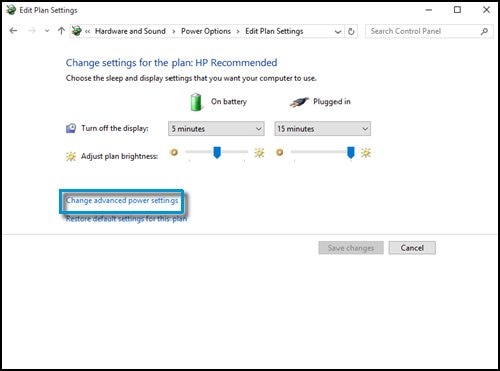
Click Change plan settings for the power plan that is selected.

-
Click Change advanced power settings.

-
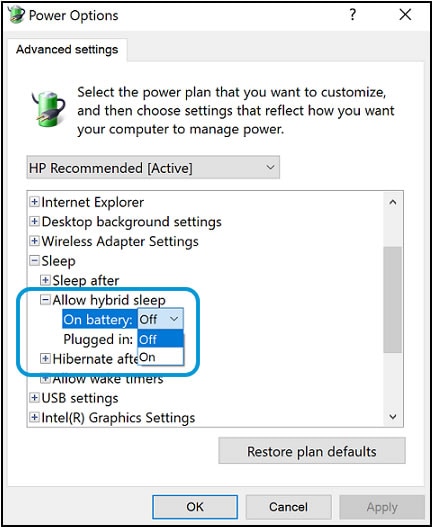
Expand Sleep, and then expand Allow hybrid sleep.
-
Select Off from the On battery drop-down menu, and then select Off from the Plugged in drop-down menu.

-
Click OK.
FOR DETAILS & FURTHER INSTRUCTIONS, USE THIS LINK: CLICK HERE
(By the end of this article all the issues should be resolved)
Let me know how that pans out,
If you feel I was helpful, simply click on Accept as Solution to help the community grow,
That said, I will have someone follow-up on this to ensure you've been helped,
Just in case you don't get back to us within 24 - 48hrs, and have a good day, ahead.
Riddle_Decipher
I am an HP Employee
Learning is a journey, not a destination.
Let's keep asking questions and growing together.