
-
×InformationNeed Windows 11 help?Check documents on compatibility, FAQs, upgrade information and available fixes.
Windows 11 Support Center. -
-
×InformationNeed Windows 11 help?Check documents on compatibility, FAQs, upgrade information and available fixes.
Windows 11 Support Center. -
- HP Community
- Archived Topics
- Desktops (Archived)
- Re: Wireless adapter does not show in device manager

Create an account on the HP Community to personalize your profile and ask a question
Your account also allows you to connect with HP support faster, access a personal dashboard to manage all of your devices in one place, view warranty information, case status and more.
 This topic has been archived. Information and links in this thread may no longer be available or relevant. If you have a question create a new topic by clicking here and select the appropriate board.

05-29-2019 02:08 AM
 HP Recommended
Product: HP Pavilion All-in-One - 23-q201ur
Operating System: Microsoft Windows 8.1 (64-bit)
Hi,
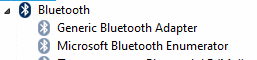
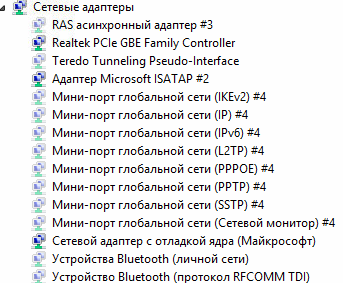
The wireless adapter does not show in device manager.
This is All-in-One and i not have keys FN+Wifi. In bios cant't find any wi-fi button.
Please tell me how i can switch it on? Install software?
Thanks.
11 REPLIES 11

05-29-2019 03:30 AM
HP Recommended
Hi
Did the PC come with W10 originally?
Copy, Paste and Save in Notepad, as LBB2Z.bat and double click to run.
Post anything non-personal, but relevant please.
@ECHO OFF
getmac
PAUSE
netsh wlan show interfaces
PAUSE
netsh wlan show drivers
PAUSE
netsh wlan show profiles
PAUSE
05-29-2019 03:34 AM
HP Recommended
Physical address transport Name
=================== ==========================================================
DC-4A-3E-F6-FF-0E \Device\Tcpip_{D536EC27-6712-420C-964A-52A0A08A5E75}
Press any key to continue . . .
There is no wireless interface in the system.
The hosted network status: not available
Press any key to continue . . .
There is no wireless interface in the system.
Press any key to continue . . .
There is no wireless interface in the system.
Press any key to continue . . .

05-29-2019 03:57 AM
HP Recommended
Hi
So...
http://partsurfer.hp.com/Search.aspx?searchText=V2F84EA
| Interface (Module) | ||||||
-N/A- | 803344-001 | Wireless LAN - 11ac INT 3165 M.2 MOW | Compliant/Exempted |
That makes it an Intel 3165 or HP
https://www.impactcomputers.com/803344-001.html
AND I believe Paul Tikkanen has the solution...
This package contains drivers for the Intel Wireless LAN adapter in supported models running a supported operating system.
ftp://ftp.hp.com/pub/softpaq/sp76501-77000/sp76890.exe
Bluetooth:
This package contains the driver installation package for the Intel Bluetooth in the supported notebook models running a supported operating systems.
ftp://ftp.hp.com/pub/softpaq/sp76001-76500/sp76055.exe
 This topic has been archived. Information and links in this thread may no longer be available or relevant. If you have a question create a new topic by clicking here and select the appropriate board.
† The opinions expressed above are the personal opinions of the authors, not of HP. By using this site, you accept the Terms of Use and Rules of Participation.


Didn't find what you were looking for?
Ask the community
† The opinions expressed above are the personal opinions of the authors, not of HP. By using this site, you accept the <a href="https://www8.hp.com/us/en/terms-of-use.html" class="udrlinesmall">Terms of Use</a> and <a href="/t5/custom/page/page-id/hp.rulespage" class="udrlinesmall"> Rules of Participation</a>.