• ×
    Information
    Need Windows 11 help?
    Check documents on compatibility, FAQs, upgrade information and available fixes.
    Windows 11 Support Center.
  • post a message
  • ×
    Information
    Need Windows 11 help?
    Check documents on compatibility, FAQs, upgrade information and available fixes.
    Windows 11 Support Center.
  • post a message
Guidelines
Join the HP Community Solve‑a‑thon | Help Others & Share Your Solutions | Live on Zoom | 2:30 PM to 2:30 AM IST | Every Wednesday Click here to know more
Archived This topic has been archived. Information and links in this thread may no longer be available or relevant. If you have a question create a new topic by clicking here and select the appropriate board.

HP Recommended

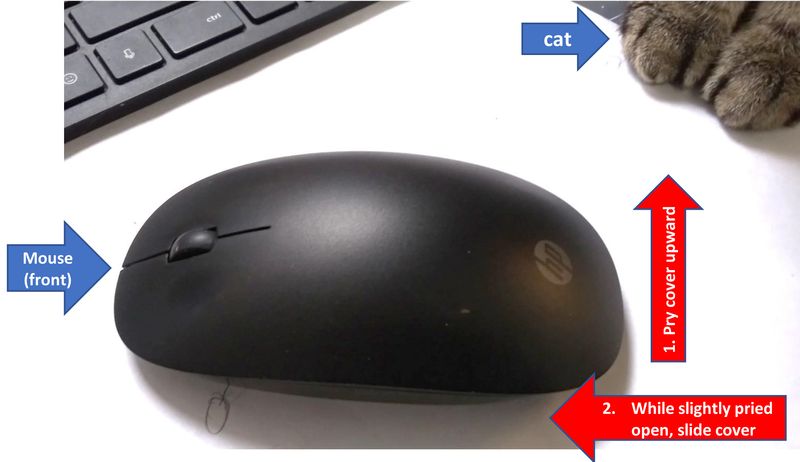
I also have been flummoxed as to how to open the HP mouse that came with my HP Envy desktop. Simply to replace batteries. There are no screws, no helpful information on the mouse, no recessed areas where one might apply a fingernail or screwdriver. HP could have provided a bit of text on the bottom, but did not.


To open, pry open the cover at the back by a few millimeters and then slide the cover forward.  Please see attached image.

HPMouse2-delete.jpg

5 REPLIES 5
HP Recommended

Take a closer look at the bottom of the mouse.


https://youtu.be/hMOpNOjbboQ
The video is in an Indian language  dialect but the video shows how to open it and replace the battery. 


I am a volunteer forum member. If my suggestion helped you solve your issue, help others by marking that post as the accepted solution. Say thanks by clicking on the Yes button next to the "was this reply helpful?"


https://youtu.be/ubEGwdzXFdI ( HP Pavilion Ryzen 7) About this item - Brand : HP Colour : Black Connectivity Technology : Wireless Special Feature : Wireless Operating System : Compatible with Windows 7, Windows 8, Windows 10, Windows 11 and mac OS 10.1 or higher. " Be more agile in your mouse ...
HP Recommended

I did. Mine has no compartment lid as you showed in your movie.  Please see image,  With mine, you slide the top cover off, as I mentioned,  Also, see the HP product page:https://www.hp.com/us-en/shop/pdp/hp-240-black-bluetooth-mouse?jumpid=cs_con_nc_ns&utm_medium=cs&utm...      
20221218_105644.jpg

HP Recommended

Hi @CharlieEx 

That isn't "my movie".


So if you had figured it out, what was the point of the thread?


I am a volunteer forum member. If my suggestion helped you solve your issue, help others by marking that post as the accepted solution. Say thanks by clicking on the Yes button next to the "was this reply helpful?"


HP Recommended

I'm sorry that you question my motives. I searched for an answer on this platform and found a thread that did not answer the question. As I did figure it out, I thought i was perhaps helping others with the same question. Yes, you are correct, I did not know the ownership of the video. More correctly, it was the answer that you provided.  Hope you have a good holiday.

HP Recommended

I wasn't questioning your motives.


I was just curious.


I am a volunteer forum member. If my suggestion helped you solve your issue, help others by marking that post as the accepted solution. Say thanks by clicking on the Yes button next to the "was this reply helpful?"


Archived This topic has been archived. Information and links in this thread may no longer be available or relevant. If you have a question create a new topic by clicking here and select the appropriate board.
† The opinions expressed above are the personal opinions of the authors, not of HP. By using this site, you accept the <a href="https://www8.hp.com/us/en/terms-of-use.html" class="udrlinesmall">Terms of Use</a> and <a href="/t5/custom/page/page-id/hp.rulespage" class="udrlinesmall"> Rules of Participation</a>.